M20_Ope_E.pdf - 第233页
Chapter 5 Libraries 5-83 Match. Threshold: The threshold value that compares the images between the fiducial model and the actual fiducial imag e. Enlarging this setting makes the criteria more severe. Spec ify “600”(def…
Chapter 5 Libraries
5-82
BBA
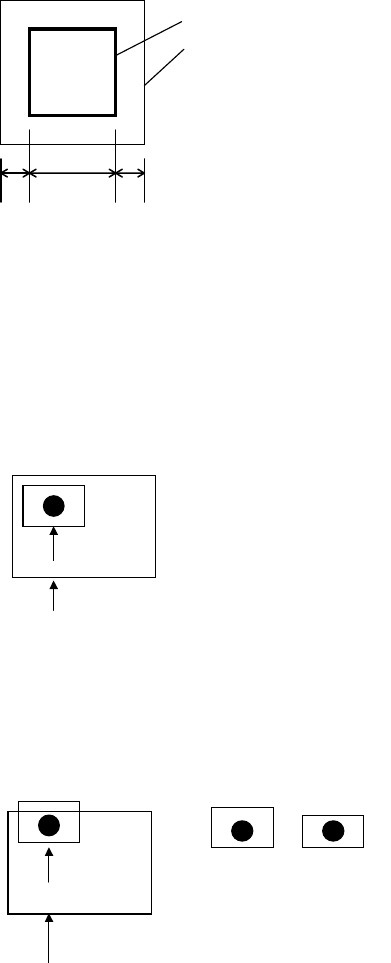
A: Model X
B: Search area
Model
Search area
Define the Search Area setting based on the print offset or
expansion/contraction, or board positioning offset in clamping.
Normally about 1mm is adequate.
A fiducial can be in varying location relative to the programmed
coordinates for its purpose. Accordingly, you should suppose the
following case should occur:
Model
Search area
When the model is fitted over the fiducial,
it is contained within the search area.
OK
However, when the model fitted over the fiducial falls out the
search area, the fiducial cannot be detected.
The T
Model
Search area
The model fitted over the fiducial
falls out the search area.
Captured imageModel
In the above case, the model and the captured image do not fit
completely to result in process failure. To prevent this, define the
search area size large enough to cover the variation in fiducial
location.
* Increment : 0.01mm
Chapter 5 Libraries
5-83
Match. Threshold: The threshold value that compares the images between the fiducial
model and the actual fiducial image. Enlarging this setting makes
the criteria more severe. Specify “600”(default value) normally.
For example, when the model is hexagonal and if a similar round
object exists in the search area, it may be mis-recognized as the
fiducial if the threshold setting is too low (not severe enough). In
such a case, you must raise the setting.
On the other hand, when there is no chance of confusing objects that
appear in the search area, it is recommended to make the criteria
less severe to reduce possible fiducial error. Fiducial mark generally
has diverse reflectance. As the result, the mark may be distorted
when captured as an image. With too severe criteria, the system
fails to detect the mark even though the mark exists.
In the latter case, it is not recommended to change the default
setting.
Search Interval: This parameter implies the intervals to search the target mark in
search area. Default value is “4”(pixels). If there are any similar
objects in the search area, that may sometimes found as the target
mark wrongly, try smaller value, 4 Æ 3 Æ 2 Æ 1, to perform more
precise check by smaller intervals. However, the smaller value will
make the recognition time longer.
Chapter 5 Libraries
5-84
Model Centering
z Summary
This function allows the sample fiducial to be centered automatically for model registration. Be
sure to use this function in using CAD data for programming. This function makes fiducial
compensation exact by matching the fiducial center to the model center for even accurate
placement.
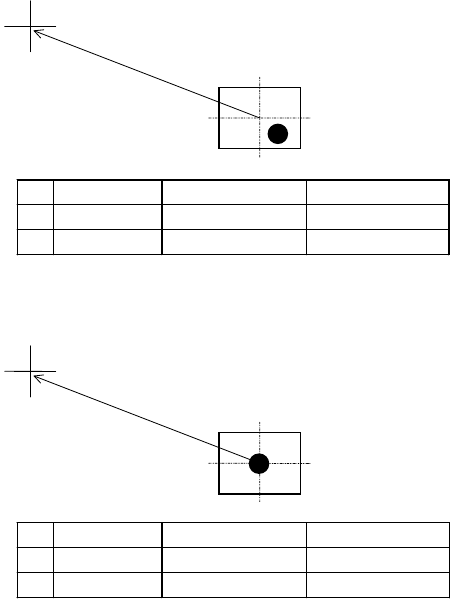
Manual mark centering
1
without using this function can yield offset.
Placement point
Registered model
CAD data Mark center offset Placement coordinate
X 80.0 2.0 78.0
Y 40.0 2.0 38.0
This function allows for matching the fiducial center to the model center automatically.
Placement point
Registered model
]
CAD data Mark center offset Placement coordinate
X 80.0 0.0 80.0
Y 40.0 0.0 40.0
This function is available only for the below fiducials:
z Color: White or black. Contrasts sharply against the surrounding.
z Number of blobs: One (recommendation) or two.
z Model X/Y setting: 1.2 to 1.5 times as large as the usual size.
z When using the Distance X/Y feature, centering is performed away from the camera
center for the specified offset.
1
In most cases, the operator performs two-point teach by visually aligning the teach the center of the camera
(cross hairs of the VCS monitor) to the fiducial for two points.