M20_Ope_E.pdf - 第235页
Chapter 5 Libraries 5-85 Action: Center searching based on a fiducial shape: The shape should be circle, square, triang le or cor ner square. (Maximum size : □ 3.0mm) ① In the Fiducial Data dialog bo x, se lect [Center S…
Chapter 5 Libraries
5-84
Model Centering
z Summary
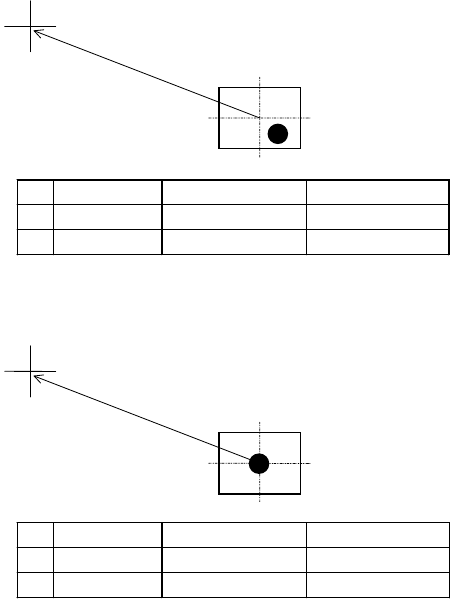
This function allows the sample fiducial to be centered automatically for model registration. Be
sure to use this function in using CAD data for programming. This function makes fiducial
compensation exact by matching the fiducial center to the model center for even accurate
placement.
Manual mark centering
1
without using this function can yield offset.
Placement point
Registered model
CAD data Mark center offset Placement coordinate
X 80.0 2.0 78.0
Y 40.0 2.0 38.0
This function allows for matching the fiducial center to the model center automatically.
Placement point
Registered model
]
CAD data Mark center offset Placement coordinate
X 80.0 0.0 80.0
Y 40.0 0.0 40.0
This function is available only for the below fiducials:
z Color: White or black. Contrasts sharply against the surrounding.
z Number of blobs: One (recommendation) or two.
z Model X/Y setting: 1.2 to 1.5 times as large as the usual size.
z When using the Distance X/Y feature, centering is performed away from the camera
center for the specified offset.
1
In most cases, the operator performs two-point teach by visually aligning the teach the center of the camera
(cross hairs of the VCS monitor) to the fiducial for two points.
Chapter 5 Libraries
5-85
Action: Center searching based on a fiducial shape:
The shape should be circle, square, triangle or corner square. (Maximum size : □3.0mm)
① In the Fiducial Data dialog box, select [Center Search] for [Algorithm].
② Enter all the required data.
③ When the coordinates of the fiducial center are not yet entered, click
Prearrange>Teach&Move Pallet to perform teach entry. When the coordinates have been
entered, use the Trace menu to move the main teach camera to the coordinates.
④ Adjust the Gain, Offset, and Inside/Outside Light settings so the fiducial image is shot
clearly.
⑤ Click <Image Test> button to execute image test. Confirm the test ends in success.
⑥ Save the data.
Pattern matching:
There is no restriction in shape, however circle is ideal. The size isφ0.2mm to φ1.0mm.
This method is most suitable for the mark plated with silver, gold or nickel etc.
① In the Fiducial Data dialog box, select [Pattern Matching] for [Algorithm].
② Enter all the required data.
③ When the coordinates of the fiducial center are not yet entered, click
Prearrange>Teach&Move Pallet to perform teach entry. When the coordinates have been
entered, use the Trace menu to move the main teach camera to the coordinates.
④ Adjust the Gain, Offset, and Inside/Outside Light settings so the fiducial image is shot
clearly.
⑤ Click <Model Centering> button to center the fiducial.
⑥ Click <Acquire Model> button to acquire the model.
⑦ Click <Image Test> button to execute image test. Confirm the test ends in success.
⑧ Save the data.
Chapter 5 Libraries
5-86
5-1-5-14 Bad Marks
Bad Mark Process
Logic Mark On Mark Off
Positive Skip Place
Negative Place Skip
Mark Color
For easy recognition, mark the bad mark in silver or white for glass epoxy boards, and mark in
black for ceramic boards.
There is no restriction in shape. The size would be φ2.0mm to φ5.0mm.
The mark color should be in contrast with the surrounding board.
Board Mark color
Glass epoxy (dark green) White or silver
Ceramic (white or pale green) Black
Creating Bad Mark Data
Window:
File>Open: Opens the list of existing bad mark data. Select data and click
<Open> button. To delete data, select data and click <Delete>
button.
File>Save As…: Saves the current file with a name and comment. Comment is not
necessarily required.
File>Save: Overwrites the current file.
File>Exit: Closes the Bad Mark Data dialog box.
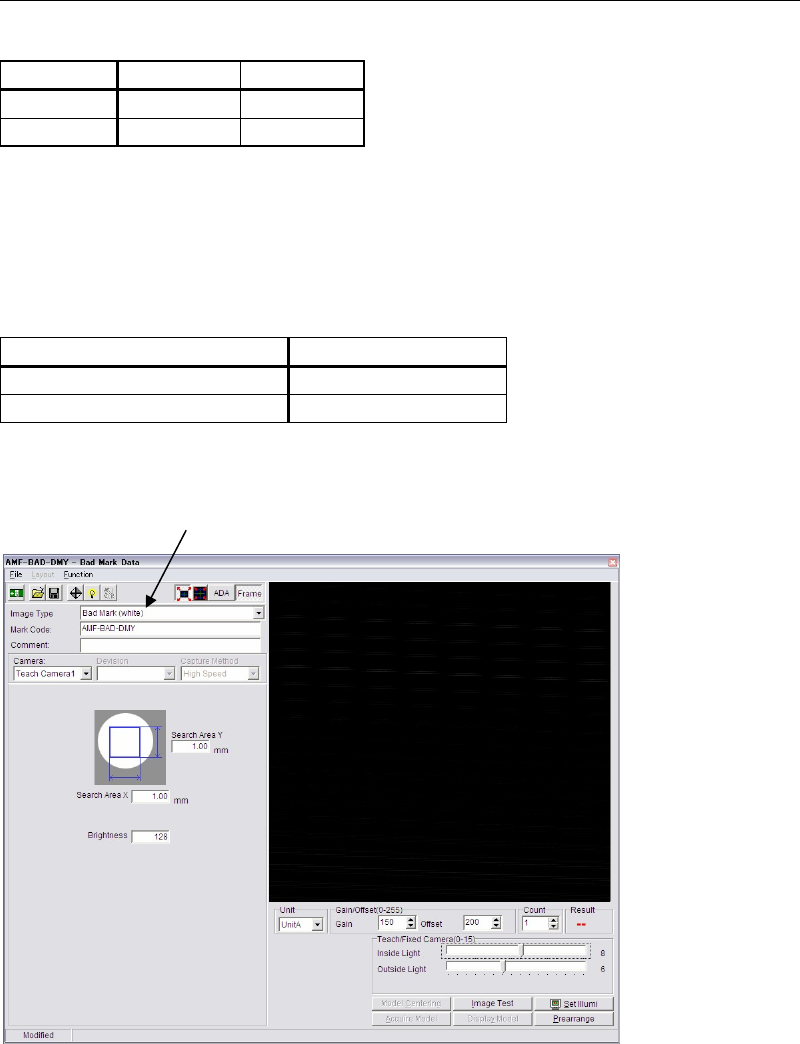
Image Type: Click <Mode> button to switch [Bad Mark (white)] and [Bad Mark
(black)].
Mark Code: To create new data, enter a desired code. To edit existing data, click
<Open> button to select data.
* Up to 38 characters can be entered.
Mode selecting combo box