M20_Ope_E.pdf - 第331页
Chapter 10 Replenishing Com ponents and Using Maintenance Menus 10-27 10-5 Using Maintenance Menus The maintenance menus (Manual>Maintenance) are utilized for pre-operation arrangements and troubleshooting. The below …
Chapter 10 Replenishing Components and Using Maintenance Menus
10-26
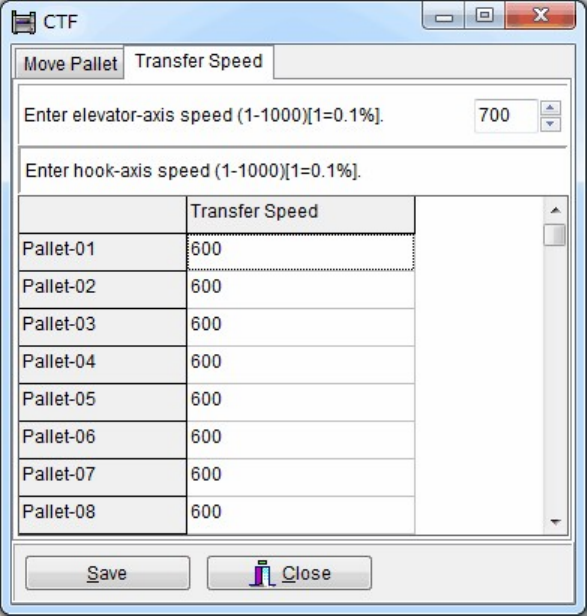
Transfer Speed tab
Allows you to set each pallet transfer speed and the elevator speed for job run (1-1000,
Increment: 0.1%).
Action:
① Click the entry field to modify the current setting.
② Enter value between 1 to 1000.
Chapter 10 Replenishing Components and Using Maintenance Menus
10-27
10-5 Using Maintenance Menus
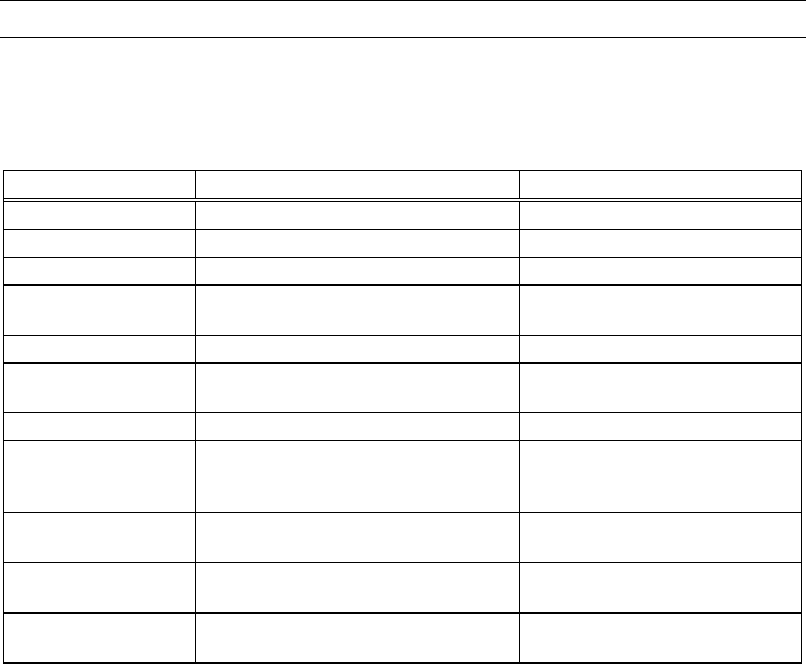
The maintenance menus (Manual>Maintenance) are utilized for pre-operation arrangements
and troubleshooting. The below table summarizes the use of each maintenance menu. For
detailed information , see the following part.
However, they are mainly for Service engineer, and hardly used for standard operation.
Maintenance Menu Purpose Related Error
Servo Off Shuts off power to the servomotors. —
ANC Test Checks the ANC operation. ANC error
Illumi. Test Checks the camera lighting. Illumination error
Feeder Bank Check Checks feeder operation on the feeder
bank.
Feeder bank error
Nozzle Scan Test Checks nozzle scan function Nozzle error
Check Feeder Refer to SET MASTER in the Parts
Feeders Instruction Manual.
Pickup error
Conveyor Test Checks conveyor repeatability. Board set error
SW Check Mode Checks switch operating. Once
performed, machine system needs to
be rebooted.
—
Intelligent Feeder Checks Intelligent Feeder LED status
etc.
—
Intelligent Feeder Checks Intelligent Feeder LED status
etc.
—
Maintenance Notice Reminds you to do necessary
maintenances periodically.
—
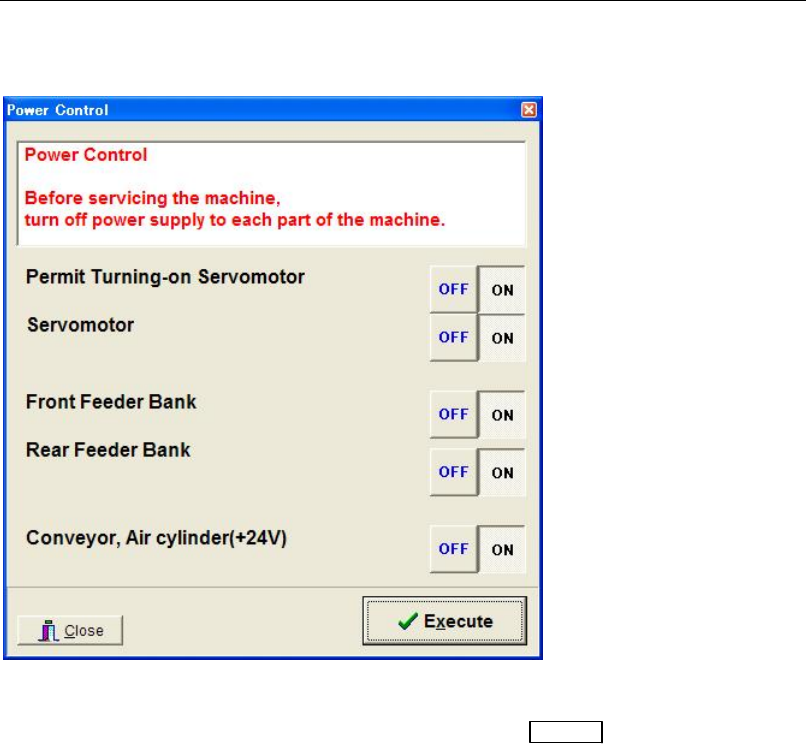
Note: Selecting Manual>Maintenance>Servo Off makes the Power Control dialog box to appear.
Turn on/off the relevant power before starting maintenance operation. See Servo Off in the
following section.
Chapter 10 Replenishing Components and Using Maintenance Menus
10-28
10-5-1 Servo Off
Menu: Manual>Maintenance>ServoOff
This menu allows you to turn on/off power supply to each part of the machine.
Window:
Permit Turning-on...: Enables (ON) or disables (OFF) the
READY switch on the front
panel.
Servomotor: Turns on/off power to the servomotors.
Front Feeder Bank: Turns on/off power to the front feeder bank.
Rear Feeder Bank: Turns on/off power to the rear feeder bank.
Conveyor, Air cylinder...: Turns on/off power to the conveyor dc motors and the
pneumatically driven actuators. These do not include the actuators
of the heads (for pickup operation).
Action:
① Click <On> or <Off> button for each power supply.
② Click <Execute> button.
③ Click <Close> button to close the window.