M20_Ope_E.pdf - 第338页
Chapter 10 Replenishing Com ponents and Using Maintenance Menus 10-34 Notification Action: ① When maintenance period has been passed; the [Noticed Period Countdown] becomes ‘ 0 ’ or the [Date] has come (whichever comes…
Chapter 10 Replenishing Components and Using Maintenance Menus
10-33
10-6 Maintenance Notice
The Maintenance Notice reminds you to do necessary maintenance at fixed time intervals. The
parts which need lubrication, cleaning, etc., are notified by the Maintenance Notice window.
If your mounter has a UPS (uninterruptable power system) option, the replacement time of the
battery is also notified.
Setting
Menu: Manual>Maintenance>Maintenance Notice
Action:
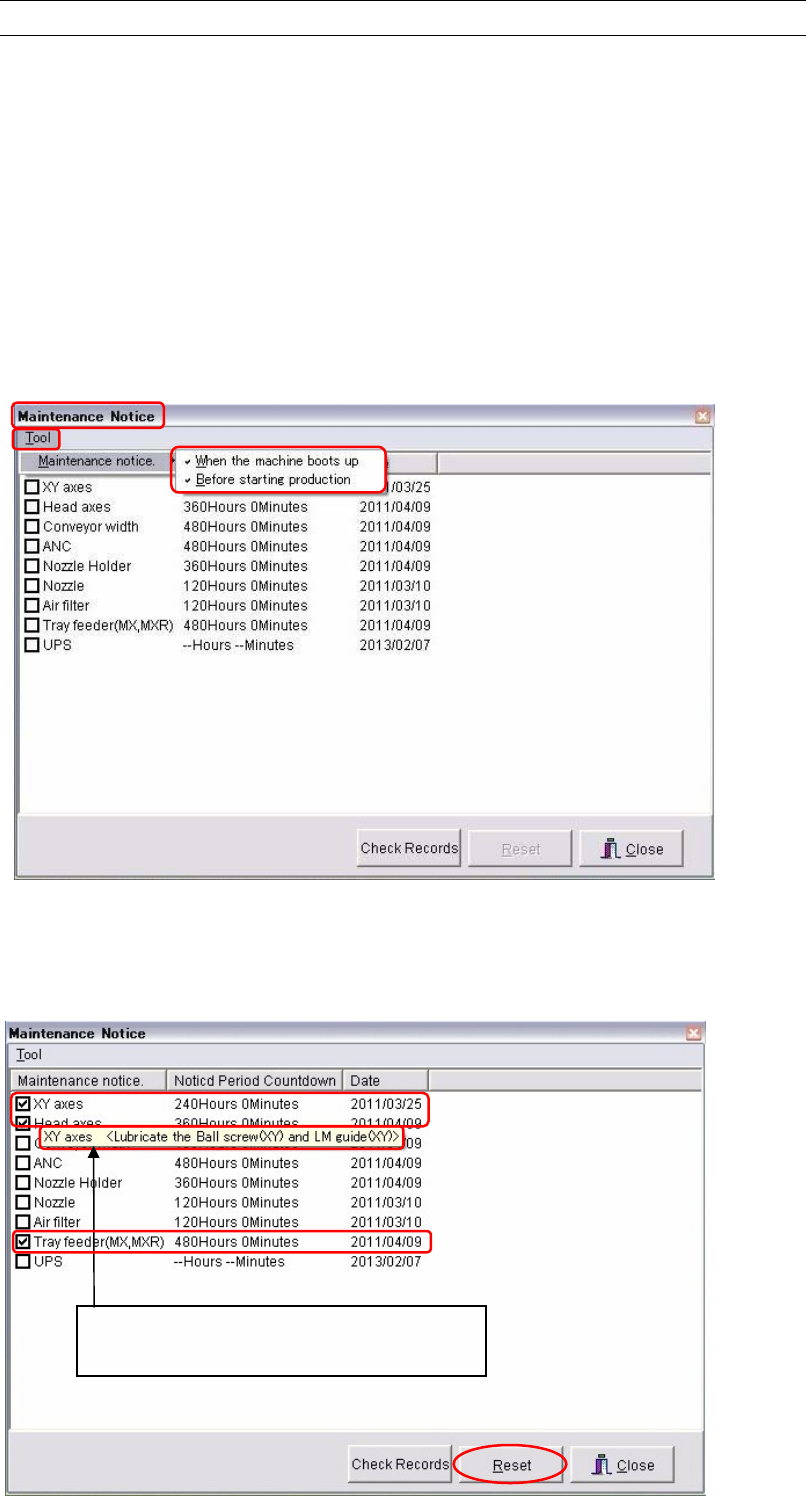
① You can select when the maintenance notice is given. Select in order of Tool and
Maintenance notice. Check the [When the machine boots up] and/or the [Before starting
production] box. The both timings can be selected at the same time.
② Optimal maintenance period of each part is registered in the mounter in two ways of
timings, by time as the [Noticed Period Countdown] and by days as the [Date].
To reset maintenance periods to the optimal intervals, check the parts you want to reset
and click the <Reset> button. Then the [Noticed Period Countdown] and the [Date] of
checked parts are reset to the registered optimal intervals.
Pointing an item spears a popup hint that
explains how the part to be maintained.
Chapter 10 Replenishing Components and Using Maintenance Menus
10-34
Notification
Action:
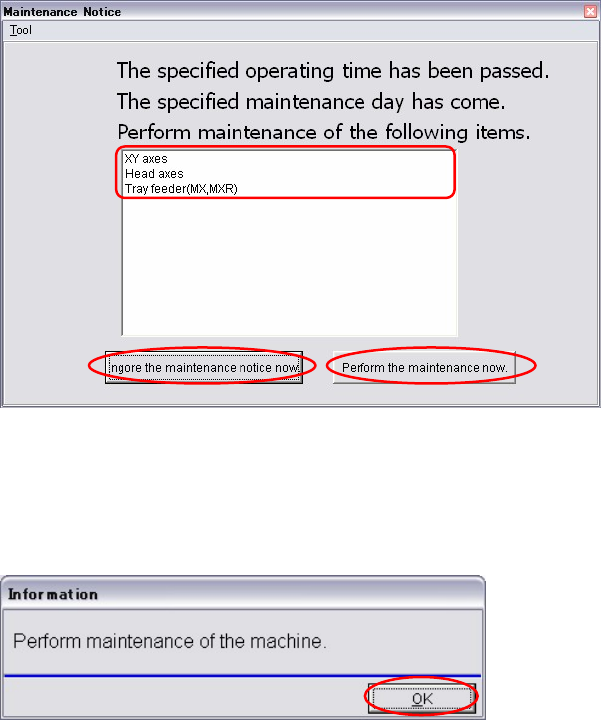
① When maintenance period has been passed; the [Noticed Period Countdown] becomes ‘0’
or the [Date] has come (whichever comes first), the parts which need to be maintained
appear in the Maintenance Notice window.
② Do maintenance of the displayed parts.
Note: For maintenance details, refer to 3. Mechanical Section in the maintenance manual.
③ If you want do the maintenance later, click the <Ignore the maintenance notice now>
button. The confirmation message appears.
④ Click the <OK> button.
The postponed maintenance notice appears again when the mounter is turned on or when
restarting the production after eight hours has passed.
Note: When you postpone the maintenance, be sure to do it later.
Chapter 10 Replenishing Components and Using Maintenance Menus
10-35
Reset
Menu: Manual>Maintenance>Maintenance Notice
Action:
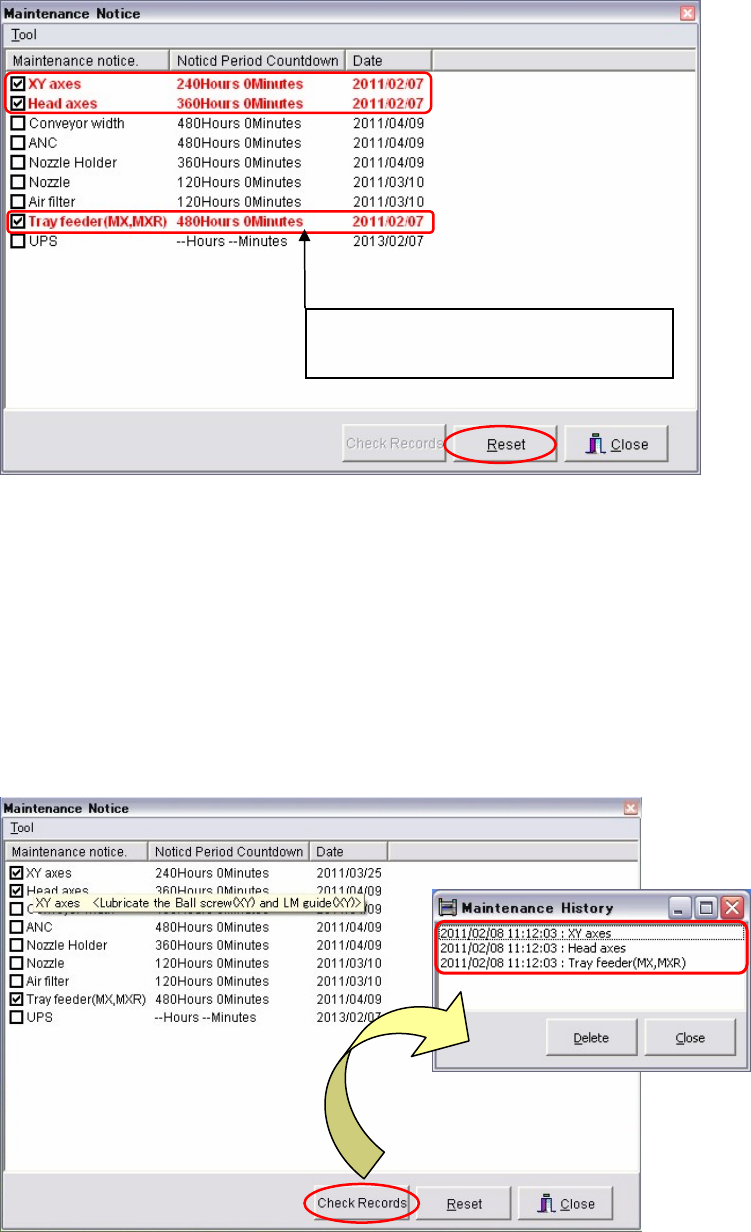
① After the notified maintenances have been performed, reset the maintenance periods for
the next maintenance notice.
The parts need maintenances are displayed in red letters. The procedures are same as
resetting the maintenance period. Click and check the red parts. Click the <Reset> button
to reset the maintenance period of the [Notice Period Countdown] and the [Date].
Note: This window also appears when the <Perform the maintenance now.> button is clicked at step
① in the previous page.
Maintenance history
Menu: Manual>Maintenance>Maintenance Notice
Action:
① Click the <Check Records> button and the [Maintenance History] window appears.
The parts maintained and their dates and times are displayed.
Times of [Notice Period Countdown]
reduce while the mounter is turned on.