M20_Ope_E.pdf - 第341页
Chapter 10 Replenishing Com ponents and Using Maintenance Menus 10-37 Restarting from the Stop by an Error z When READ Y switch is lit after the machine stops: The machine is suspended with an alarm soun d(intermittent…

Chapter 10 Replenishing Components and Using Maintenance Menus
10-36
10-7 Stopping and Restarting a Job Run
10-7-1 Stopping a Job Run
There are four methods to stop the machine:
Cause Machine State
Cycle Stop
• Pressing STOP switch
• Component exhaustion
• Error
The placement cycle finishes, and then each axis
stops.
Power to the servomotors remains on.
Power to the actuator remains on, so pickup and
board clamp remain on.
Immediate
Stop
• Activation of the interlock
function
1
Each axis stops immediately.
Power to the servomotors remains on.
Power to the actuator remains on, so pickup and
board clamp remain on.
Emergency
Stop
• Pressing
EMERGENCY STOP
switch
• Activation of the overrun
sensor
Each axis stops immediately.
Power to the servomotors is shut off. Restarting
requires zeroing of the axis positions.
Power to the actuators, including the pickup
actuator, is shut off, and board clamp is released.
Safety Stop
• Opening a cover in the AUTO
mode.
Each axis stops immediately.
Power to the servomotors is shut off, but there is
no need to perform zeroing of the axis positions.
Power to the actuator remains on, so pickup and
board clamp remain on.
10-7-2 Restarting a Job Run
If the machine stops during running, restart the machine as follows:
Cause of Stop Restarting Procedure
Pressing STOP START
Opening the front or rear
cover
CLEAR
Î Close the cover Î CLEAR Î START
Component exhaustion
CLEAR
Î CLEAR Î Replenish components Î START
Pressing
EMERGENCY STOP
CLEAR Î Release EMERGENCY STOP Î Remove cause of the
error Î CLEAR
Î READY Î Zero the axes position Î Restart
Activation of the overrun
sensor
CLEAR
Î Remove cause of the error Î CLEAR Î RESET Î
READY
Zero the axes position Î Restart
Note: Zero the axes position via the Manual>Origin menu.
1
The safety interlock function works if you open the front or rear cover or put your hand or part of the body in the
optional safety guard or the detection area of the safety sensor during operation.
Chapter 10 Replenishing Components and Using Maintenance Menus
10-37
Restarting from the Stop by an Error
z When READY switch is lit after the machine stops:
The machine is suspended with an alarm sound(intermittent high-pitched beep) and the
relevant error message appears on the [Status Report] window.
Action:
① Press
CLEAR switch to silence the alarm sound.
② Press
CLEAR switch again.
③ Press
RESET switch to cancel the job run mode.
④ Eliminate the cause of the error referring to the error message.
z When READY switch is not lit after the machine stops:
The machine stops with an alarm sound(continuous high-pitched beep) and the relevant error
message appears on the [Status Report] window.
Action:
① Press
CLEAR switch to silence the alarm sound.
② Press
CLEAR switch again.
③ Press
RESET switch to cancel the job run mode.
④ Eliminate the cause of the error referring to the error message.
⑤ Press
READY switch.
⑥ Zero all the axes position in Manual>Origin.
Restarting from the Stop by Opening a Cover
Action:
① Press
CLEAR switch to silence the alarm sound.
② Close the cover.
③ Press
CLEAR switch again.
④ Press
START switch to restart, or press RESET switch to cancel the job run mode.
Chapter 10 Replenishing Components and Using Maintenance Menus
10-38
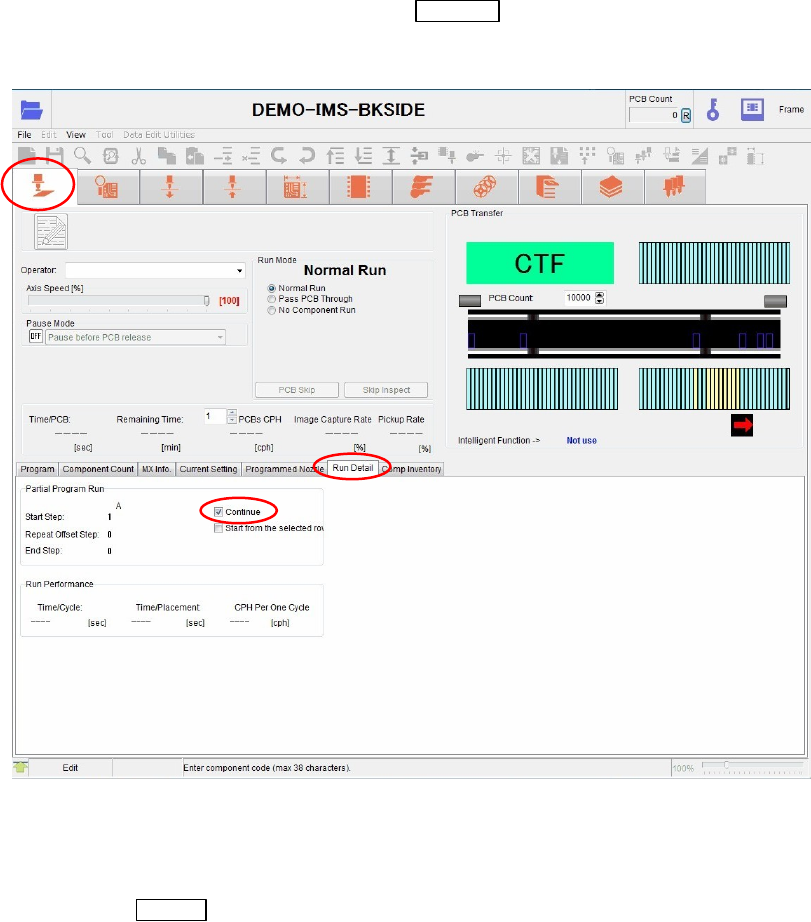
Resuming the production from the step the production cancelled
z Resuming the production without entering the step No.
When the production is paused by pressing the
CANCEL switch, the mounter retains the
continuous steps in the memory. Here is the procedures to resume the production from the
continuous steps.
Action:
① Open the [Run]>[Run Detail] tab.
② Check on the [Continue] check box.
③ Press the
START switch to restart the production.
Note: Be sure to select the [Resume] check box.
Note: When you start the production from the beginning, the entered step Nos. are cleared.