M20_Ope_E.pdf - 第342页
Chapter 10 Replenishing Com ponents and Using Maintenance Menus 10-38 Resuming the production fr om the step the production cancelled z Resuming the production without entering the step No. When the production is pause…
Chapter 10 Replenishing Components and Using Maintenance Menus
10-37
Restarting from the Stop by an Error
z When READY switch is lit after the machine stops:
The machine is suspended with an alarm sound(intermittent high-pitched beep) and the
relevant error message appears on the [Status Report] window.
Action:
① Press
CLEAR switch to silence the alarm sound.
② Press
CLEAR switch again.
③ Press
RESET switch to cancel the job run mode.
④ Eliminate the cause of the error referring to the error message.
z When READY switch is not lit after the machine stops:
The machine stops with an alarm sound(continuous high-pitched beep) and the relevant error
message appears on the [Status Report] window.
Action:
① Press
CLEAR switch to silence the alarm sound.
② Press
CLEAR switch again.
③ Press
RESET switch to cancel the job run mode.
④ Eliminate the cause of the error referring to the error message.
⑤ Press
READY switch.
⑥ Zero all the axes position in Manual>Origin.
Restarting from the Stop by Opening a Cover
Action:
① Press
CLEAR switch to silence the alarm sound.
② Close the cover.
③ Press
CLEAR switch again.
④ Press
START switch to restart, or press RESET switch to cancel the job run mode.
Chapter 10 Replenishing Components and Using Maintenance Menus
10-38
Resuming the production from the step the production cancelled
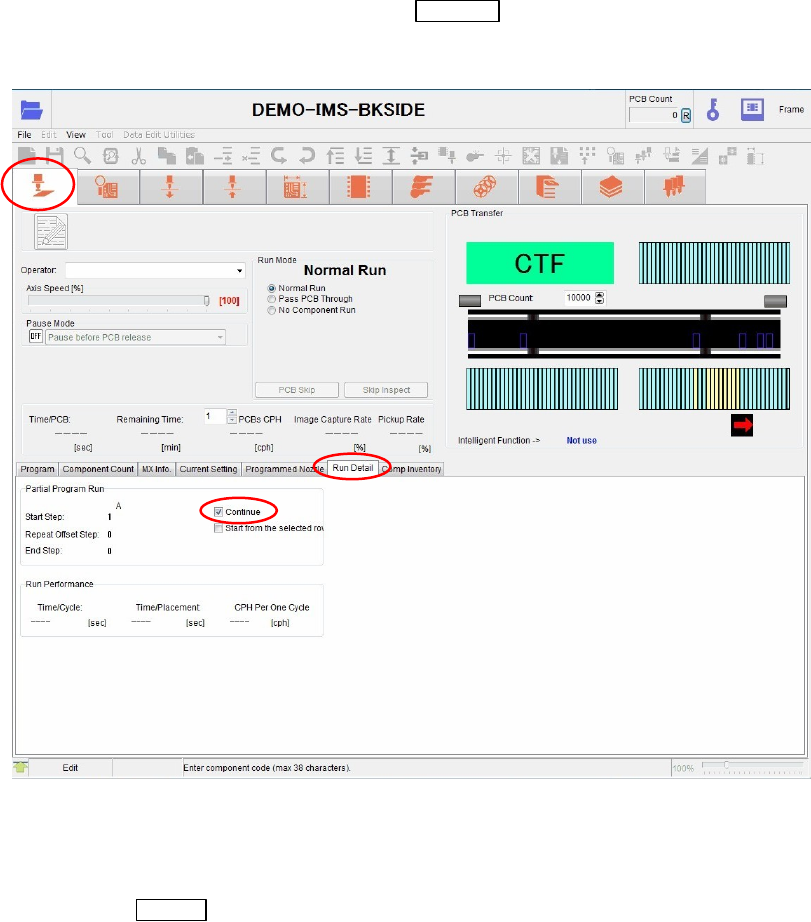
z Resuming the production without entering the step No.
When the production is paused by pressing the
CANCEL switch, the mounter retains the
continuous steps in the memory. Here is the procedures to resume the production from the
continuous steps.
Action:
① Open the [Run]>[Run Detail] tab.
② Check on the [Continue] check box.
③ Press the
START switch to restart the production.
Note: Be sure to select the [Resume] check box.
Note: When you start the production from the beginning, the entered step Nos. are cleared.

Chapter 10 Replenishing Components and Using Maintenance Menus
10-39
z Start the production from the steps you selected.
Action:
① Open the [Run]>[Run Detail] tab.
② Check on the [Start from the selected row] check box.
③ Click <Start Step Edit> button.
④ Enter the step No. to start the production.
⑤ Click the <Apply> button.
⑥ Press the
START switch to restart the production.