M20_Ope_E.pdf - 第347页
Chapter 11 Parameter Setting 11-1 Chapter 11 Parameter Setting User Parameter System Parameter

Chapter 10 Replenishing Components and Using Maintenance Menus
10-42
10-10 Other Menus
10-10-1 About
Menu: System>About
Shows the system version Nos. and ID information.
10-10-2 Reentering a Password
Menu: System>ReenterPassword
Allows you to reenter a password without rebooting the system. Enter new password and click
<OK> button to restart the system.
10-10-3 Enabling/Disabling the Screen Saver
Menu: Tool>Enable Screen Saver
Tool >Disable Screen Saver
The screen saver helps prevent burned-in images and prolongs monitor life. With the Enable
Screen Saver mode selected, if you have not moved the mouse or pressed a key for a certain
period of time, the screen saver automatically goes on. The screen saver is disabled when the
Teach, Axis, or Run dialog box is open.
Moving the mouse or pressing a key will make the screen saver disappear.
10-10-4 Network Neighborhood
Menu: System>NetworkNeighborhood
Allows you to access a computer on the network.
10-10-5 Network Properties
Menu: System>NetworkProperties
Set the network properties of your system. Consult TenryuTechnics for information.
10-10-6 Calculator
Menu: Tool>Calculator
See the online Help for information.
Chapter 11 Parameter Setting
11-1
Chapter 11
Parameter Setting
User Parameter
System Parameter
Chapter 11 Parameter Setting
11-2
11-1 User Parameter
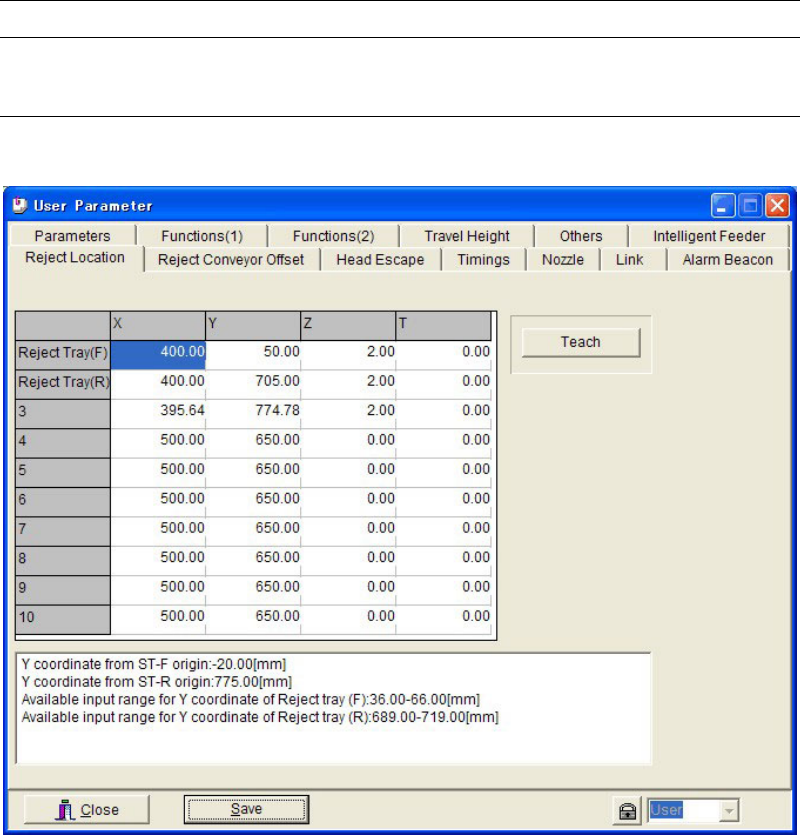
11-1-1 Reject Location
Menu: System>UserParameter>RejectLocation
Set coordinates to reject defective components. Up to 8 sets of coordinates can be registered.
[Reject Location] setting in the packaging library and tray library is associated to the data
number (No. 3–10) in this tab.
The data lines, Reject Tray (F)/(R), are used when [Reject/Reuse] setting in pickup data is set
to “Standard” in case of ST-F or ST-R Feed Style data.
Action:
① Click <Teach> button to open the Teach dialog box.
② Bring the main teach camera to the desired position, and enter the coordinates.
③ Return to the User Parameter dialog box. Click <Save> button.
④ Click <Close> button to close the dialog box.