M20_Ope_E.pdf - 第370页
Chapter 11 Parameter Setting 11-24 11-2-2 Placement History File Note: Placement History Files are saved in the specified folder selected in “L ocation of History Data” in iOSII. They are sorted out in folders each day a…

Chapter 11 Parameter Setting
11-23
11-2 Traceability (optional)
)
Menu: System>UserParameter>PCB_CodeScan
Traceability is the function to create Placement History Record. This function manages each
board production with a unique ID called Board ID. Not only Board ID, Traceability function
creates and manages the following data; production date, used components, component lot No.,
machine serial No., used feeder models, feeder IDs, nozzle IDs, and head Nos. used for each
production. If any mis-placements are found, you can trace which board and component caused
the mis-placement.
11-2-1 Preparations
■Board ID
A) For preparation, you need to assign a unique Board ID to each board and to print the
bar-coded Board ID on the board beforehand. The barcode (QR code or Data matrix)
printed on the board is used as Board ID. (PCB Code Scan option is needed.)
If you check [Enable Auto-Assignment of Board ID] box in
UserParameter>PCB_CodeScan, unique Board IDs will be created even if there are no
barcodes. In addition if the printed barcode is not a unique Board ID, this function creates
a new unique Board ID automatically.
B) Auto-assignment rules to create Board ID
When you select “Enable Auto-Assignment of Board ID”, Board ID is output in order
of ”Program name (or Board barcode)” + “date and time” + “the numbers of produced
board” (Produced boards after the machine is powered on.) as the example below.
Example
Program name; ABC_TEST, Production start time; 2007/09.21 15:10, 1000th produced
board after the machine is powered on.
ABC_TEST092115101000
■Lot No.
When you register components of Intelligent-feeder database to barcodes, you should
include Lot No. of component reel. You can extract and register Lot No. from the barcode
put on the component reel. In case of the barcode does not include Lot No. information,
re-print the barcode so to include Lot No. and put the new barcode on the component reel.

Chapter 11 Parameter Setting
11-24
11-2-2 Placement History File
Note: Placement History Files are saved in the specified folder selected in “Location of History Data”
in iOSII. They are sorted out in folders each day as below.
Placement History files are saved in ID.csv format.
In csv files, data is output in the following order.
= Board ID, Date, Component code, Lot No., Machine Serial No., Feeder ID, Feeder serial No.,
Nozzle ID, Head No.
Example
ABC_TEST092115101000,2007/09/21 15:10:05,ERJ2GE0R00,A00243,A99999,61,522,32,201
ABC_TEST092115101000,2007/09/21 15:10:05,ERJ2GE0R00,A00243,A99999,61,522,32,202
ABC_TEST092115101000,2007/09/21 15:10:05,ERJ2GE0R00,A00243,A99999,61,522,32,203
ABC_TEST092115101000,2007/09/21 15:10:05,ERJ2GE0R00,A00243,A99999,61,522,32,204
Board ID
20070921
ABC_TEST092115101000.csv
ABC_TEST092115101001.csv
ABC_TEST092115101002.csv
ABC_TEST092115101003.csv
ABC_TEST092115101004.csv
ABC_TEST092115101005.csv
20070922
Chapter 11 Parameter Setting
11-25
11-2-3 Board ID for Multi-board
Machine can recognize one Board ID per one board. Even all small boards of Multi-panel have
Board ID, only one Board ID is acquired.
Only on the following conditions, all small boards of multi-panel can get Placement History.
① There is only one repeat block and no other placement steps out the repeat block.
② The last 6 digits of Board ID are numbers.
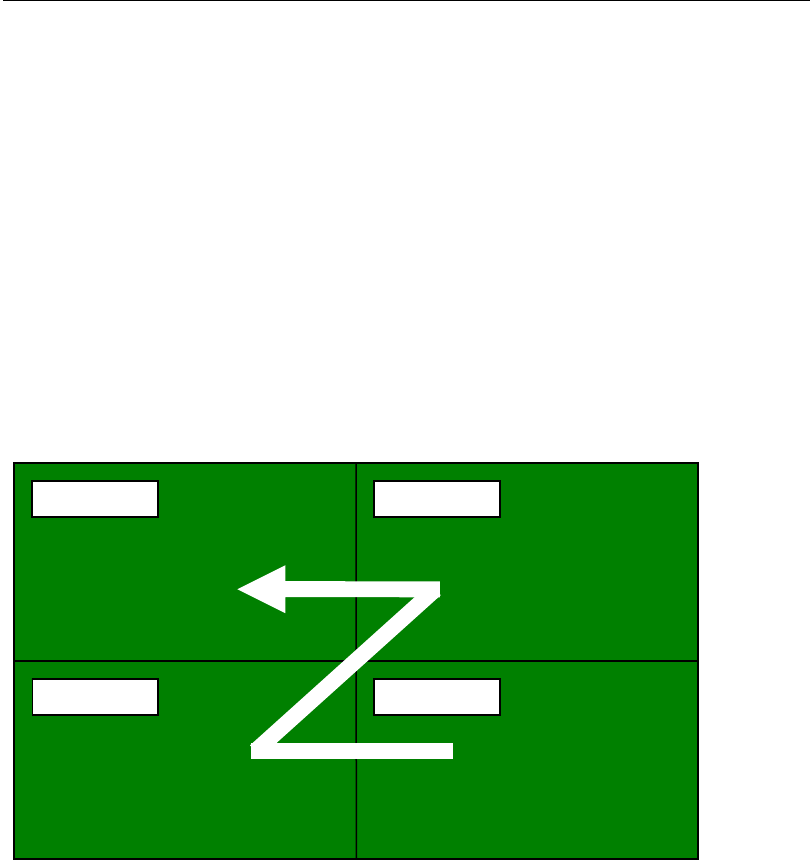
③ Board ID numbers of small boards increase in order from the right to left of the lowest
boards and right to left of the next upper boards.
④ Repeat placement order of small boards is the same to the Board ID as 7-3.
⑤ Repeat placement flag is enabled in ¥your application path¥iOSENVCF.ini file as below.
[Trace]
Block_On=1 *1=Enable, 0=Disable
Sample of Placement Data
Step No.1 Start of repeat placement
Step No.2 Placement step
Step No.3 Placement step
Step No.4 Placement step
Step No.5 End of repeat placement
Step No.6 Repeat offset - A000002
Step No.7 Repeat offset - A000003
Step No.8 Repeat offset - A000004
A000004
A000002
A000001
A000003
1st 2nd
3rd 4th