M20_Ope_E.pdf - 第374页
Chapter 11 Parameter Setting 11-28 11-4 System Prameter To enable the changes you made to the system parameters, turn off t he system once and then restart the system. 11-4-1 Machine Origin (ST) Menu: System>SystemPar…
Chapter 11 Parameter Setting
11-27
■Enable ID Registration
If this checkbox is checked, the barcode input software (InputBar) will be started automatically
when the MMI is started.
→Even if the barcode input software is not started automatically, it can still be started manually
by right-clicking the client software icon on the taskbar and clicking [Execute InputBar].
■Enable Server
If this checkbox is checked, the server software will be started on the mounter when the MMI is
started.
To run the server on another PC on the network, this checkbox must be unchecked.
■Feeder OFF recognition time
Set the time to be expired before judgment that the feeder has been removed is made.
(Default: 2,000ms)
■Server connection time
Set the time to be expired before judgment that a communication error with the server has
occurred is made. (Default: 5,000ms)
■Simple check LED ON time
Set the time during which the feeder LED is to be lit when a simplified check is performed.
(Default: 2,000ms)
(→Currently, the time set here is used as the time during which the feeder LED is to be lit when
the station is checked.)
③ If any settings are changed, click <Save>
button to save the changes.
Chapter 11 Parameter Setting
11-28
11-4 System Prameter
To enable the changes you made to the system parameters, turn off the system
once and then restart the system.
11-4-1 Machine Origin (ST)
Menu: System>SystemParameter>Parameter>MachineOrigin(ST)
Allows you to adjust coordinates of each feeder station (ST-F/R).
To perform teach entry, click in the line of the desired station and click <Teach> button to access
the Teach dialog box. When the teach entry has been done, return to the Machine Origin (ST)
dialog box and click <Save> button.
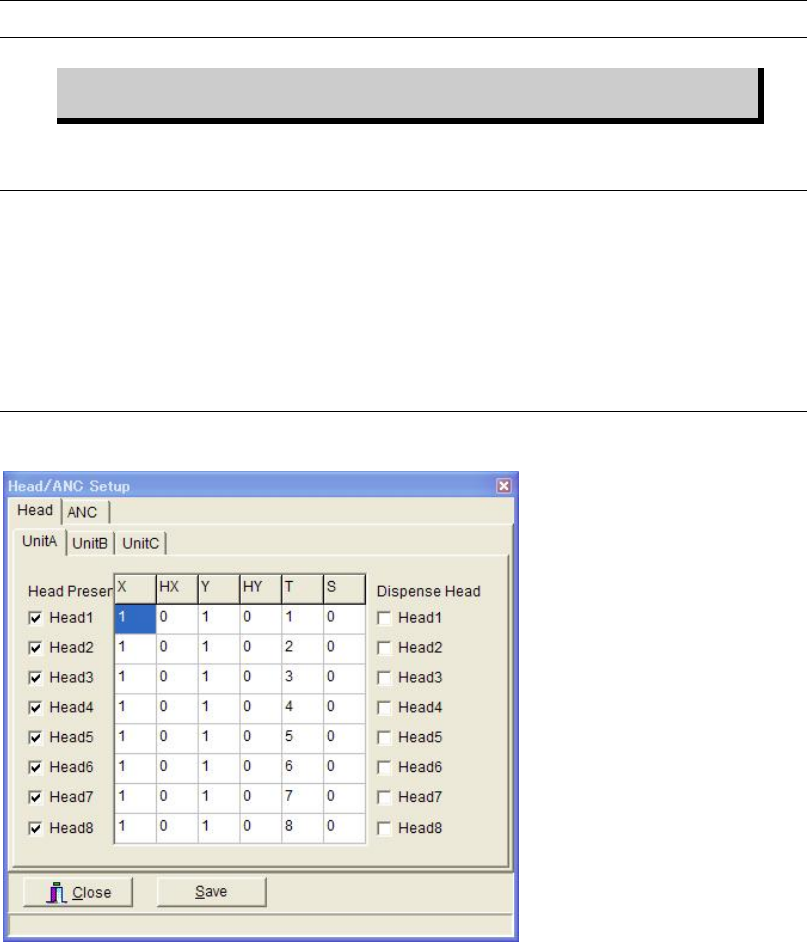
11-4-2 Head/ANC Setup
Menu: System>SystemParameter>Parameter>Head/ANC Setup
* The number of heads varies with the machine.
Head tab
To assign particular head not to be used, uncheck the head. Then click <Save> button.
ANC tab
To assign particular nozzle station not to be used, enter “0” to [Nozzle] field of the
corresponding nozzle station number (ANC No.) Then click <Save> button.
Chapter 11 Parameter Setting
11-29
11-4-3 Adjusting Cameras
This parameter has been adjusted prior to shipment. Use the default setting normally.
Menu: System>SystemParameter>Tool>AdjustCamera
Window:
Resolution: Measures the resolution of the specified camera.
Tilt: Measures tilt of the specified camera.
Focus: Measures focus of the specified camera.
Brightness: Measures brightness of the specified camera.
Nozzle Center: Measures nozzle rotational center of the specified head.
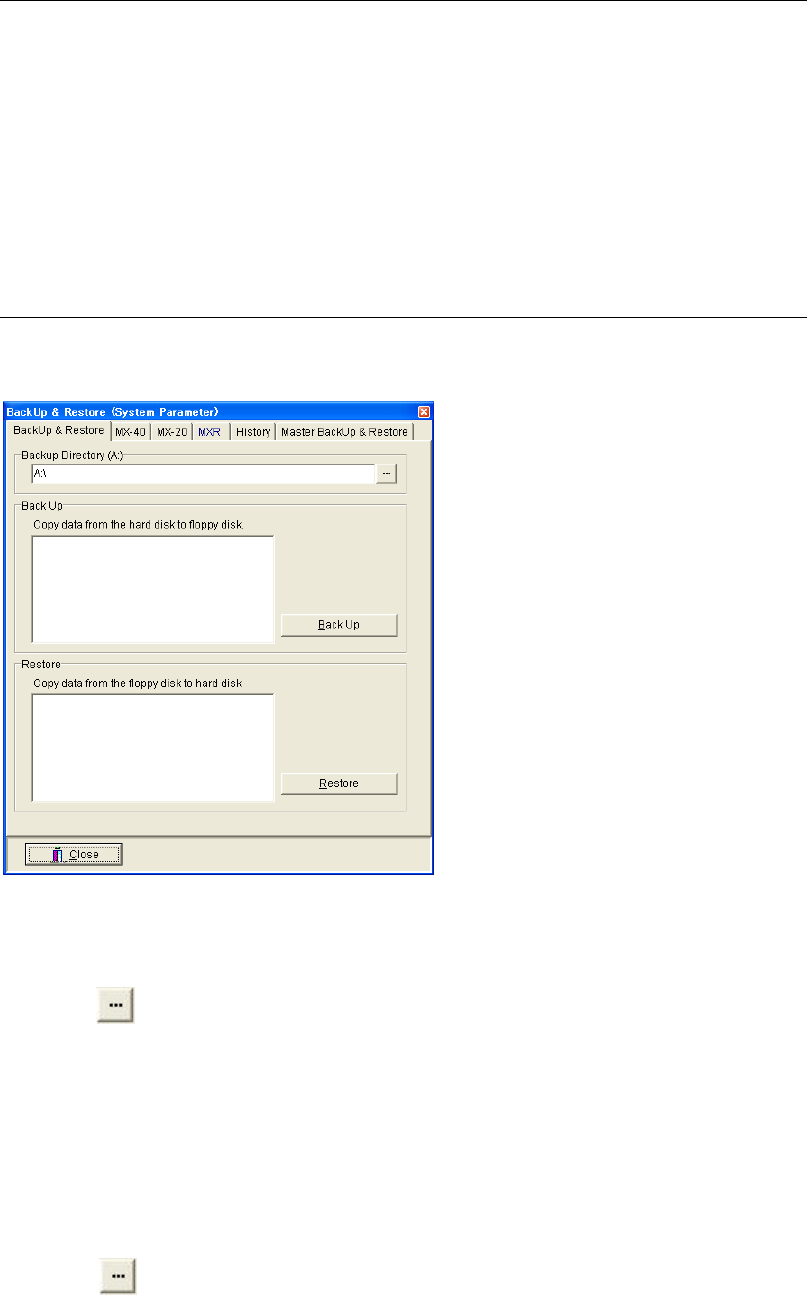
11-4-4 Backing Up & Restoring Data
Menu: System>SystemParameter>Tool>Backup&Restore
Allows for backing up and restoring system parameters.
Backing Up System Parameters
Action:
① Connect a USB memory stick to the port on the mounter.
② Click button to select the Removable disk.
③ Click <Back Up> button.
④ “Execute?” message appears. Click <Yes> button to execute.
⑤ When the backup process is completed, “System parameters have been backed up.”
message appears. Click <OK> button to finish.
Restoring System Parameters
Action:
① Connect the USB memory stick contains the system parameters to the port on the mounter.
② Click button to select the Removable disk.
③ Click <Restore> button.
④ “Execute?” message appears. Click <Yes> button to execute.
⑤ When the restoring process is completed, “System parameters have been restored.”
message appears. Click <OK> button to finish.