M20_Ope_E.pdf - 第376页
Chapter 11 Parameter Setting 11-30 ---Blank page---
Chapter 11 Parameter Setting
11-29
11-4-3 Adjusting Cameras
This parameter has been adjusted prior to shipment. Use the default setting normally.
Menu: System>SystemParameter>Tool>AdjustCamera
Window:
Resolution: Measures the resolution of the specified camera.
Tilt: Measures tilt of the specified camera.
Focus: Measures focus of the specified camera.
Brightness: Measures brightness of the specified camera.
Nozzle Center: Measures nozzle rotational center of the specified head.
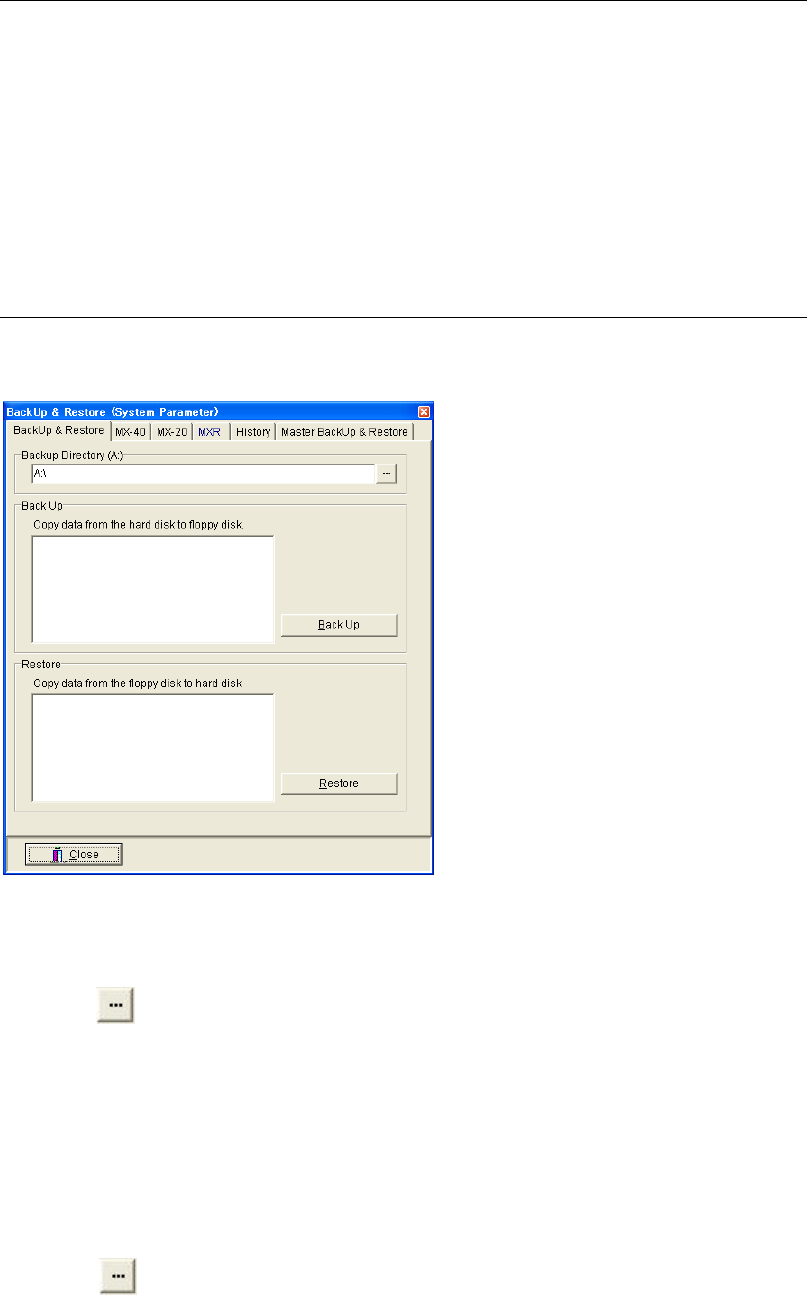
11-4-4 Backing Up & Restoring Data
Menu: System>SystemParameter>Tool>Backup&Restore
Allows for backing up and restoring system parameters.
Backing Up System Parameters
Action:
① Connect a USB memory stick to the port on the mounter.
② Click button to select the Removable disk.
③ Click <Back Up> button.
④ “Execute?” message appears. Click <Yes> button to execute.
⑤ When the backup process is completed, “System parameters have been backed up.”
message appears. Click <OK> button to finish.
Restoring System Parameters
Action:
① Connect the USB memory stick contains the system parameters to the port on the mounter.
② Click button to select the Removable disk.
③ Click <Restore> button.
④ “Execute?” message appears. Click <Yes> button to execute.
⑤ When the restoring process is completed, “System parameters have been restored.”
message appears. Click <OK> button to finish.
Chapter 11 Parameter Setting
11-30
---Blank page---
Chapter 12 Management Data
12-1
Chapter 12
Management Data
Performance Record
Log
Operator Management
Plan
Operator Record