M20_Ope_E.pdf - 第38页
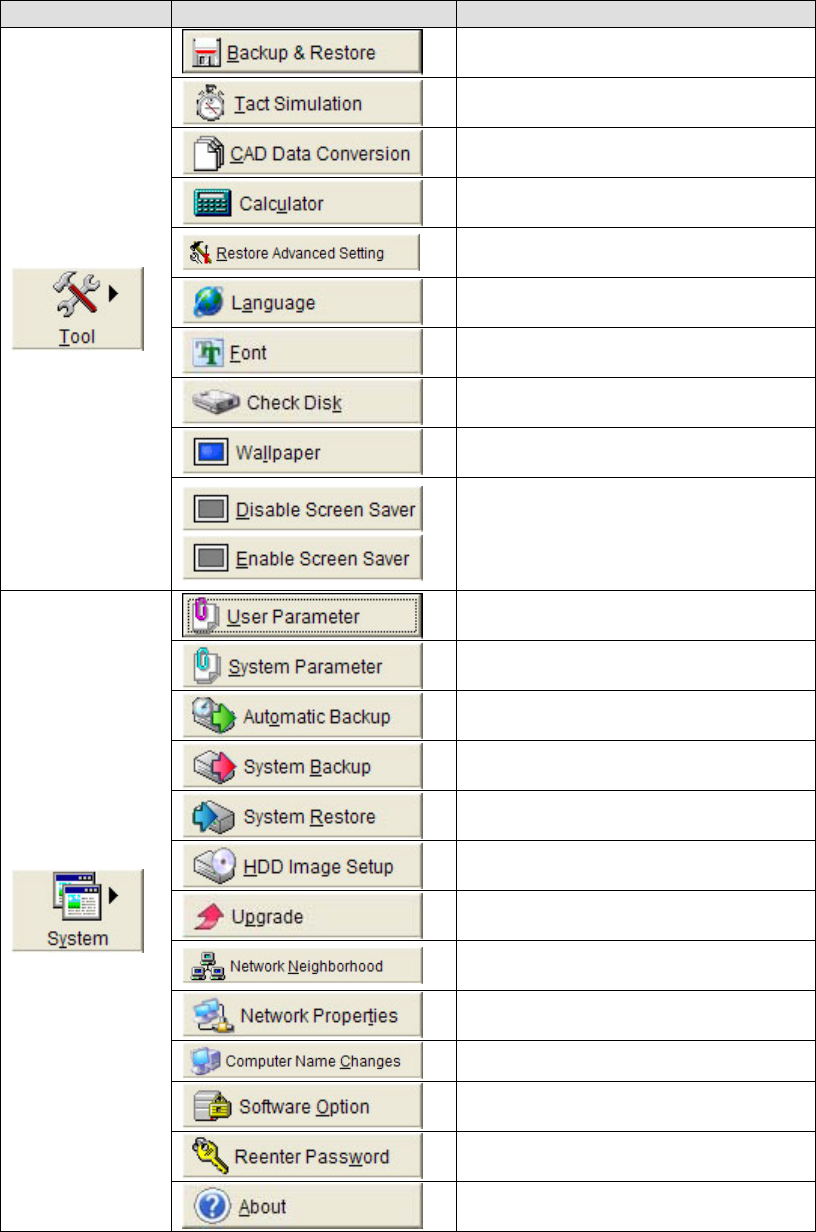
Chapter 1 General 1-20 Main menu bar Sub-menu Performs backup or restore user data such as program or Library records. Calculates approximate time required o run a program. Allows CAD data to be translated into program d…
Chapter 1 General
1-19
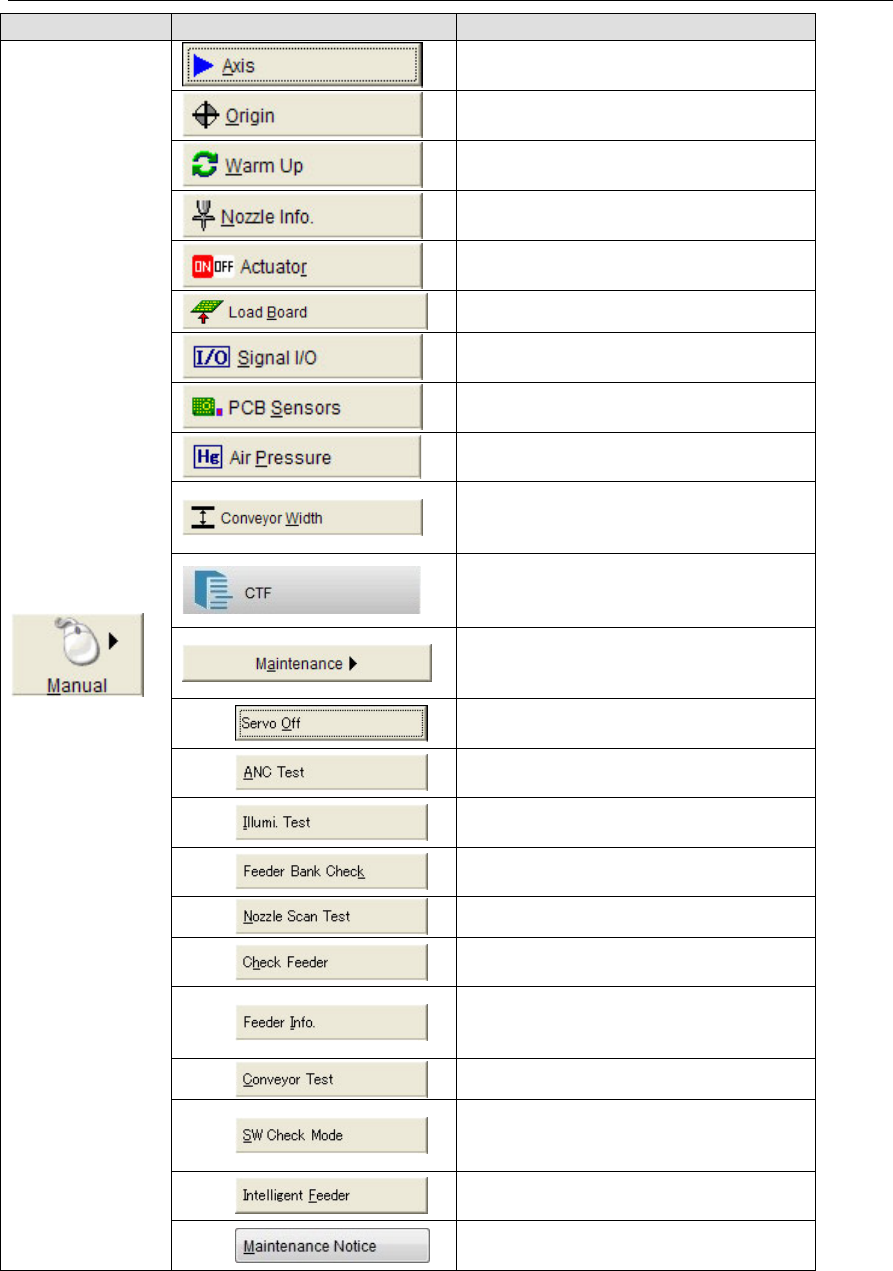
1-3-2 Overviews of Menu Commands
Main menu bar Sub-menu
Moves a specified axis manually for
checking its movement.
Allows specified axis/axes to return to
its/their origin.
Performs warm-up and self-checking.
Nozzle information screen will open.
Allows to check each actuator (air-drive
unit) movement and to measure its timing.
Loads a board to the mounter.
Signal I/O screen will open. Allows
checking digital Input/Output status.
Displays the condition of each PCB
sensors.
Allows to measure air pressure value for
each head.
Allows performing Jog operation or
Origin Initialization for W-axis of Auto
Conveyor Width
Checks the stocker for pallet presence, and
moves a specified pallet in and out on
CTF-40(OP).
(These commands here are mainly for
maintenance, which may not be used
normally.)
Shuts Off power to Servo-motors or
Feeder-bank individually.
Performs Open/Close test of ANC
Shutter.
Performs Illumination test of Teaching
Camera.
Checks each Feeder’s operation on Feeder
bank.
Checks Nozzle Scan function.
Checks pickup point of each feeder (ST
Origin).
Specifies feeder type to be used for
manual feeder operation. (Necessary for
PS-32A feeder)
Checks conveyor repeatability.
Checks each switch operation. After
performed, machine system needs to be
restarted.
Checks Intelligent feeder’s operation such
as LED illumination status etc.
Reminds you to do necessary
maintenances at fixed time intervals.
Chapter 1 General
1-20
Main menu bar Sub-menu
Performs backup or restore user data such
as program or Library records.
Calculates approximate time required o
run a program.
Allows CAD data to be translated into
program data.
Displays digital Calculator.
Initializes all Advanced Settings of
Component Library.
Switches Language type of operation
display.
Allows changing font type of operation
display.
Performs HDD Check utility.
Allows changing wallpaper on display.
Turns On/Off screen saver function. The
opposite mode to the current mode will be
displayed as a command button in the
menu.
Allows setting of User Parameter.
Allows setting of System Parameter.
Specifies options for performing the
automatic backup function.
Allows backup the system programs to
the storage directory on the hard disk.
Allows restoring the system programs
that have been backed up.
Allows backup and restoring the HDD
image.
Performs upgrading System software.
Call up the Network Neighborhood
function of Windows.
Allows changing Network Properties.
Allows changing Computer Name.
Enables/disables each software option.
Allows reentering a password without
rebooting the system.
Shows the system version Nos. and ID
information.
Chapter 1 General
1-21
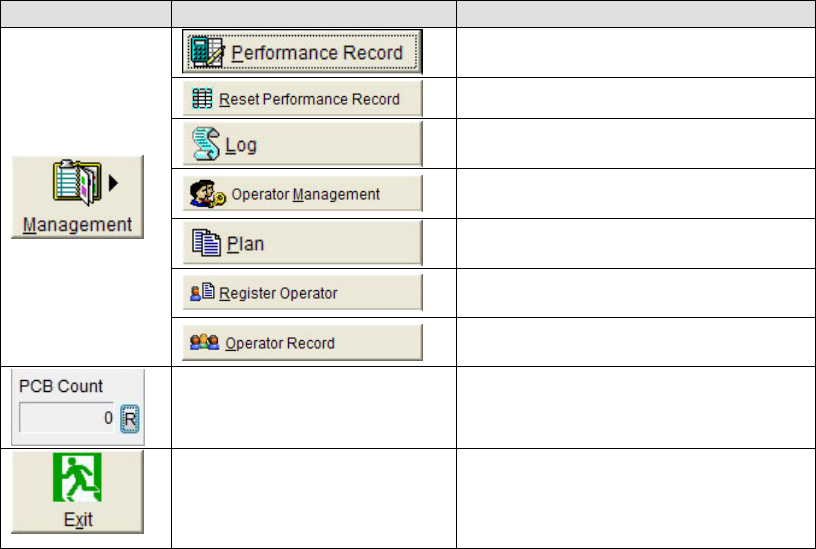
Main menu bar Sub-menu
Displays and outputs performance
records.
Reset performance record.
Displays recorded events that occurred
during the machine operation.
Allows registering access level and
password of various operator levels.
Allows registering a program to run.
Allows registering/deleting Operator’s
name.
Displays Start/End time of each job by
each operator’s name.
Displays the production PCB count from
previous counter reset to present. Clicking
the <R> button will reset the counter.
Shuts down system.
Note: The display of the command related to the option function may vary depending on the option installation
status.