M20_Ope_E.pdf - 第385页
Chapter 12 Management Data 12-9 ■ Total Used to display the total of accumulated perfor mance records. The following two kinds of total performance records are available: Total and User. “Total Record” displays the total…
Chapter 12 Management Data
12-8
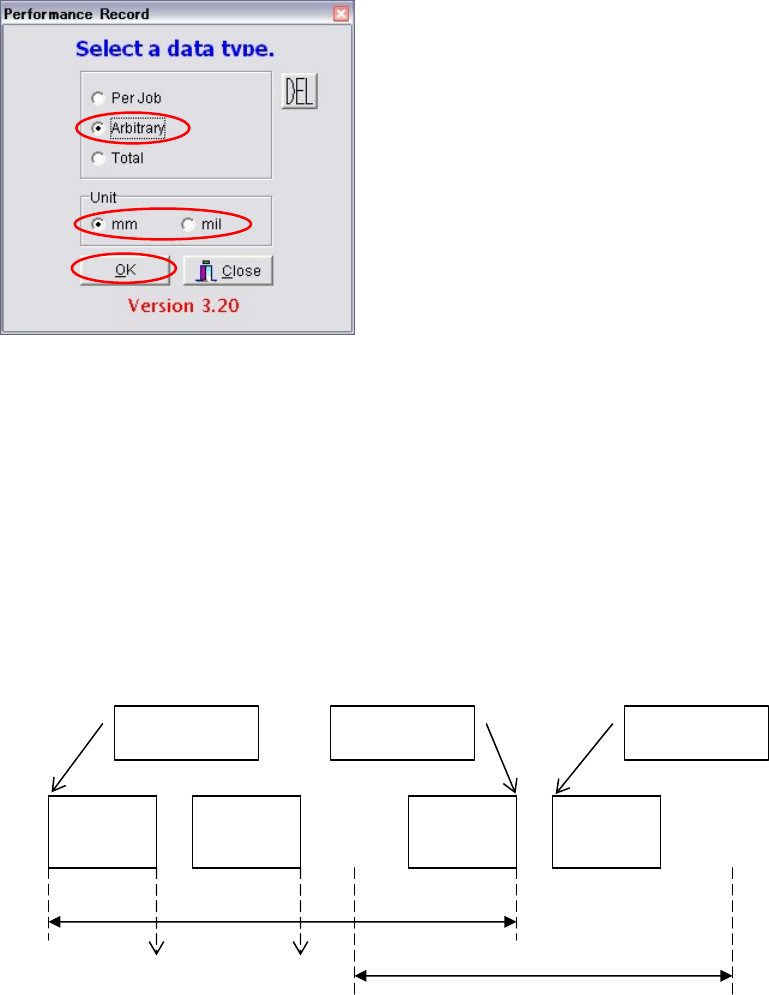
●Accumulating performance records by arbitrary setting
Action:
① Select Management > Performance Record.
② Select “Arbitrary”.
③ Select “mm” or “mil” for the unit. (Same as “Per Job”.)
④ Click <OK> button. (Same as “Per Job”.)
⑤ By referring to “Program Name”, “Start Date” and “End Date”, select the desired file.
(Two or more files can be selected.) (Same as “Per Job”.)
⑥ Click <OK> button to display performance records. (If two or more files have been
selected, the sum of the performance records of those files will be displayed.) (Same as
“Per Job”.)
⑦ If you want to output the records in text format, connect an USB memory to the USB port
of the machine and select File > Text Convert.
⑧ Select Removable Disk (G:) and click <OK> button.
⑨ A message “Convert to text data?” appears, so click <Yes>. The records will be output in
text format to the USB memory.
・・・
Operation
start
CANCEL
Operation
start
・・・
Performance record is accumulated per job.
Performance record is accumulated at
arbitrary timings.
Performance record is accumulated
in real-time
p
er PCB.
PCB 1 PCB 2 PCB n PCB n+1
Chapter 12 Management Data
12-9
■Total
Used to display the total of accumulated performance records. The following two kinds of total
performance records are available: Total and User.
“Total Record” displays the total records accumulated from mounter shipment up to now.
(Cannot be reset)
“User Record” displays the total records accumulated from a reset made by the user up to now.
(Can be reset any time)
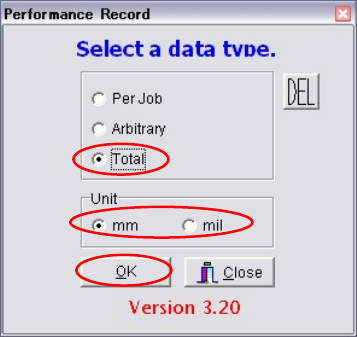
Action:
① Select Management > Performance Record.
② Select “Total”.
③ Select “mm” or “mil” for the unit.
④ Click <OK> button to display performance records.
⑤ Select Edit > Load, then select from “Total Record” or “User Record”.
⑥ If you want to output the records in text format, connect an USB memory to the USB port
of the machine and select File > Text Convert.
⑦ Select Removable Disk (G:) and click <OK> button.
⑧ A message “Convert to text data?” appears, so click <Yes>. The records will be output in
text format to the USB memory.
Chapter 12 Management Data
12-10
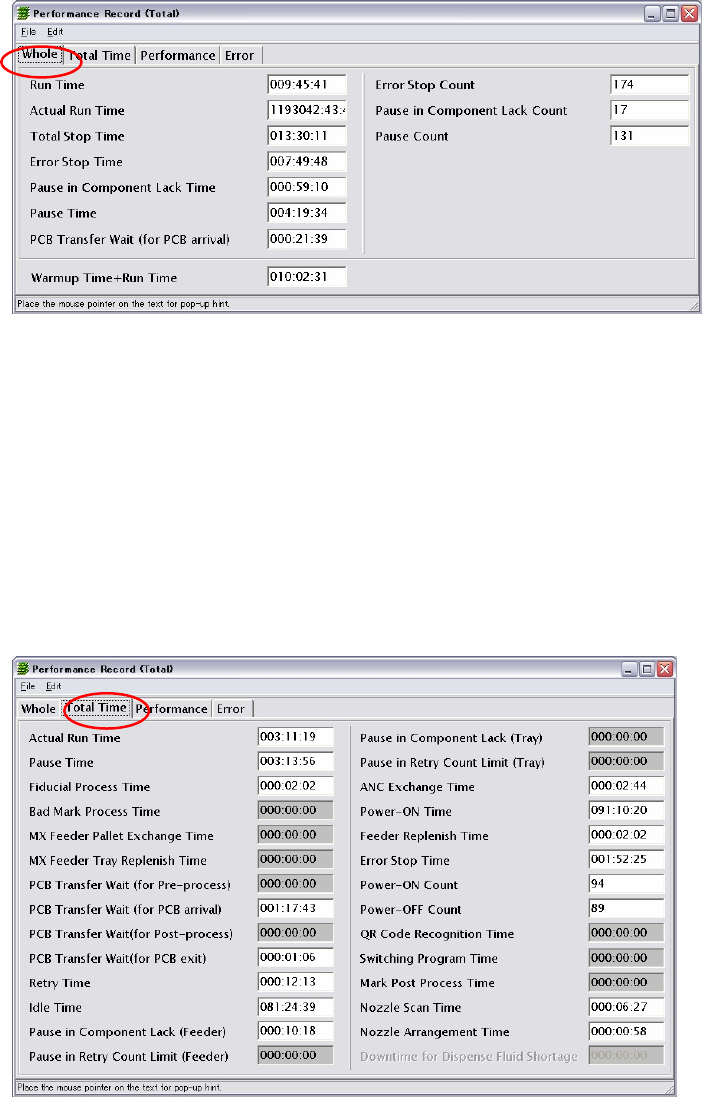
■Whole (Total)
Run Time: Job Eng Time - Job Start Time (Total time in run mode)
Actual Run Time: Run Time – Total Stop Time
Total Stop Time: Error Stop Time + Pause in Component Lack Time + Pause
Time + PCB Transfer Wait (for PCB arrival)
Error Stop Time
Pause in Component Lack Time
Pause Time
PCB Transfer, Wait (for PCB arrival)
PCB Time+Run Time
■Total Time (Total)
Refer ‘Total Time (Per Job)’ for more information of the items in this window. The followings
are the additional items in [Total Time (Total)].
Idle Time: Power-ON Time – Run Time
Power-ON Time: MMI operation time = MMI start to MMI end
Power-ON Count: Number of times MMI is started.
Power-OFF Count: Number of times MMI is exited.
■Performance (Total)
Same as “Per Job” and “Arbitrary”.
■Error (Total)
Same as “Per Job” and “Arbitrary”.