M20_Ope_E.pdf - 第435页
Chapter 15 Data 15-6 15-1 MMI Messages Note: “%s” and “%m” represent character strings (e.g. cover name, conveyor name, switch name, motor name” will be inserted. “%d1” to “%d8” represent numbers (e.g. station No., palle…
Chapter 15 Data
15-5
<Reference>
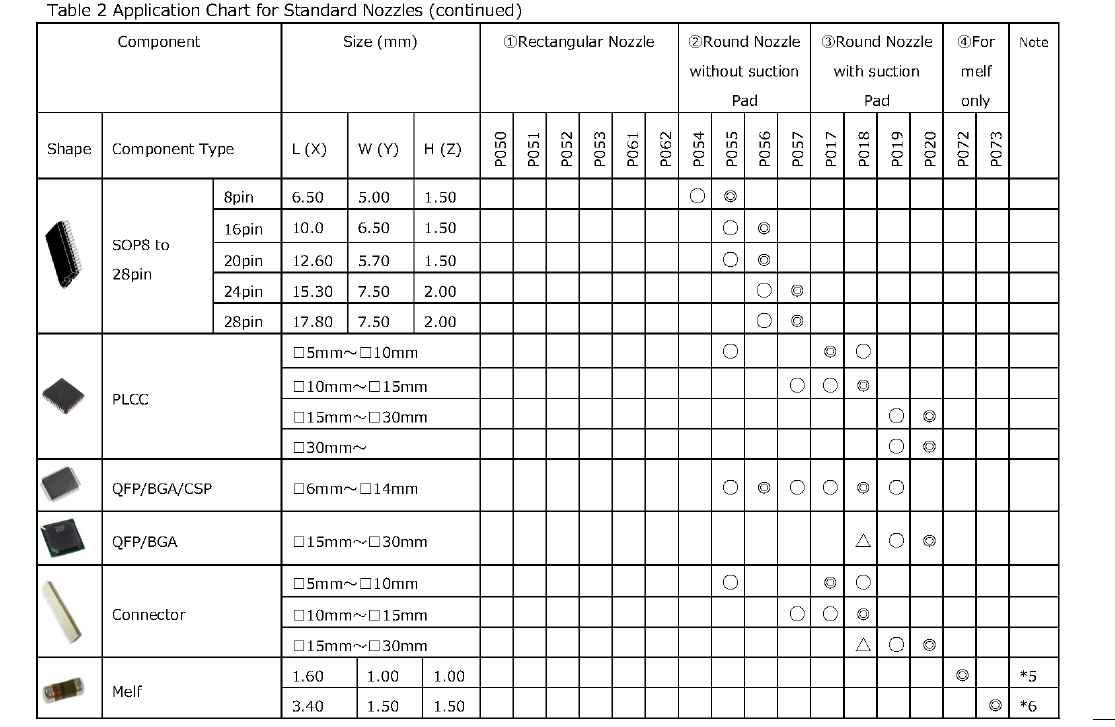
Standard nozzles in the above table are classified into the following 4 types by edge shape.
① Rectangular Nozzle: P050, P051, P052, P053, P061, P062
Suitable for most of chip components
② Round Nozzle without suction pad: P054, P055, P056, P057
Suitable for components of □ 4mm to □ 15mm size
③ Round Nozzle with suction pad: P017, P018, P019, P020
Suitable for components of □5mm or larger size for which vacuum pressure is difficult to rise
④ Nozzle for melf only: P072,P073
Suitable for melf components of Φ 1.0mm to Φ 2.2mm size
* 1 : P050 for 01005(0402)R and 01005(0402)C only
* 2 : P051 for 0201(0603), P061 for 0201(0603) to 0402(1005)
* 3 : P052 for 0402(1005) to 0603(1608), P062 for 0603(1608) to 1206(3216)
* 4 : P053 for 0805(2012) to 1210(3225)
* 5 : P072 for melf of Φ 1.0mm to Φ1.1mm
* 6 : P073 for melf of Φ 1.2mm to Φ2.2mm

Chapter 15 Data
15-6
15-1 MMI Messages
Note:
“%s” and “%m” represent character strings (e.g. cover name, conveyor name, switch name, motor
name” will be inserted.
“%d1” to “%d8” represent numbers (e.g. station No., pallet No., component count, retry count) will be
inserted.
No. Main Detail
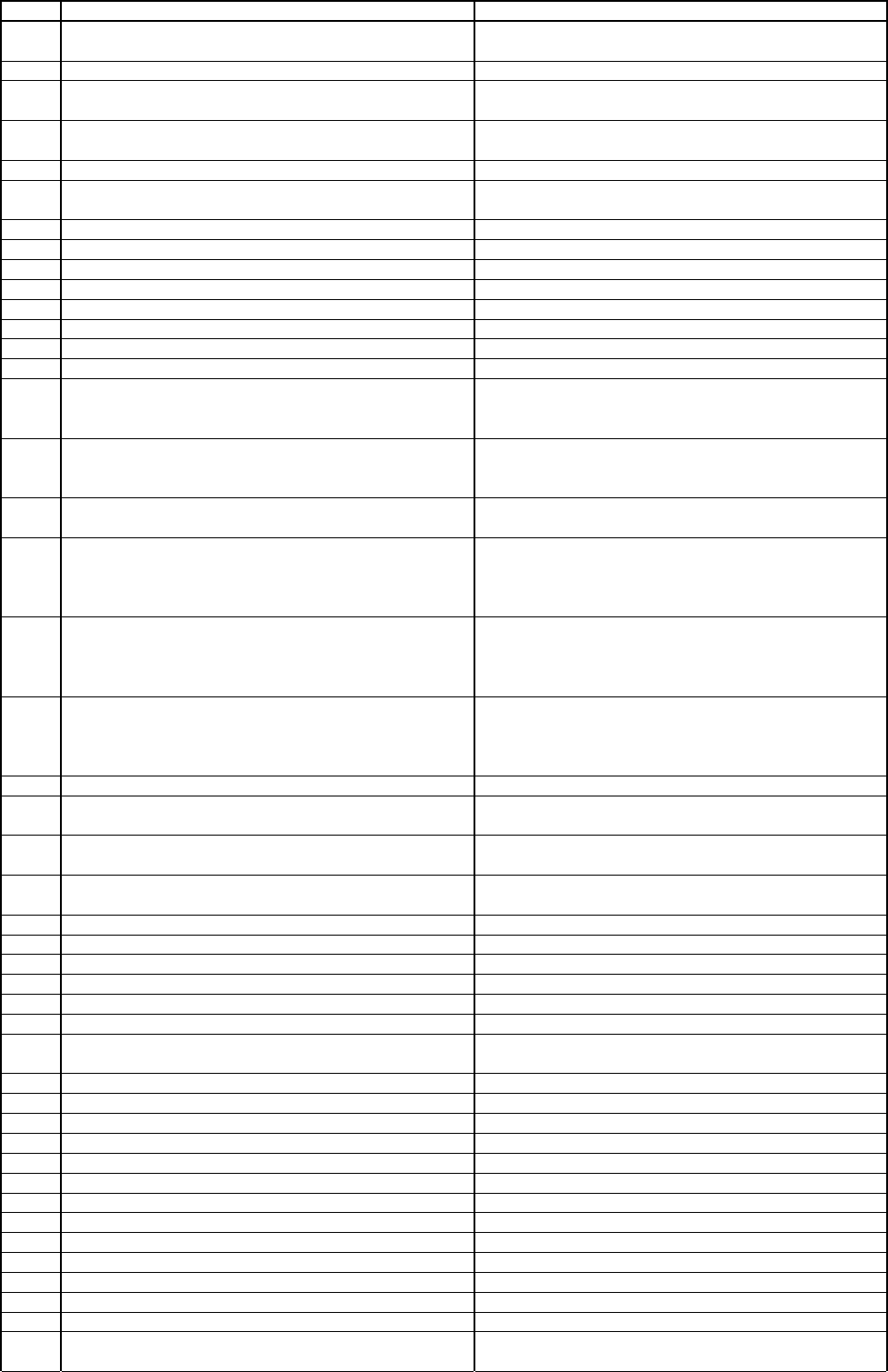
100 Cannot handle the component. %m
Inapplicable process code is downloaded or specified.
Contact us.
101 Invalid input data.
102 Image library data is not found. %m
Image library data that is not downloaded is specified.
Check image library.
103
There is no resolution data for the specified camera.
%m
Check the user parameter to see if the resolution
data is acquired, then contact us.
104 Cannot handle the component. %m Unauthorized process mode is specified. Contact us.
105 Failed in detecting threshold of the object. %m
Check image data (outer dimensions) or illumination
setting.
106 Your request for an image recheck cannot be granted. Your request for an image recheck cannot be granted.
107 Inapplicable unit or machine model is specified. Inapplicable unit or machine model is specified.
108 This function is currently not available. This function is currently not available.
109 Incorrect chain length.
110 Failed in labeling mask function.
111 Incorrect labeling area.
112 Failed in labeling fuction.
113 Angle over.
114
Compensation angle exceeded acceptable range. %m
Head%c1
Compensation angle exceeds 45 degrees. Check
component data/thickness/condition, illumination, and
camera.
115
Compensation angle exceeded acceptable range. %m
Head%c1
Compensation angle exceeds 20 degrees. Check
component data/thickness/condition, illumination, and
camera.
116
Detection result exceeds the acceptable range. %m
Head%c1
117 Failed in provisional positioning. %m Head%c1
The object could not be detected because a
disturbing image may come into the provisional
detection area or boarder between the object and the
background is not clear.
118 Failed in positioning. %m Head%c1
The object could not be detected because a
disturbing image may come into the provisional
detection area or boarder between the object and the
background is not clear.
119 Failed in provisional positioning. %m Head%c1
The object could not be detected because a
disturbing image may come into the provisional
detection area or boarder between the object and the
background is not clear.
120 Component data includes errors. %m Head%c1 Correct component data.
121 Failed in detection of component size. (magnification)
Check component data/thickness/condition,
illumination, and camera.
122 Internal Error 122 %m Head%c1
Check component data/thickness/condition,
illumination, and camera.
123
Position or size of process area exceeds allowable
range. %m
Check component data/thickness/condition,
illumination, and camera.
124 Guide window does not fit into screen. %m Head%c1 Check multiple view assignment and specified camera.
125 Internal Error 125 Number of windows exceeds the limit. Contact us.
126 Number of registered models exceeds the limit. Max number of models per program is 100.
127 Model size is too large. Make model size smaller.
128 Model size is too small. Make model size larger.
129 Wrong head number is specified. Check head number.
130 No model data is found.
Model data that is not downloaded is specified .
Check image data.
134 Mark detection fails. Check illumination, gain/offset data, equipment.
135 Mark detection fails. Check illumination, gain/offset data, equipment.
136 Wrong camera number is specified. Check camera number.
138 Model data is destroyed. Re-acquire model.
139 Mark detection failed. Check mark coordinates or lower matching threshold.
140 Mark detection failed. Check mark coordinates or lower matching threshold.
141 Detection score is abnormal. Check mark coordinates or lower matching threshold.
142 Pattern matching failed. Check coordinates or lower matching threshold.
143 Edge detection failed. No part of the mark is found in search area.
144 Failed to detect a mark. Failed to detect a mark in pattern matching process.
146 Wrong order of offset capturing
147 Mark detection fails. Check illumination, gain/offset data, equipment.
148 Mark detection fails. Check illumination, gain/offset data, equipment.
149
Number of registered image data exceeds the limit.
%m Head%c1
Decrease the number of image data.