M20_Ope_E.pdf - 第45页
Chapter 2 Creating and Editing a Program 2-1 Chapter 2 Creating and Editing a Program Customizing the MMI Windows Data Entry Methods Editing Features Working with Files Entering Header and Editing Board Data …
Chapter 1 General
1-26
---Blank page---
Chapter 2 Creating and Editing a Program
2-1
Chapter 2
Creating and Editing
a Program
Customizing the MMI Windows
Data Entry Methods
Editing Features
Working with Files
Entering Header and Editing Board Data
Creating and Editing a Program
Checking a Program
Chapter 2 Creating and Editing a Program
2-2
2-1 Customizing MMI Windows
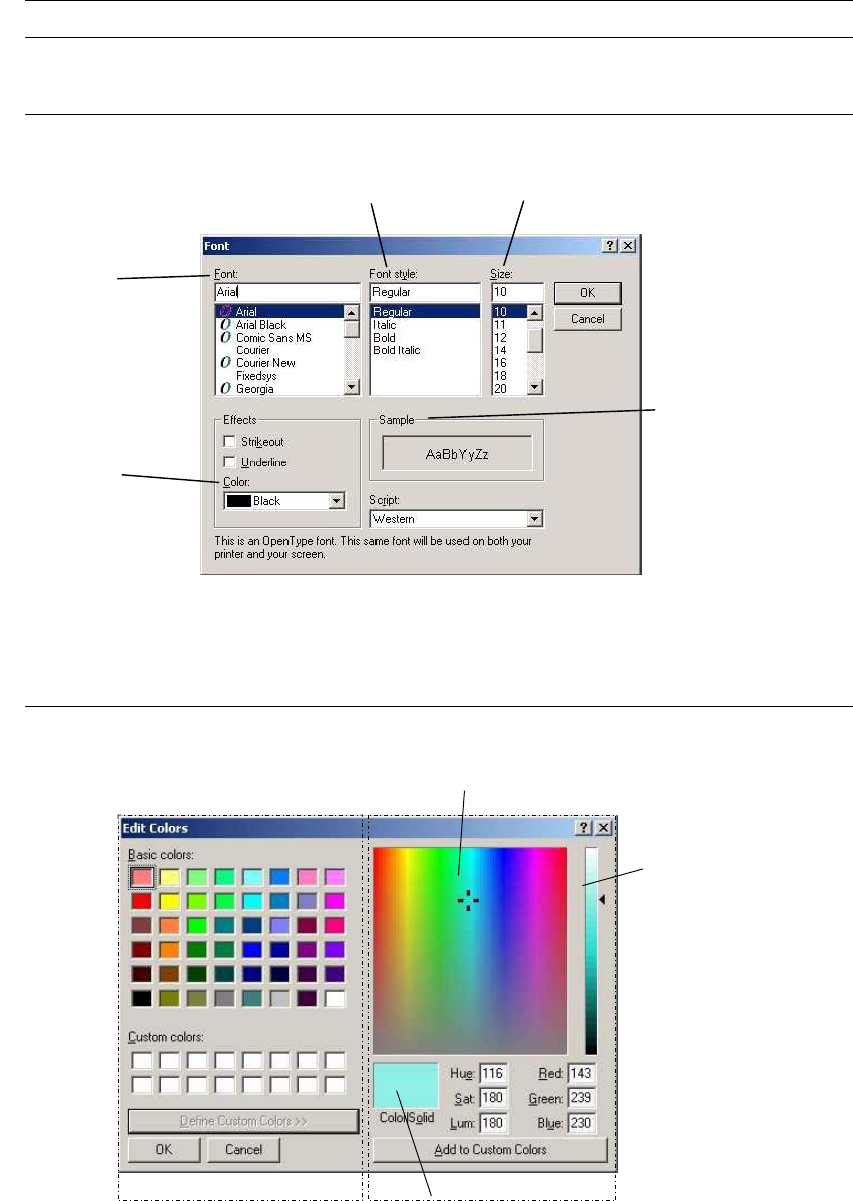
2-1-1 Customizing the Font
Menu: Tool>Font
Regular, Italic, Bold, Bold Italic
Select a font.
Select a font color.
Select a font size (points).
Display sample characters
with specified value
Note: If you enlarge the font size too far, the displayed text might be too large to fit into place.
2-1-2 Customizing the Background Color
Applied only to the Placement & Mark Data editor.
Menu: Program>Tool>Color
A
B
C
Window 1 Window 2
Action: Window 1: Click a desired color from [Basic colors] and choose <OK> button.
Window 2: This window appears when <Define Custom Colors> button is clicked. How to use this
window is shown below: