M20_Ope_E.pdf - 第477页
Chapter 16 Dispenser 16-7 Offset Count The set offset co unt from [X] and [Y] of the re ference dispense point on the PCB is displayed. When there are no offsets, “1” is displ ayed and one point expressed by [X] and [Y] …
Chapter 16 Dispenser
16-6
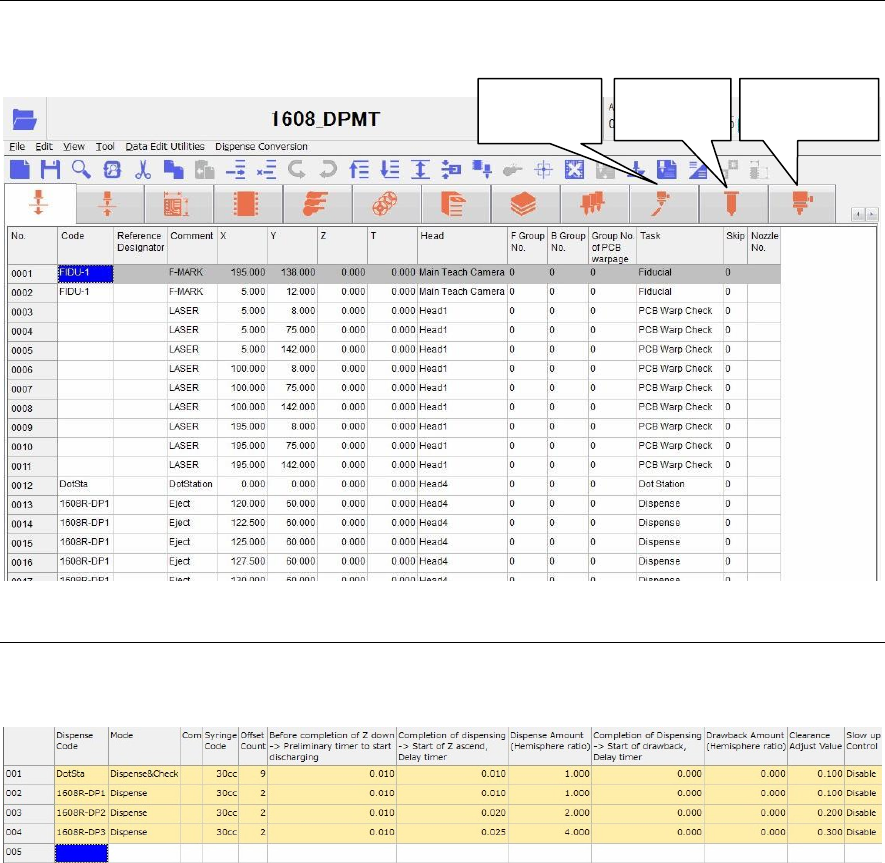
16-1-3-1 Dispenser related data
This dispense related data includes dispense data, syringe data, and dispense nozzle data as described
below.
16-1-3-2 Dispense data
The dispense amount is set with the dispense data.
Menu: Dispense Data
Window:
Dispense Code Enter a dispense code.
This dispense code will link with the code of the placement & mark
(program).
Additionally, double-click the [Dispense Code] cell to display the [Dispense
check] (Tool>AdvancedSetting) window.
Note: Do not use the word “DotStation” for this dispense code. Doing so may cause
an error.
Mode Right-click this cell to select a mode.
① When dispensing the dot station, select “Dispense & Check”.
After dispensed, the dispensed portion is captured by the teach camera
to automatically adjust the dispense diameter to the set diameter
(dispense area).
② To dispense onto the PCB, select “Dispense”.
Comment Enter a comment.
Syringe Code Right-click this cell to select a syringe code of the syringe data described later.
Additionally, double-clicking this cell will jump to the syringe data.
Dispense
data
Syringe
data
Dispense
nozzle data
Chapter 16 Dispenser
16-7
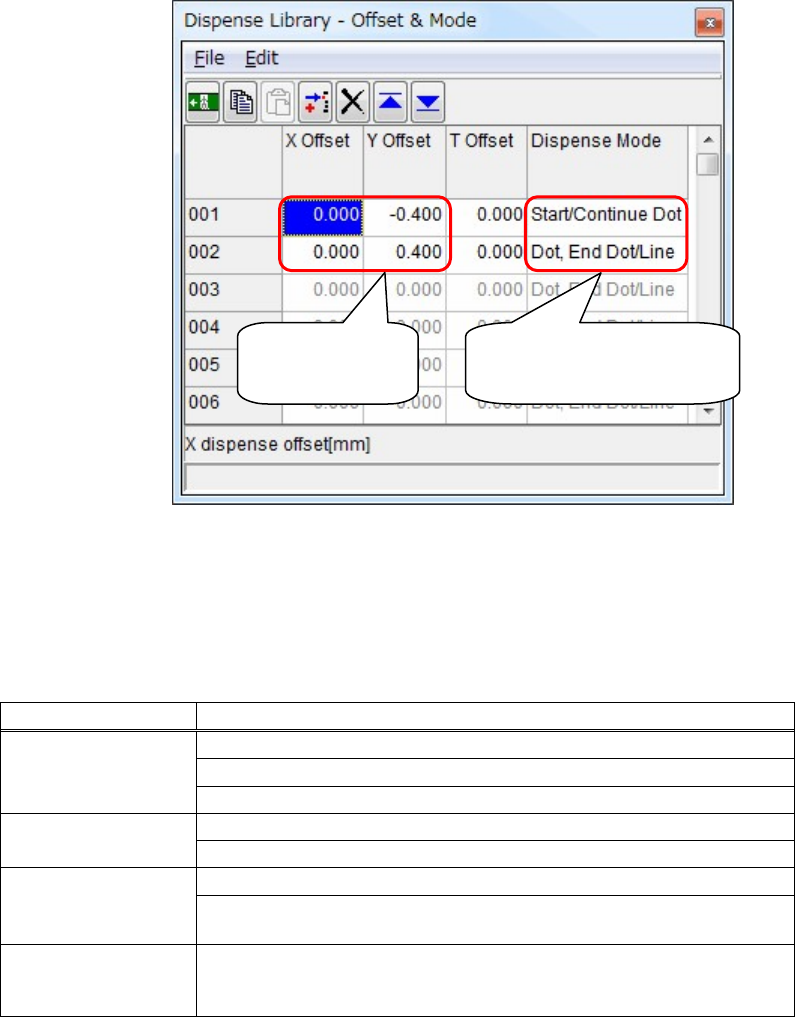
Offset Count The set offset count from [X] and [Y] of the reference dispense point on the
PCB is displayed.
When there are no offsets, “1” is displayed and one point expressed by [X]
and [Y] of the dispense point on the PCB is dispensed.
Additionally, double-click this cell to display the [Offset & Mode] window.
In this window, you can set the offsets of the dispense point. Additionally,
you can also set the line dispense.
Note: Consider [X Offset] and [Y Offset] as offsets from [X] and [Y] of the reference
dispense point of the placement & mark (program).
Additionally, determine [X Offset] and [Y Offset] according to the component
size.
Dispense Mode
Dispense mode Contents
Dot, End Dot/Line
Performs the dot dispense.
Ends the dot dispense.
Ends the line dispense.
Start/Continue Dot
Starts the dot dispense.
Continues the dot dispense.
Start/Continue Line
Starts the line dispense.
Continues the line dispense (changes the direction of the line dispense
without moving up of the head).
End Line & Continue
Ends the line dispense (moves up the head once) and continues the dot
dispense or line dispense further. Performs multiple line dispenses
without changing of the dispense code.
Before completion of Z down -> Preliminary timer to start discharging
Set timing, at which the dispense starts before completion of Z moving down.
(Unit: Sec.)
Completion of dispensing -> Start of Z ascend, Delay timer
Set timing, at which Z starts ascending after completion of dispensing.
(Unit: Sec.)
Enter [X Offset]
and [Y Offset].
Right-click this cell to select
a desired [Dispense Mode].
Chapter 16 Dispenser
16-8
Dispense Amount (Hemisphere ratio)
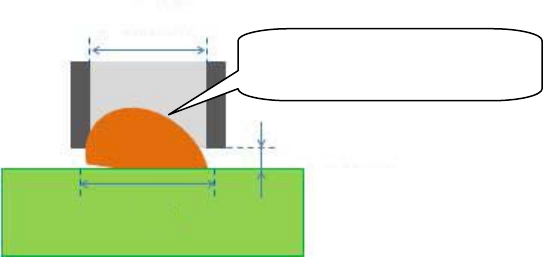
Normally, the dispense diameter is larger than the internal diameter of the
nozzle.
① The dispense diameter is calculated from the formula below.
Dispense diameter = Internal diameter of nozzle x [Dispense diameter
factor N]
Since this [Dispense diameter factor N] is determined by the dispense
material, set it with the syringe data described later.
② Assuming that the dispense shape is a hemisphere, the hemisphere
volume is calculated from the dispense diameter.
③ The result that the calculated hemisphere volume is multiplied by this
[Hemisphere ratio] becomes the dispense volume.
Dispense volume = Hemisphere volume x [Hemisphere ratio]
The dispense volume is adjusted with the numeric value of [Hemisphere
ratio].
Completion of Dispensing -> Start of drawback, Delay timer
The dispense material that may drip from the nozzle tip after dispensing
needs to be sucked.
In the screw type dispense head, the screw is rotated reversely to suck the
dispense material.
This suction method is called “suck back”.
In this cell, set timing, at which “suck back” is started.
(Unit: Sec.)
Drawback Amount (Hemisphere ratio)
Set an amount of “suck back” described above.
“Suck back” amount = Hemisphere volume x [Hemisphere ratio]
This “Suck back” amount is adjusted with the numeric value of this
[Hemisphere ratio].
Note: The above "Suck back" function can be enabled only for screw type dispense
heads.
It is disabled for pneumatic type dispense heads.
Clearance Adjust Value Adjust the clearance between the PCB and nozzle during dispensing.
[Nozzle Tip Clearance] corresponding to the internal diameter of the nozzle is
set in the dispense nozzle data described later.
Nozzle clearance = [Nozzle Tip Clearance] + Clearance Adjust Value
(Unit: mm)
Slow-UP control Problems caused by trailing threads of dispense material after the dispensing
operation can be minimized by specifying the slow-UP function for the nozzle
after dispensing has occurred.
This slow-UP function can be ENABLED or DISABLED.
It is assumed that the dispensed
shape is a hemisphere
Internal diameter
of nozzle
Clearance
Dispense diameter