M20_Ope_E.pdf - 第490页
Chapter 16 Dispenser 16-20 Item Unit Contents Recommended value Expected width mm Enter a desired line dispense width (line dispense width to be adjusted in the adjustment of the dispense check). Normally, the line dispe…
Chapter 16 Dispenser
16-19
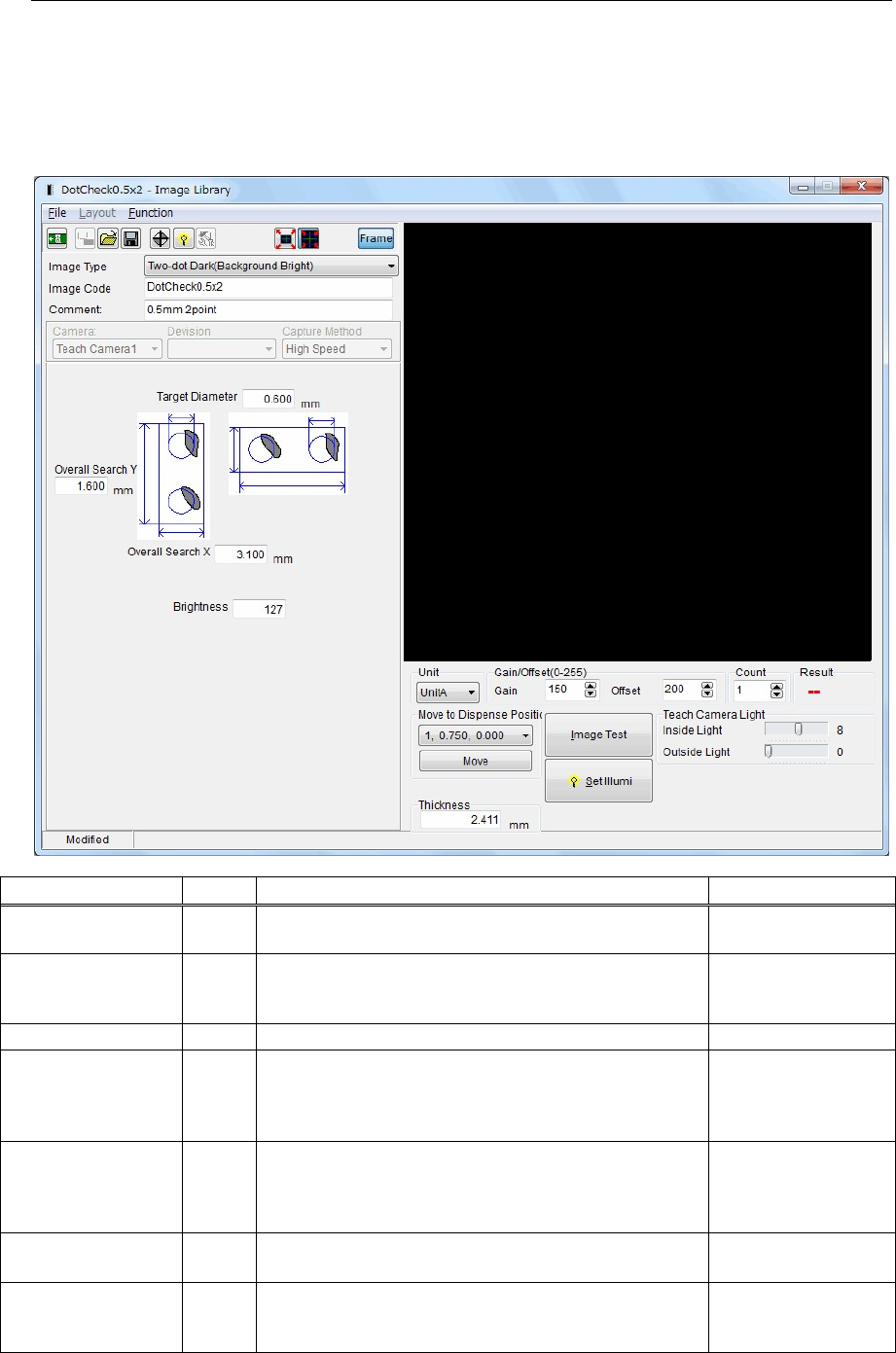
16-3-1-4 Image Library (image data) setting
Menu: Dispense data>Dispense Library - Dispense Check>Image Library
Action:
① Double-click the [Image Code] cell in the Dispense Library - Dispense Check window to display the
Image Library (image data) window.
② In this window, you can set the Image Library (image data) parameters.
Item Unit Contents Recommended value
Image Type ―
Specify a dispense image type.
Select dispense points and background type.
Two-dot Dark
(Background Bright)
Image Code ―
Enter an image code.
This image code will link with the image code in the
Dispense Library - Dispense Check window.
―
Comment ― Enter a comment. ―
Target Diameter mm
Enter a target dot dispense diameter (dispense diameter
to be adjusted in the adjustment of the dispense check).
Normally, the dispense diameter is larger than the outer
diameter of the nozzle.
Nozzle outer
diameter or more
Overall Search X mm
Input an area X where the dispense point is searched
for.
Target Diameter + 1
mm + dispense point
X offset pitch
(1.5mm)
Overall Search Y mm
Input an area Y where the dispense point is searched
for.
Target Diameter
+
1
mm
Brightness ―
Enter a brightness used to recognize the dispense
material that has been dispensed.
(0 to 255)/2 = 128 (Default value)
128
Chapter 16 Dispenser
16-20
Item Unit Contents Recommended value
Expected width mm
Enter a desired line dispense width (line dispense
width to be adjusted in the adjustment of the dispense
check).
Normally, the line dispense width is larger than the
outer diameter of the nozzle.
Outer diameter of
nozzle or more
Width Perm %
A permissible value of the line dispense width, the
image process of which is determined as OK.
This value is expressed by ±% value based on the
expected width.
20%
Gain ― Teach camera gain 150
Offset ― Teach camera offset 200
Teach Camera Light
Inside Light
― Teach camera light, inside light 8
Teach Camera Light
Outside Light
― Teach camera light, outside light 0
Note: It is recommended to use only [Inside Light] of the teach camera light.
If [Outside Light] is used, the edge of the dispense material that has been dispensed may be blurred.
Note: Move the teach camera to the dispense point on the dot station to perform the image test.
Make sure that the square frame of the image test result is in contact with the edges of the dispense
material that has been dispensed.
The long side of the square frame of this image test result becomes the maximum diameter of the
dispense diameter while the short side becomes the minimum diameter of the dispense diameter.
If the square frame of the image test result is not in contact with the dispense material that has been
dispensed, adjust the light.
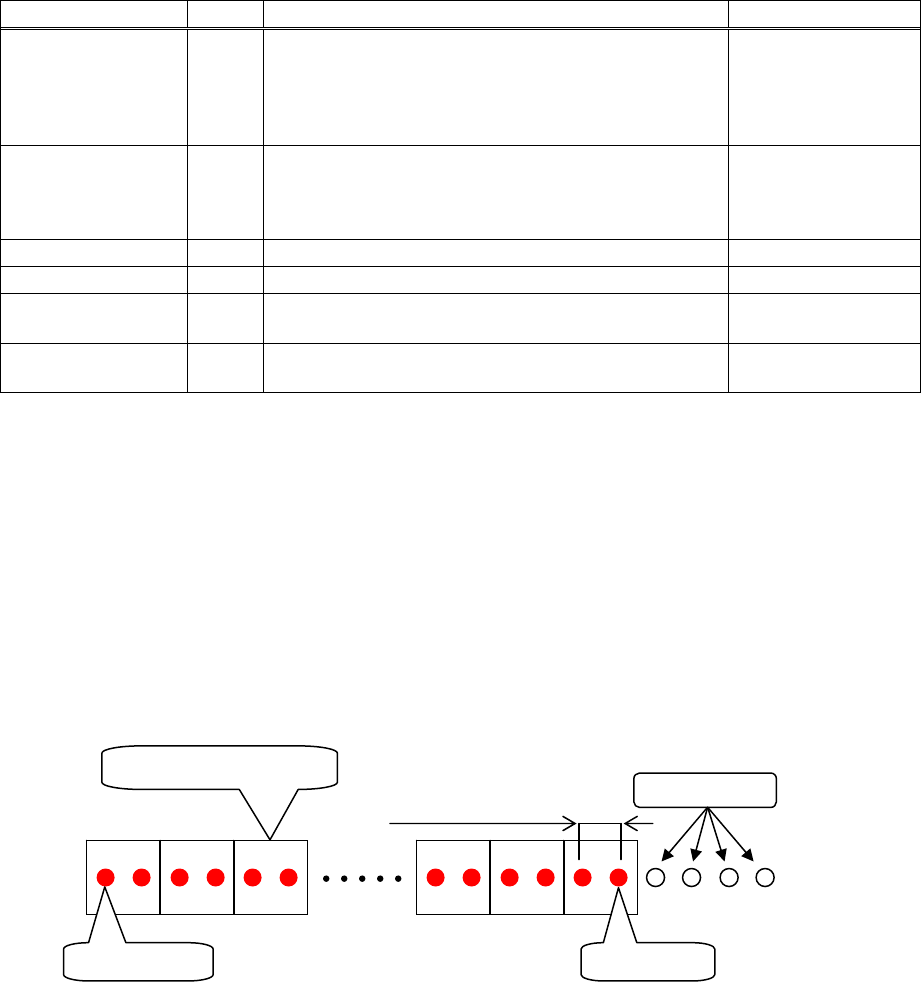
Dispense status on the dot station when dispensed with the recommended values entered.
Dispense offset pitch
1.500 (mm)
1 image process block
5th shot 32nd shot
Pre-dispense
Chapter 16 Dispenser
16-21
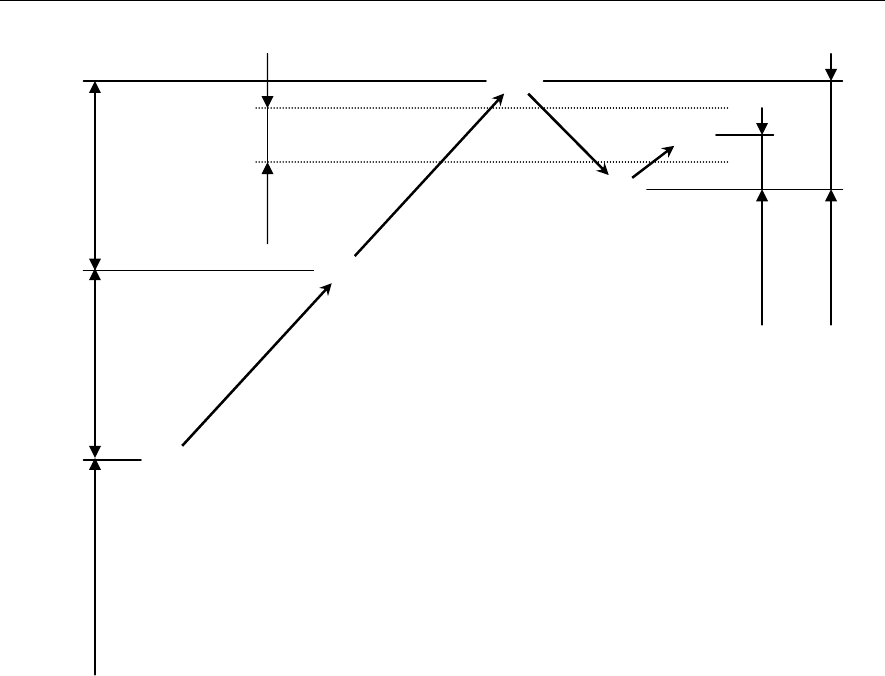
16-3-1-5 Dispense correction by means of 1/2 convergence method
The following describes the principle of the dispense correction.
Example:
① First, the dispense amount (hemisphere volume) set for the dot station is dispensed to perform the
dispense check. (① in the Fig. above)
② Since the dispense area is smaller than the range of the check tolerance value [±%], the set correction
amount is added to the dispense amount to retry the dispense check. (② in the Fig. above.)
③ Since the dispense area is still smaller than the range of the check tolerance value [±%], the set
correction amount is further added to the dispense amount to retry the dispense check. (③ in the Fig.
above)
④ Since the dispense area exceeds the range of the check tolerance value [±%], 1/2 of the previous
correction amount is subtracted from the dispense amount to retry the dispense check. (④ in the Fig.
above)
⑤ Since the dispense area becomes smaller than the range of the check tolerance value [±%], 1/2 of the
previous correction amount (1/4 of the original correction amount) is added to the dispense amount
to retry the dispense check.
The dispense area then enters the range of the check tolerance value [±%]. (⑤ in the Fig. above)
Note: Every time the dispense correction direction (positive/negative) is changed, the correction value is
reduced by half (1/2).
This correction method is called “1/2 convergence method”.
①
②
③
④
⑤
Check
tolerance
[±%]
Correction amount
Correction
amount /4
Set dispense amount
(Hemisphere volume)
Correction amount
Correction
amount /2