M20_Ope_E.pdf - 第76页
Chapter 2 Creating and Editing a Program 2-32 Reference Designator: Alphanumerals printed on a board used for identifying placed components. * Up to 14 characters can be entered. Comment: Any annotation for the compon en…
Chapter 2 Creating and Editing a Program
2-31
2-7 Creating Program and Pickup Data
2-7-1 Creating a Program
Menu: Program
Create component placement data and fiducial/bad mark data in a program.
Program> View(Simple/Detail)
You can either show or hide the columns of [Reference Designator], [Comment], and [Type] by
selecting View(Simple/Detail).
Window:
No.: The order the program is executed.
* Up to 10000 steps per program
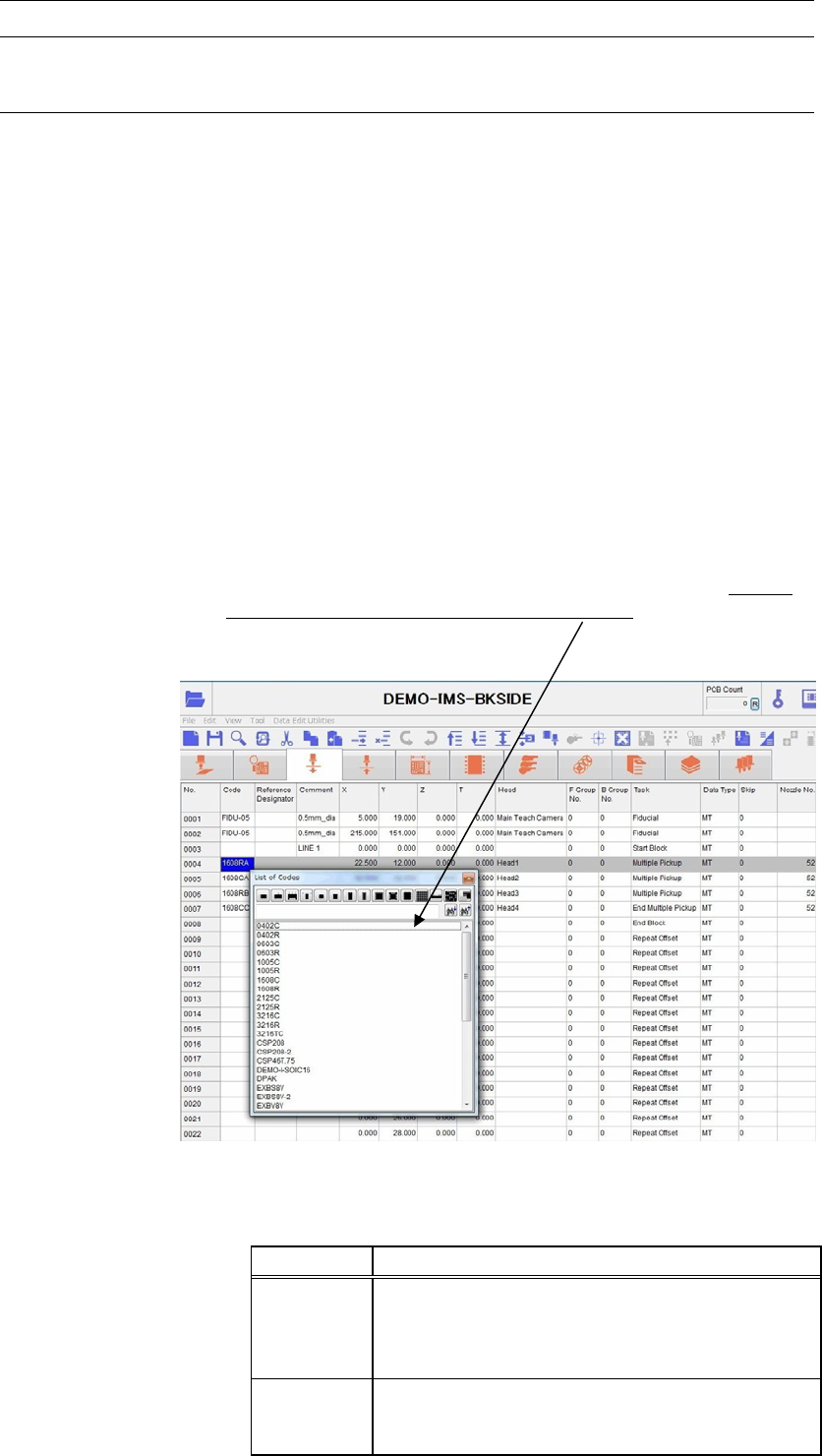
Code: Identification code for components and marks. It allows the operator to
tell what a step is for, a placement step or fiducial/bad mark step. Code
serves to link Placement & Mark Data, Pickup Data, and libraries with
each other, therefore a code is required for each step. To enter a code to
[Code] field, right-click the mouse with [Code] field selected and select
a code from the provided list, or type in a code. By selecting
component-type icon, you can extract the selected type of component
codes only in the list. There are two kinds of codes available,
component code and mark code. Right-click a desired cell to select a
code through the filtering by the component type or enter a code
directly through the keyboard.
* Up to 38 characters can be entered.
Note: To display the list of fiducial codes by right-clicking the mouse, enter “Fiducial” to [Task] field in
advance. To display the list of bad mark codes, enter “Bad Mark Positive Logic” or “Bad Mark
Negative Logic” to [Task] field in advance.
Code Links “Placement & Mark Data” To...
Component
code
* Pickup data—Component pickup coordinates and
others.
* Component library—Component characteristics
and size data.
Mark code
* Fiducial data
* Bad mark data
Used for mark sensing with the main teach camera.
Chapter 2 Creating and Editing a Program
2-32
Reference Designator: Alphanumerals printed on a board used for identifying placed
components.
* Up to 14 characters can be entered.
Comment: Any annotation for the component. Used for user identification.
* Up to 40 characters can be entered.
X, Y, Z, T: Placement/mark coordinates. To perform teach entry for the current
step, click the right mouse button or click Tool>Teach.
* Increment—X/Y/Z : 0.01mm, T : 0.01deg.
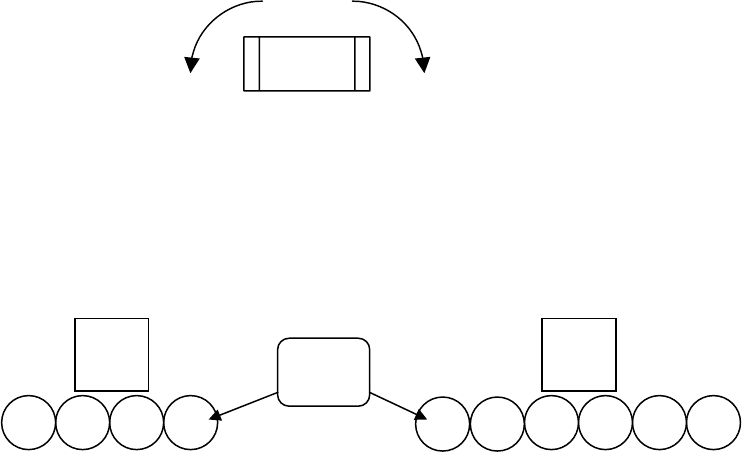
T: Counter-clockwise in the downward-looking perspective indicates
positive T.
-
+
Plus sign (+) is not needed for positive values. Minus sign (-) can be
entered from the keyboard.
Head: Click the right mouse button and select a head from the given list. The
head assembly is configured as follows.
F Group No.: Specify the fiducial number.
0 : Global fiducial(default):
1-249 : Local fiducial
At a fiducial step, enter a number (0-249) you want to assign to the
fiducial step. At a placement step, enter the fiducial number assigned
to the fiducial step you want to use for the placement.
B Group No.: Click the right mouse button and select bad mark number.
0 : Standard bad mark
1-249 : Group bad mark
255 : Master bad mark
254 : Master bad mark (excluding group bad mark processes)
At a bad mark step, enter a number you want to assign to the bad mark
step. At a placement step, enter the bad mark number assigned to the
bad mark step you want to use for the placement.
Task: Click the right mouse button and select a task for the step. (See later in
this chapter for detailed description.)
● Start Block Placement: Flags the start of a program block in a repeat program. Repeat
programs are typically used for multi-up panels. Actual program
begins at the next step.
● End Block Placement: Flags the end of a program block in a repeat program. Repeat
programs are typically used for multi-up panels. Actual program ends
at the previous step.
● Repeat Offset: Indicates the program repetition occurs at this step. Consists only of
offset values. Repeat program is typically used for multi-up panels.
1
2 3 4
Main
teach
camera
4 heads s
p
ecs
(
To
p
view
)
1
2
3 4
5
6
6 heads s
p
ecs
(
To
p
view
)
Head
Nos.
Main
teach
camera
Chapter 2 Creating and Editing a Program
2-33
● B Mark Positive Logic: Bad mark process in positive logic.
● B Mark Negative Logic: Bad mark process in negative logic.
● Fiducial: Fiducial process. This assignment requires an image code for the
fiducial also.
● Skip: Designates the step to be skipped.
● Multiple Pickup: Multiple heads continuously pick up components from a pickup point
or points and place them. When a set of certain requirements are met,
heads simultaneously pick up components.
● End Multiple Pickup: The last of the multiple pickup steps.
● Single Pickup: A head picks up a component from a pickup point and place it.
Note: When [Task] setting is “Fiducial”, the list of fiducial codes is displayed by right-clicking the mouse.
When [Task] setting is “Bad Mark Positive Logic” or “Bad Mark Negative Logic”, the list of bad
mark codes is displayed. When [Task] setting is other item or blank, the list of component codes is
displayed.
Data Type: “MT” is the only option (fixed).
Skip: Skip assignment you make on [Skip Editor] is shown. See the section
on Skip Editor.
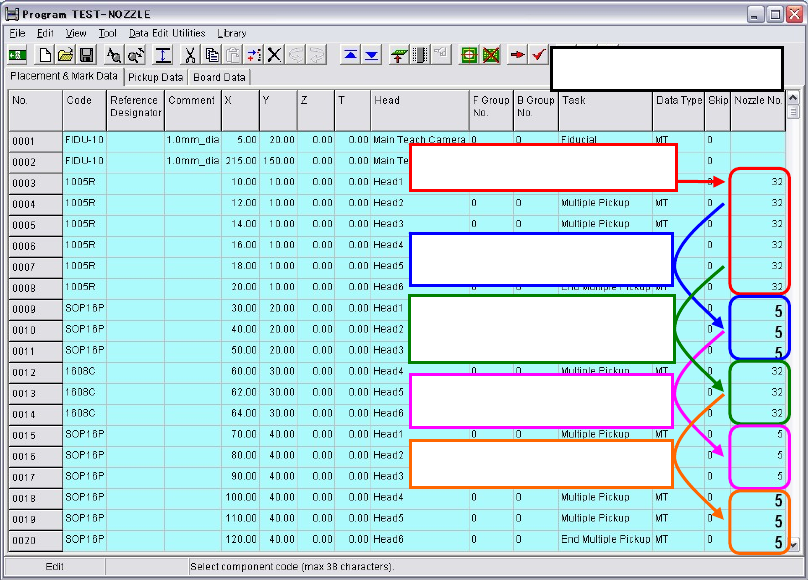
Nozzle No.: Displays linked nozzle No. entered in component data. Nozzles to be
exchanged are displayed in larger and bold letters. To change nozzle
Nos., click a Code cell to open and edit the component data.
The first pickup of each head:
Small letters
Need nozzle exchan
g
es:
Larger and bold letters.
No need to nozzle exchan
g
e for
similar sized components:
Small letters
No need to nozzle exchan
g
e:
Small letters
Need nozzle exchan
g
es:
Larger and bold letters.
Nozzle No. Display