M20_Ope_E.pdf - 第8页
Different sections of the mounter have the following warning labels. Read the message on the label and always comply with its instructions.
Detailed safety precautions
During mounter unloading, the center of gravity of the mounter may change due to a shift of
the movable sections inside the mounter, so the mounter may fall from the unloading
equipment (forklift, etc.) and cause injuries. Always be sure to move the mounter with the XY
axes clamped with the jigs.
Improper installation of the mounter can cause mechanical or electrical hazards. Check the
methods used to install the mounter and the power connections.
It is assumed that the mounter will be used as a direct link in the production line.
If using the mounter separately, then the customer should install some sort of cover that
satisfies the requirements in [EN294/JISB9707] given below that ensure hands are kept away
from the board carry-in and carry-out openings.
Even when using the mounter as a direct link in the production line, there may be board
carry-in and carry-out openings where hands can reach inside.
In that case, the customer should also install some sort of cover that satisfies requirements in
[EN294/JISB9707] below to keep hands away from the board carry-in and carry-out openings.
[Safety standards EN294/JISB9707: Safe distance (upper limbs) from opening] are shown
below.
[Safety standards EN294/JISB9707: Safe distance (upper limbs) from opening]
e: Opening width Shape of opening
Rectangle (Square)
6<e≦8 ⇒Safe distance ≧20(15)
8<e≦10 ⇒ ≧80(25)
10<e≦12 ⇒ ≧100(80)
12<e≦20 ⇒ ≧120(120)
When not all of the feeders are used for feeder installation, then the operator may hurt himself
or herself by placing hands in the head movement range from the gap on the feeder stations
where no feeders are installed.
Please purchase the dummy feeders (option) and install them in the gap where there are no
feeders to prevent the operator’s hands from reaching inside.
Another method is to keep the operator’s hands away from these openings by installing some
sort of cover that meets the above requirements in [EN294/JISB9707].
Even if you turn off the main power switch, live voltage will still be supplied to the primary
power side and the wiring between the terminal block [XB11] and the main switch [QS11].
To prevent electrical shocks, do not remove or disassemble the mounter covers.
If the mounter is equipped with a UPS (option), then there will still be residual voltage even if
the main power switch is turned off.
So to prevent electrical shocks, do not remove or disassemble the mounter covers.
The regenerative resistor may reach high temperatures.
Touching the heat-sink or regenerative resistor may cause burns, so do not remove or
disassemble the mounter covers.
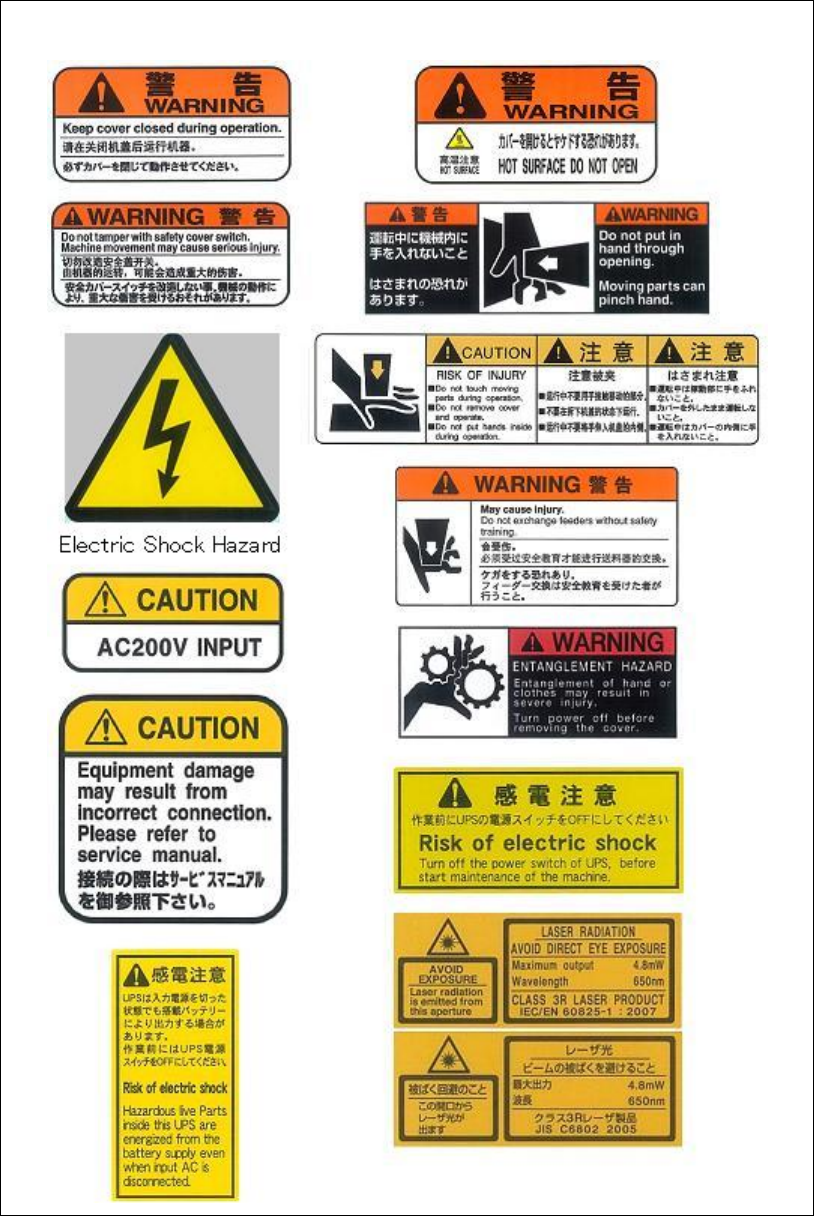
Different sections of the mounter have the following warning labels.
Read the message on the label and always comply with its instructions.
General
Keep the machine and its surrounding area safe and clean.
Do not get on the feeder bank or machine top.
Operation
To prevent machine damage, before operation, make sure accessories such as parts feeders are
set completely and not to jump off.
Never operate the mounter with tools, measuring instruments or such like left inside the
operating range of the movable sections (e.g. around conveyor, on feeder banks / linear guides,
inside tray feeders). Doing so may result in machine damage.
After turning off the mounter, leave the machine 15 seconds or more before turning on again.
Otherwise, motor alarm can result.
Before starting teach, make sure no foreign obstacles are left in the mounter or tray feeder.
Otherwise, costly machine damage can occur. (Chapter 2 > Teach Entry)
Do not manually install a nozzle to a head. If a nozzle is not installed properly, it can hit other
parts of the machine to result in head damage. (Chapter 5 > Image Data Creation Support Tool
> Setting Nozzles to Heads)
Do not attach a nozzle to the head by hand. If the nozzle is not completely attached, the head
may collide with other parts of the mounter and may be damaged. (Chapter 9 > ANC Initial
Setting)
Before pressing Start
switch, make sure no foreign obstacles are left in the mounter or tray
feeder. Otherwise, costly machine damage can occur. (Chapter 9 > Running a Job )
Before starting line search, make sure no foreign obstacles are left in the mounter or tray feeder.
Otherwise, costly machine damage can occur. (Chapter 9 > Line Search (ASJ))
Before executing axis movement, make sure no foreign obstacles are left in the mounter or tray
feeder. Otherwise, costly machine damage can occur. (Chapter 10 > Axis)
When moving the head along the X or Y axis, make sure the head tip (nozzle, nozzle holder) is
at the raised position. If the head is moved along the X or Y axis while the head is lowered, the
head tip may interfere with the conveyor rails or other parts of the mounter. (Chapter 10 >
Axis)
Before zeroing the axes position, make sure no foreign obstacles are left in the mounter or tray
feeder. Otherwise, costly machine damage can occur. (Chapter 10 > Origin)
Before performing signal output on/off operation, make sure no foreign obstacles are left in the
mounter or tray feeder. Otherwise, costly machine damage can occur. (Chapter 10 > Signal I/O
> Signal Output Control)
Before executing the actuator operation, make sure no foreign obstacles are left in the mounter
or tray feeder. Otherwise, costly machine damage can occur. (Chapter 10 > Actuators)
Before performing vacuum-breaking, make sure that the nozzle is removed from the head.
Performing vacuum-breaking with the nozzle attached may cause the nozzle to pop out from
the head. (This especially happens with small-bore nozzles.) (Chapter 10 > Air Pressure)
Before starting warm-up, make sure no foreign obstacles are left in the mounter or tray feeder.
Otherwise, costly machine damage can occur. (Chapter 10 > Warm-up)
Caution