M20_Ope_E.pdf - 第82页
Chapter 2 Creating and Editing a Program 2-38 z Example An example using the bad mark functions are shown below. Bad mark A is used to determine if the ba d mark processes will be performed or not. Bad mark B is used to …
Chapter 2 Creating and Editing a Program
2-37
How to Specify Bad Marks
Bad mark functions are realized as follows:
z PCB bad mark
The PCB bad mark is used to determine whether the bad mark processes appearing after the mark
will be performed or not. Only when a PCB bad mark is recognized, the following bad mark
processes are performed.
The PCB bad mark is specified by the “Master bad mark.” The master bad mark is specified in the
first placement step. To specify a master bad mark, enter “255” in the [B Group No.] cell.
z Block bad mark
The block bad mark is used to determine whether component placements for a block (of placement
steps) will be performed or not. The block bad mark is specified by setting the “Standard bad
mark” right after the “Start Block Placement” step. To specify a standard bad mark, enter “0” in
the [B Group No.] cell.
z Local bad mark
The local bad mark is used to determine whether a component will be placed or not. The local bad
mark is specified by the “Group bad mark.” To specify a group bad mark, enter “1” to “249” in the
[B Group No.] cell.
Chapter 2 Creating and Editing a Program
2-38
z Example
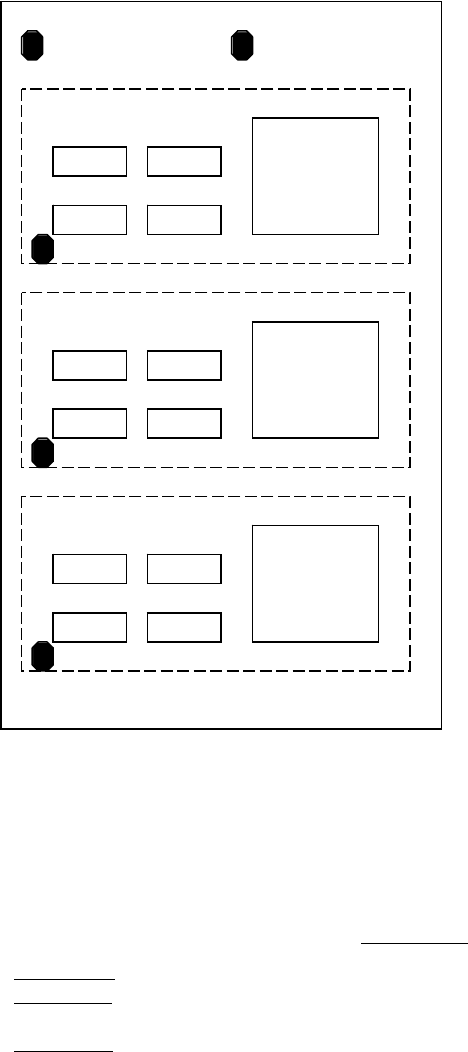
An example using the bad mark functions are shown below.
Bad mark A is used to determine if the bad mark processes will be performed or not.
Bad mark B is used to determine if the components C2 will be placed or not.
Bad mark X is used to determine if the placement steps for each block will be performed or not.
[Placement Program]
B Group No.
① Bad mark A
255 (PCB bad mark)
② Bad mark B
1 (Local bad mark)
③ Start of block placement
④ Bad mark X
0 (Block bad mark)
⑤ Placement of R1 (Multiple Pickup) 0
⑥ Placement of R2 (Multiple Pickup) 0
⑦ Placement of C1 (Multiple Pickup) 0
⑧ Placement of C2 (Multiple Pickup) 1 (determined by the local bad mark)
⑨ Placement of IC1 (Single Pickup) 0
⑩ End of block placement
⑪ Repeat offset 1 (Block 2)
⑫ Repeat offset 2 (Block 3)
R1
C1
R2
C2
IC1
Block 2
Bad Mark X
Bad Mark A
R1
C1
R2
C2
IC1
Block 1
Bad Mark X
R1
C1
R2
C2
IC1
Block 3
Bad Mark X
Bad Mark B
Chapter 2 Creating and Editing a Program
2-39
Bad Mark Steps in Placement Program
There are three types of bad mark steps.
z Master bad mark
The master bad mark is used to determine whether the bad mark processes (except the master bad
mark process itself) will be performed or not. Only when a master bad mark is recognized, the
following bad mark processes are performed. To specify a master bad mark, enter “255” in the [B
Group No.] cell.
There is another type of master bad mark. You can exclude the group bad mark processes from
being affected by the result of master bad mark process. To specify this type of master bad mark,
enter “254” in the [B Group No.] cell.
The result of a master bad mark process is effective until the next master bad mark appears.
The master bad mark cannot be assigned within a repeat block.
The master bad mark (the type excluding the group bad mark) can only be assigned in the first
step of the placement program.
z Standard bad mark
The standard bad mark is used to determine whether the component placements for a certain
range will be performed or not. When a standard bad mark is recognized, all the placement steps
will be skipped until one of the following steps appears.
① [Start of Block Placement] step
② [End of Block Placement] step
③ Next standard bad mark step
If no such steps appear, all the placement steps until the end of the program will be skipped.
When there is a standard bad mark immediately before the [Start of Block Placement] step, all the
following offset blocks will be skipped.
To specify a standard bad mark, enter “0” in the [B Group No.] cell.
z Group bad mark
The group bad mark is used to determine whether a certain component will be placed or not. A
bad mark group No. will be assigned for each placement step. When a group bad mark is
recognized, the placement step having the same B Group No. is skipped. 1 to 249 can be assigned
to [B Group No.].