M20_Ope_E.pdf - 第87页
Chapter 2 Creating and Editing a Program 2-43 Example2: Suppose you are to skip board B in the Example1 program. 60mm 40mm 40mm 60mm D C B A Bad mark The program using a bad mark step will be as below: X Y Task Board 0.0…
Chapter 2 Creating and Editing a Program
2-42
2-7-1-4 Repeat Programs and Bad Marks
Menu: Program>Placement&MarkData>Task>StartBlockPlacement
Program>Placement&MarkData>Task>EndBlockPlacement
Program>Placement&MarkData>Task>RepeatOffset
In producing multi-up panels, the same program is repeated for the number of boards. This
section describes programming of repeat programs and bad marks.
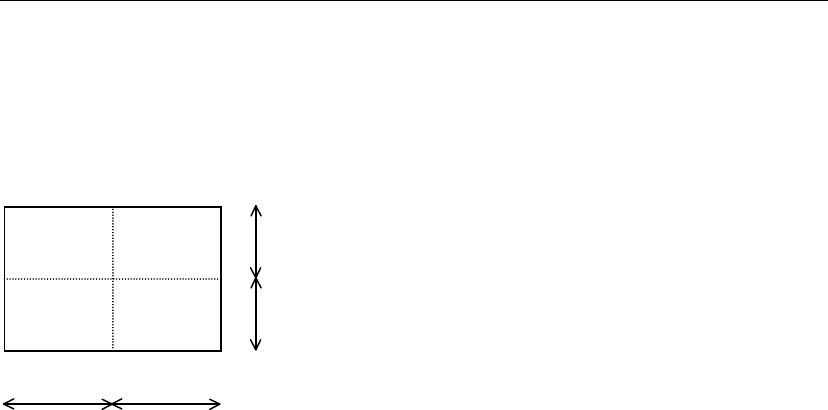
Example1:Four-board panel:
40mm
40mm
60mm
60mm
DC
B
A
Suppose the program for board A is as follows:
X Y
10.00 10.00
30.00 20.00
To repeat the above program for the remaining boards (B ⎝ C ⎝ D), the program will be as follows:
X Y Task Board
0.00 0.00 Start Block Placement
10.00 10.00 Multiple Pickup A
30.00 20.00 End Multiple Pickup A
0.00 0.00 End Block Placement
60.00 0.00 Repeat Offset B
60.00 40.00 Repeat Offset C
0.00 40.00 Repeat Offset D
Note: Offset values in a repeat offset step are always based on the original board position for which the
repeat program is created. (board A in the above example)
Note: Only the Task setting is required for the Start Block Placement/End Block Placement steps.
Effective Range for a Bad Mark Inspection
z Assign a bad mark step immediately before a repeat block
The result of the bad mark inspection is effective up to the end of the repeat block. When the bad
mark is present, the entire repeat block will be skipped.
Note: To assign a bad mark step, specify a bad mark code to [Code] of the step.
z Within a repeat block, assign only one bad mark step immediately after [Start Block Placement]
step
The result of the bad mark inspection is effective up to [End Block Placement] step. This
assignment is typically used for skipping a particular board of a multi-up panel.
Chapter 2 Creating and Editing a Program
2-43
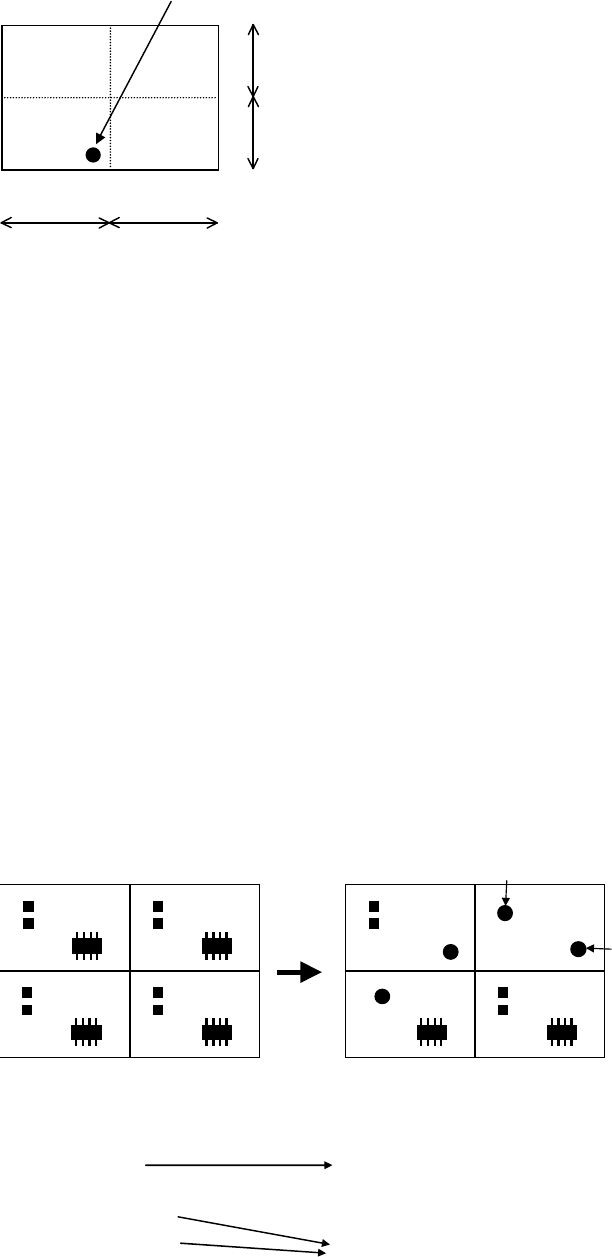
Example2: Suppose you are to skip board B in the Example1 program.
60mm
40mm
40mm
60mm
DC
B
A
Bad mark
The program using a bad mark step will be as below:
X Y Task Board
0.00 0.00 Start Block Placement
5.00 5.00 B Mark Positive Logic A
10.00 10.00 Multiple Pickup A
30.00 20.00 End Multiple Pickup A
0.00 0.00 End Block Placement
60.00 0.00 Repeat Offset B
60.00 40.00 Repeat Offset C
0.00 40.00 Repeat Offset D
In this program, at each of the four boards, the main teach camera inspects the bad mark
coordinates for the mark presence. The mounter detects the bad mark at board B and skips the
board.
Note: In a multi-up panel programming, the bad mark position must be the same from board to board.
z Within a repeat block, assign multiple bad mark steps
The result of a bad mark inspection is effective up to the next bad mark step. As for the last bad
mark step, its result is effective up to [End Block Placement] step. This assignment allows for
skipping particular steps within a board.
Example:
Bad mark 1
Bad mark 2
Task
Start Block Placement
B Mark Positive Logic (Bad mark 1)
Single Pickup (IC)
B Mark Positive Logic (Bad mark 2)
Single Pickup (Chip 1)
Single Pickup (Chip 2)
End Block Placement
When bad mark 1 is
present, skip this step.
When bad mark 2 is
present, skip these steps.
Chapter 2 Creating and Editing a Program
2-44
Bad Mark Positive/Negative Logic
Menu: Program>Placement&MarkData>Task>BMarkPositiveLogic
Program>Placement&MarkData>Task>BMarkNegativeLogic
The logic for bad mark skip operation is shown in the below table. This applies regardless of the
mark color.
Mark On Mark Off
B Mark Positive Logic Skip Place
B Mark Negative Logic Place Skip
Bad Mark Learning Feature
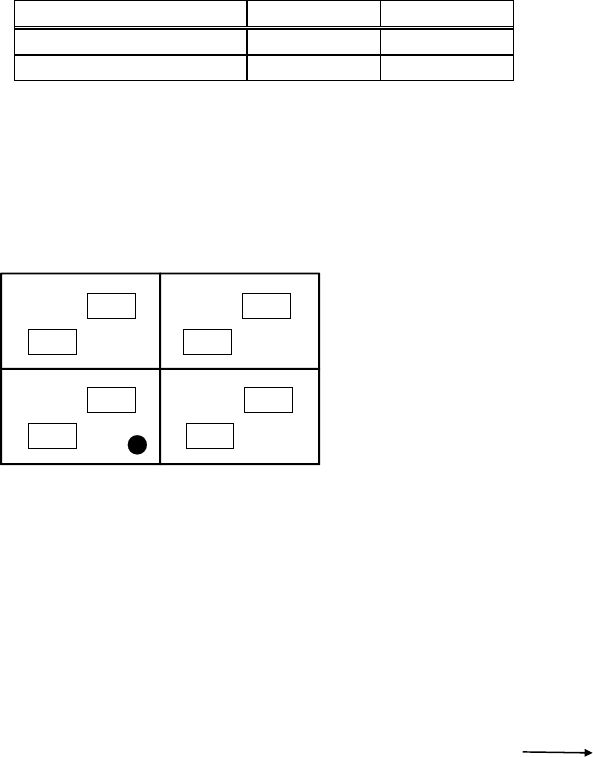
In running a repeat-block program including several bad mark steps with the same coordinates,
the system learns the result of the first bad mark process and applies it to the second or later bad
mark process. At this time, actual mark sensing is not performed and thus the cycle times can be
reduced. The following shows a typical example where this feature takes effect:
A
B
A
B
A
B
A
B
X Y Task
0.00 0.00 Start Block Placement
5.00 5.00 B Mark Positive Logic
: : (Placement routine A)
0.00 0.00 End Block Placement
60.00 0.00 Repeat Offset
60.00 40.00 Repeat Offset
0.00 40.00 Repeat Offset
0.00 0.00 Start Block Placement
5.00 5.00 B Mark Positive Logic
: : (Placement routine B)
0.00 0.00 End Block Placement
60.00 0.00 Repeat Offset
60.00 40.00 Repeat Offset
0.00 40.00 Repeat Offset
Note: This feature applies to up to 300 bad mark steps per program.
Bad mark process is
skipped.