M20_Ope_E.pdf - 第9页
General Keep the machine and its surrounding area safe and clean. Do not get on the feeder bank or machine top. Operation To prevent machine damage, before operation, ma ke sure accessories such as parts feeders are set …
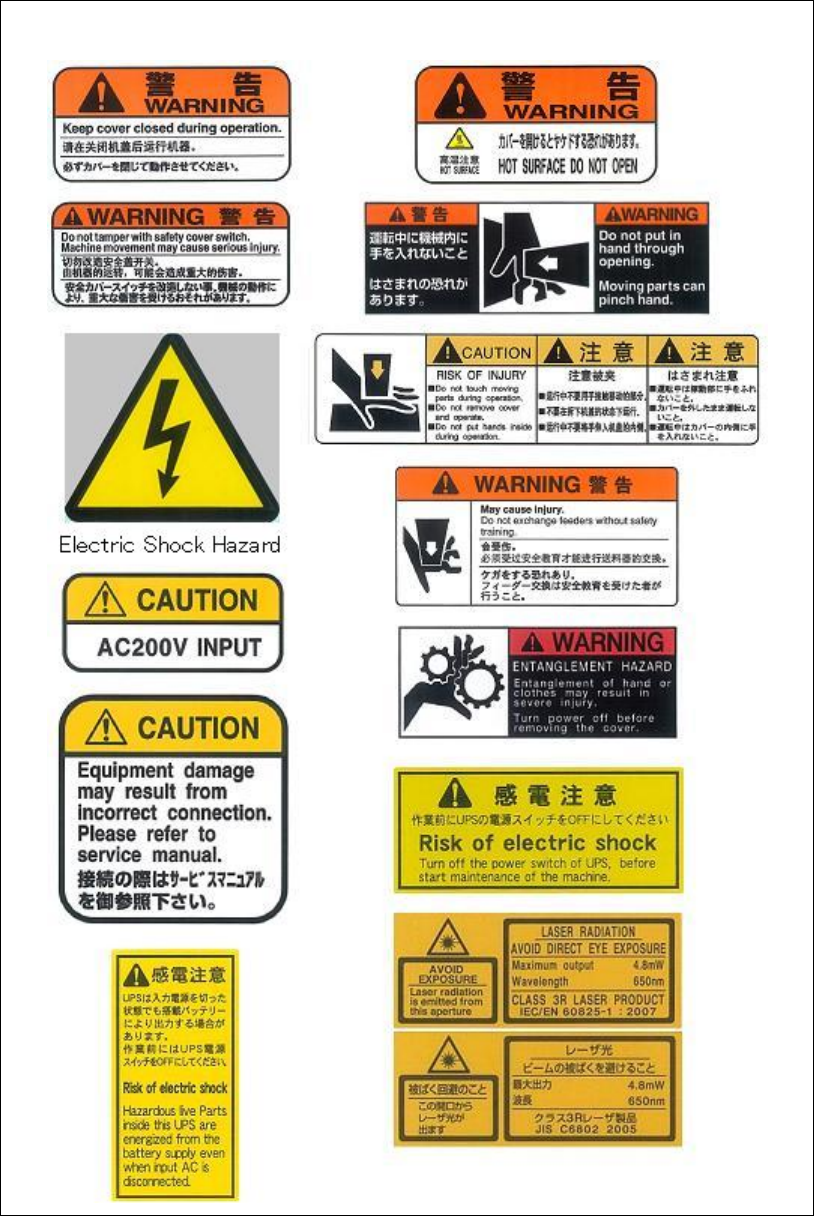
Different sections of the mounter have the following warning labels.
Read the message on the label and always comply with its instructions.
General
Keep the machine and its surrounding area safe and clean.
Do not get on the feeder bank or machine top.
Operation
To prevent machine damage, before operation, make sure accessories such as parts feeders are
set completely and not to jump off.
Never operate the mounter with tools, measuring instruments or such like left inside the
operating range of the movable sections (e.g. around conveyor, on feeder banks / linear guides,
inside tray feeders). Doing so may result in machine damage.
After turning off the mounter, leave the machine 15 seconds or more before turning on again.
Otherwise, motor alarm can result.
Before starting teach, make sure no foreign obstacles are left in the mounter or tray feeder.
Otherwise, costly machine damage can occur. (Chapter 2 > Teach Entry)
Do not manually install a nozzle to a head. If a nozzle is not installed properly, it can hit other
parts of the machine to result in head damage. (Chapter 5 > Image Data Creation Support Tool
> Setting Nozzles to Heads)
Do not attach a nozzle to the head by hand. If the nozzle is not completely attached, the head
may collide with other parts of the mounter and may be damaged. (Chapter 9 > ANC Initial
Setting)
Before pressing Start
switch, make sure no foreign obstacles are left in the mounter or tray
feeder. Otherwise, costly machine damage can occur. (Chapter 9 > Running a Job )
Before starting line search, make sure no foreign obstacles are left in the mounter or tray feeder.
Otherwise, costly machine damage can occur. (Chapter 9 > Line Search (ASJ))
Before executing axis movement, make sure no foreign obstacles are left in the mounter or tray
feeder. Otherwise, costly machine damage can occur. (Chapter 10 > Axis)
When moving the head along the X or Y axis, make sure the head tip (nozzle, nozzle holder) is
at the raised position. If the head is moved along the X or Y axis while the head is lowered, the
head tip may interfere with the conveyor rails or other parts of the mounter. (Chapter 10 >
Axis)
Before zeroing the axes position, make sure no foreign obstacles are left in the mounter or tray
feeder. Otherwise, costly machine damage can occur. (Chapter 10 > Origin)
Before performing signal output on/off operation, make sure no foreign obstacles are left in the
mounter or tray feeder. Otherwise, costly machine damage can occur. (Chapter 10 > Signal I/O
> Signal Output Control)
Before executing the actuator operation, make sure no foreign obstacles are left in the mounter
or tray feeder. Otherwise, costly machine damage can occur. (Chapter 10 > Actuators)
Before performing vacuum-breaking, make sure that the nozzle is removed from the head.
Performing vacuum-breaking with the nozzle attached may cause the nozzle to pop out from
the head. (This especially happens with small-bore nozzles.) (Chapter 10 > Air Pressure)
Before starting warm-up, make sure no foreign obstacles are left in the mounter or tray feeder.
Otherwise, costly machine damage can occur. (Chapter 10 > Warm-up)
Caution

Safety Interlock
The front and rear covers of the mounter have an interlock mechanism. If either of the covers is
opened during operation, this mechanism is activated to immediately stop the mounter
operation. (Chapter 10 > Stopping a Job Run)
Environmental conditions
Use the mounter within the following conditions:
[Environmental conditions]
・Ambient temperature: Accuracy guaranteed at 23±2°C
・Ambient temperature: Functions guaranteed at 10 to 35°C
(Average temperature for 24 hours or more must be 30°C or less.)
・Relative humidity : 20 to 90%RH (no condensation)
・Elevation : Within 1000 meters above sea level
・Air: Shall contain no dust, particles, corrosive gases, etc.
The mounter is not designed for use in home or commercial business environments.
The maximum noise level during production is 76.6dB.
[Warning]
At high acoustic noise ranges (80dB or more) the machine operators should use ear protective
gear to prevent hearing impairment.
The XiO board uses a lithium battery.
Expected service life is 8 years (in a usage environment of 23°C.
If the battery dies the date and time appearing on the desktop are reset.
Our serviceman will replace the lithium battery on the XiO board, so contact us or our sales
representative if needed.
If disposing of the lithium batteries yourself, do not place them among incombustible
(non-flammable) items for disposal.
Cover the terminals (+ and -) on the lithium battery with tape to insulate them and dispose or
recycle them in compliance with legal statutes, regulations and environmental restrictions in
the country where used.
Shorting the lithium battery terminals (+ and -) together may cause the battery to heat up,
rupture or emit sparks.
When exporting the mounter overseas, we use the following types of packing materials.
If disposing or recycling the packing materials, do so while complying with legal statutes,
regulations and environmental restrictions in the country where used.
Constituents of various packing materials are shown in the table below.
Name Application Main constituents
Barrier Star
(transparent barrier)
Packing material for
moisture-proofing
and rust prevention
during shipping
Polyethylene terephthalate (PET)
(polyester)
Polyethylene (PE)
Cross: Polyethylene (PE)
LL film: Ethylene・Single butene
copolymer
HiPLE-ACE Corrugated
fiberboard for outer
packing
Paper (cellulose fiber aggregate)
Starch paste
Dikkuesuter band Fastener band for
corrugated fiberboard
for outer packing
Polyethylene terephthalate (PET)
polyester
Pigments : approximately 0.2%
Carbon black : approximately 0.2%
Dick PP band Lightweight fastener
band (monitor, parts)
Polyprophylene (PP)
Calcium carbonate : 3%
Pigments : approximately 0.2%
Carbon black : approximately 0.4%