MDO3000 Programmer Manual.pdf - 第1016页
Status and Events Figure 3-6: Status and Event Handling Process When an event occurs, a signal is sent to the DESER (1). If that type of event is enabled in the DESER (that is, if the bit for that event type is set to 1)…

Status and Events
Event Queue
The Event Queue
storesdetailedinformationonupto33events. Ifthan32
events stack up in the Event Queue, the 32nd event is replaced by event code
350, "Queue Overflow."
Read the Event Queue with the EVENT? query (which returns only the event
number), with the EVMSG? query (which returns the event number and a text
description of the event), or with the ALLEV? query (which returns all the event
numbers along with a description of the event). Reading an event removes it
from the queue.
Before reading an event from the Event Queue, you must use the *ESR? query to
read the summary of the event from the SESR. This makes the events summarized
by the *ES
R? read available to the EVENT? and EVMSG? queries, and empties
the SESR.
Reading
the SESR erases any events that were summarized by previous *ESR?
reads but not read from the Event Queue. Events that follow an *ESR? read are
put in the Event Queue but are not available until *ESR? is used again.
Event Handling Sequence
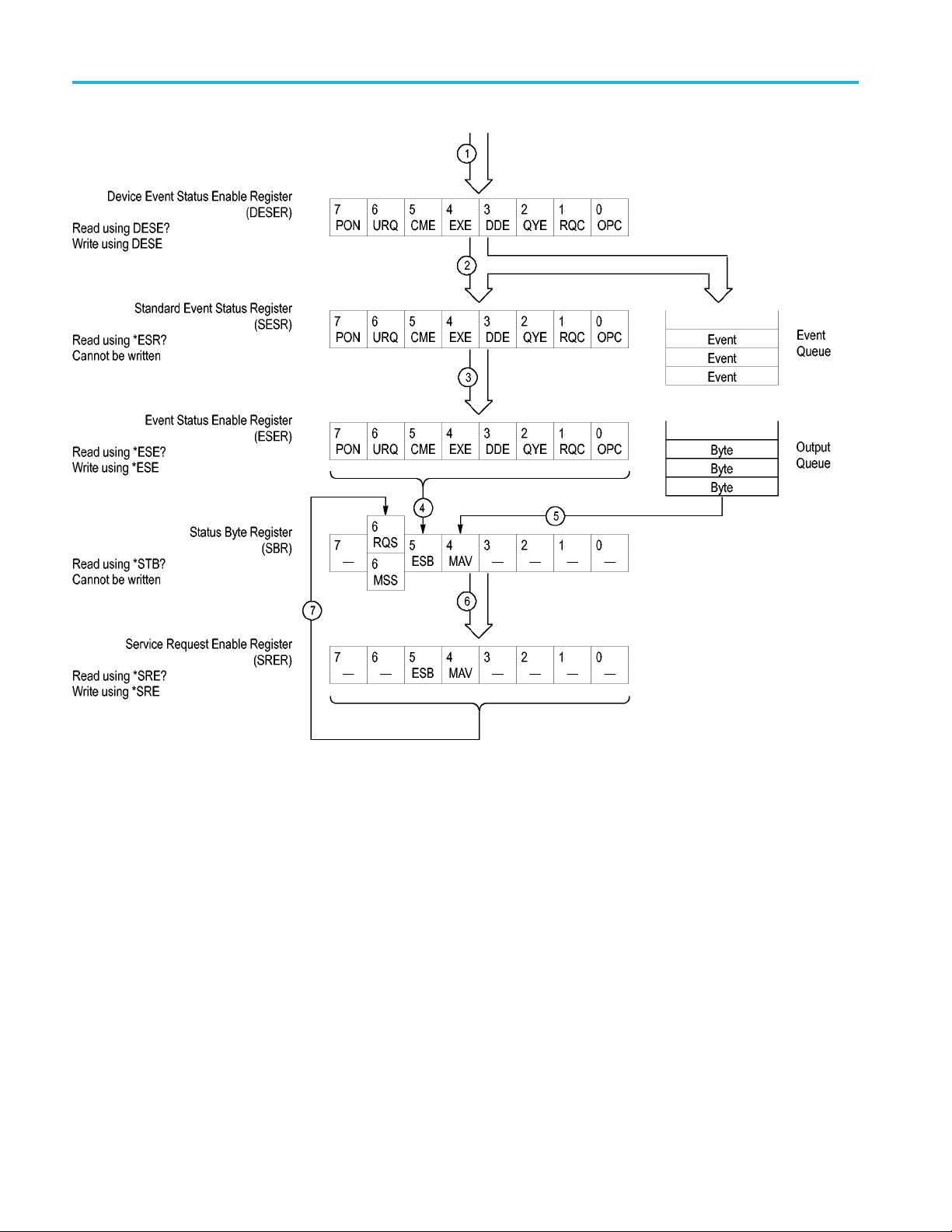
The following figure shows how to use the status and event handling system. In
the explanation that follows, numbers in parentheses refer to numbers in the figure.
MDO4000/B/C, MSO/DPO4000B and MDO3000 Series Oscilloscopes Programmer Manual 3-5
Status and Events
Figure 3-6: Status and Event Handling Process
When an event occurs, a signal is sent to the DESER (1). If that type of event
is enabled in the DESER (that is, if the bit for that event type is set to 1), the
appropriate bit in the SESR is set to one, and the event is recorded in the Event
Queue (2). If the corresponding bit in the ESER is also enabled (3), then the
ESB bit in the SBR is set to one (4).
When output is sent to the Output Queue, the MAV bit in the SBR is set to one (5).
When a bit in the SBR is set to one and the corresponding bit in the SRER
is enabled (6), the MSS bit in the SBR is set to one and a service request is
generated (7).
3-6 MDO4000/B/C, MSO/DPO4000B and MDO3000 Series Oscilloscopes Programmer Manual

Status and Events
Synchronizat
ion M ethods
Overview
Although most commands are completed almost immediately after being received
by the oscilloscope, some commands start a process that requires time. For
example, onc
e a single sequence acquisition command is executed, depending
upon the applied signals and trigger settings, it may take an extended period
of time before the acquisition is complete. Rather than remain idle while the
operation is in process, the oscilloscope will continue processing other commands.
This means that some operations will not be completed in the order that they
were sent. Furthermore, sometimes the result of an operation depends upon the
result of
an earlier operation. A first operation must complete before the next
one is processed.
In order
to handle these situations, the oscilloscope status and event reporting
system allows you to synchronize the operation of the oscilloscope with your
application program, using the Operation Complete function. Note, however,
that only some operations are able to take advantage of this function; a table is
provided below of commands that support this.
The following commands are used to synchronize the oscilloscope functions
using Operation Complete. See examples of how to use these commands later
on in this section:
*OPT? — sending the *OPC command will set bit 0 of the SESR (Standard
Events Status Register). The bit will only be set high when all pending operations
tha
t generate an OPC message have finished execution. (The SESR is queried
using *ESR?)The
*OPC? query form returns 1 only when all operations have
completed, or a device clear is received.
*WAI — prevents the oscilloscope from executing further commands or queries
until all pending commands that generate an OPC message are complete.
BUSY? — returns the status of operations: 1 means there are pending operations,
0 means that all pending operations are complete.
NOTE. Some OPC operations may require an extended period of time to complete
or may n ever complete. For example, a single sequence acquisition may never
complete when no trigger event occurs. You should be aware of these conditions
and tailor your program accordingly by:
— setting the timeout sufficiently for the anticipated maximum time for the
operation and
— handle a timeout appropriately by q uerying the SESR (*ESR?) and event queue
(EVMsg? or ALLEv?).
MDO4000/B/C, MSO/DPO4000B and MDO3000 Series Oscilloscopes Programmer Manual 3-7