MDO3000 Programmer Manual.pdf - 第34页
Command Syntax Abbreviating Y ou can abbrev i ate many oscilloscope comman ds. Each command in this documentation shows the minimum accep table abbreviations in capitals. F or example, you can enter the command ACQuire:N…
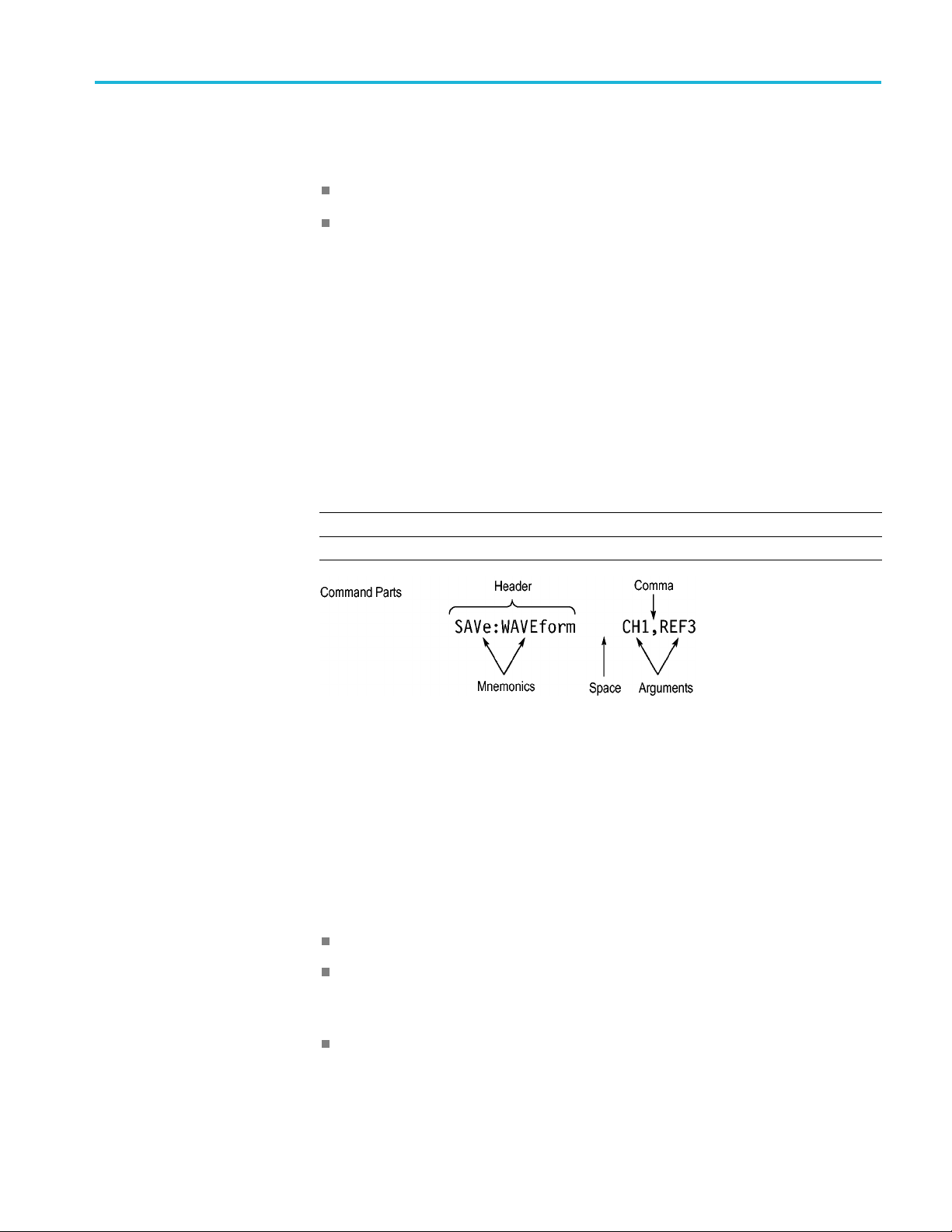
Command Syntax
Queries
Queries cause t
he oscilloscope to return status or setting information. Queries
have the structure:
[:]<Header>
[:]<Header>[<Space><Argument> [<Comma><Argument>]...]
You can specify a query command at any level within the command tree unless
otherwise noted. These branch queries return information about all the mnemonics
below the specified branch or level.
Headers
Use the HEADer command to control whether the oscilloscope returns headers as
part of the query response. If header is on, the query response returns command
headers, then formats itself as a valid set command. When header is off, the
response includes only the values. This may make it easier to parse and extract the
information from the response. The table below shows the difference in responses.
Table 2-3: Comparison of Header Off and Header On Responses
Query Header Off Header On
TIME?
14:30:00 :TIME “14:30:00”
ACQuire:NUMAVg?
100
:ACQUIRE:NUMAVG 100
Clearing the oscilloscope
You can clear the Output Queue and reset the oscilloscope to accept a new
command or query by using the selected Device Clear (DCL) function.
Command Entry
The following rules apply when entering commands:
You can enter commands in upper or lower case.
You can precede any command with white space characters. White space
characters include any combination of the ASCII control characters 00 through
09 and 0B through 20 hexadecimal (0 through 9 and 11 through 32 decimal).
The oscilloscope ignores commands consisting of any combination of white
space characters and line feeds.
MDO4000/B/C, MSO/DPO4000B and MDO3000 Series Oscilloscopes Programmer Manual 2-3

Command Syntax
Abbreviating
You can abbrevi
ate many oscilloscope commands. Each command in this
documentation shows the minimum acceptable abbreviations in capitals. For
example, you can enter the command
ACQuire:NUMAvg simply as ACQ:NUMA
or acq:numa.
Abbreviation rules may change over time as new oscilloscope models are
introduced. Thus, for the most robust code, use the full spelling.
If you use the HEADer command to have command headers included as part
of query responses, you can further control whether the returned headers are
abbreviated or are full-length with the
VERBose command.
Concatenating
You can concatenate any combination of set commands and queries using a
semicolon (;). The oscilloscope executes concatenated commands in the order
received.
When concatenating commands and queries, you must follow these rules:
1. Separate completely different headers by a semicolon and by the beginning
colon on all commands except the first one. For example, the commands
TRIGger:MODe NORMal and ACQuire:N UMAVg 8, can be concatenated
into the following single command:
TRIGger:MODe NORMal;:A CQuire:NUMAVg 8
2. If concatenated commands have headers that differ by only the last mnemonic,
you can abbreviate the second command and eliminate the beginning colon.
For example, you can concatenate the commands
ACQuire:MODe ENVelope
and ACQuir e:NUMAVg 8 into a single command:
ACQuire:MODe ENVelope; NUMAVg 8
The longer version works equally well:
ACQuire:MODe ENVelope; :ACQuire:NUMAVg 8
3. Never precede a star (*) command with a colon:
ACQuire:STATE 1;*OPC
Any commands that follow will be processed as if the star command was
not there so the commands,
ACQuire:MODe ENVel
ope;*OPC;NUMAVg 8
will set the acquisition mode to envelope and set the number of acquisitions
for averaging to 8.
4. When you concatenate queries, the responses to all the queries are
concatenated into a single response message. For example, if the display
graticule is set to Full and the display style is set to dotsonly, the concatenated
query
DISplay:GRAticule?;STYle:DOTsonly? will return the following.
If the header is on:
DISPLAY:GRATICULE FULL;:DISPLAY:STYLE:DOTSONLY 1
2-4 MDO4000/B/C, MSO/DPO4000B and MDO3000 Series Oscilloscopes Programmer Manual

Command Syntax
If the header is
off:
FULL;1
1. Set commands and queries may be concatenated in the same message. For
example,
ACQuire:MODe SAMple;NUM AVg?;STATE?
is a valid message that sets the acquisition mode to sample. The message then
queries the number of acquisitions for averaging and the acquisition state.
Concatenated commands and queries are executed in the order received.
Here are some invalid concatenations:
DISPlay:STYle:DOTsonly OFF;ACQuire:NUMAVg 8 (no colon before
ACQuire)
DISPlay:GRAticule FULL;:STYle:DOTSONLY OFF (extra colon before
STYle.
DISPlay:GRAticule FULL;:*TRG (colon before a star (*) command)
MATH:HORizontal:SCAle 1.0e-1;HORizontal:POSition 5.0el
(levels of the mnemonics are different; either remove the second use of
HORizontal: or place :MATH in front of HORizontal:POSition)
Terminating
This documentation uses <EOM> (End of Message) to represent a message
terminator.
Table 2-4: End of Message Terminator
Sym
bol
Mea
ning
<E
OM>
Message terminator
The end-of-message terminator must be the END message (EOI asserted
concurrently with the last data byte). The last data byte may be an ASCII line
feed (LF) character.
This oscilloscope does not support ASCII LF only message termination. The
oscilloscope always terminates outgoing messages with LF and EOI.
Constructed Mnemonics
Some header mnemonics specify one of a range of mnemonics. For example, a
channel mnemonic can be CH1, CH2, CH3, or CH4. You use these mnemonics
in the command just as you do any other mnemonic. For example, there is a
CH1:POSition command, and there is also a CH2:POSi tion command. In the
command descriptions, this list of choices is abbreviated as CH<x>.
MDO4000/B/C, MSO/DPO4000B and MDO3000 Series Oscilloscopes Programmer Manual 2-5