Hybrid Calibration Offset Measurement and Correction Operation Manual.pdf - 第17页
H ybrid Cali bration Offset M easurement and Correction Operation Manual N XT V8.95 FUJI CORPORAT ION 17/18 9.2. Cl earing nozzle changeover err ors from A ccessory S oftware Accessory S oftware remot e operation Ÿ Sele …
Hybrid Calibration Offset Measurement and Correction Operation Manual NXT V8.95
FUJI CORPORATION 16/18
9. Clearing errors in Accessory Software
Errors cannot be cleared by pushing READY ON if the module is not pulled forward
and the nozzle station removed. If the state of the stopped machine makes it difficult to
pull the module out or remove the nozzle station, then the nozzle changeover error
cannot be cleared. In this case, Accessory Software can be used to forcibly clear the
error.
9.1. Specify remote operation access authority
The command for clearing errors in accessory software is an emergency use
command. For this reason, it is recommended that access authority for remote
operation is set in Security Tool Editor, and that the environment is set up so that only
line managers can use the function.
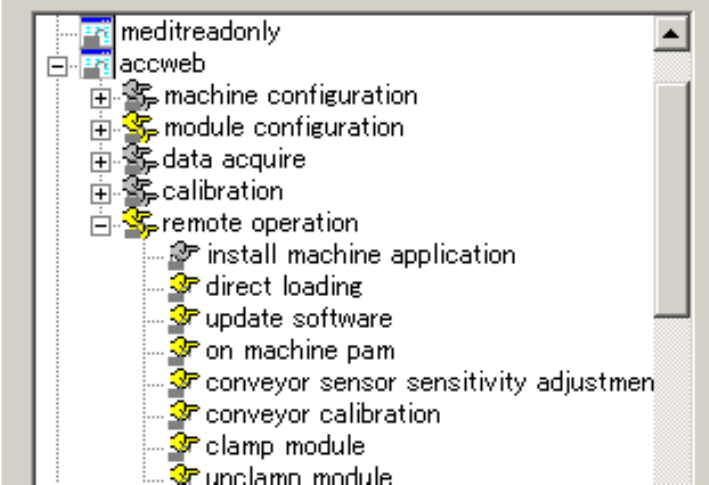
Ÿ Select [Programs]-[Fuji Flexa]-[Setup]-[Security Tool Editor] on the computer
installed with Fuji Flexa to start Security Tool Editor.
Ÿ Use Security Tool Editor to specify access authority for the [Remote operation] -
[Forced error removal] command. Refer to the Fuji Flexa User Manual for details.
Ÿ Turn on the user confirmation function in Accessory Software and perform access
management. Refer to the Fuji Accessory Software Operation Manual for details
on the method for specifying the setting.
Hybrid Calibration Offset Measurement and Correction Operation Manual NXT V8.95
FUJI CORPORATION 17/18
9.2. Clearing nozzle changeover errors from Accessory Software
Accessory Software remote operation
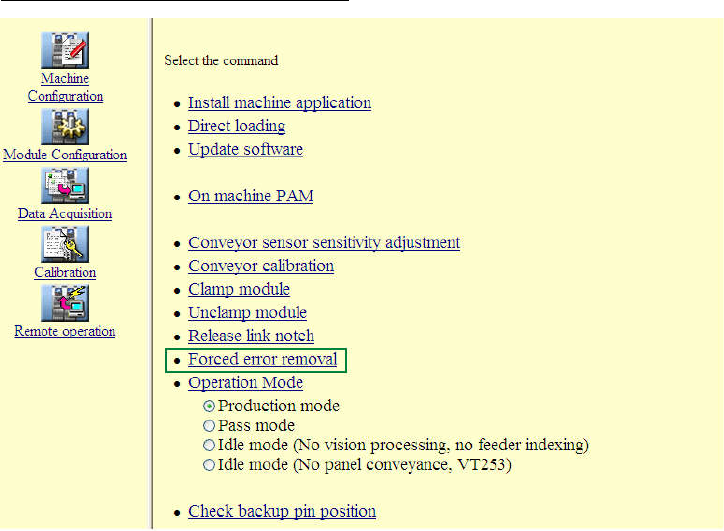
Ÿ Select the appropriate module and then click [Remote operation] on the menu.
Ÿ Select the [Forced error removal] command.
Ÿ Click [Start] to clear the nozzle changeover error.
Hybrid Calibration Offset Measurement and Correction Operation Manual NXT V8.95
FUJI CORPORATION 18/18
10. Reducing the time for hybrid calibration
10.1. Specifications and important points
Ÿ Supported heads: H04S, H08M, H12HS, V12, DX, H24
Ÿ Supported version: V8.60 or later
10.2. How to specify settings
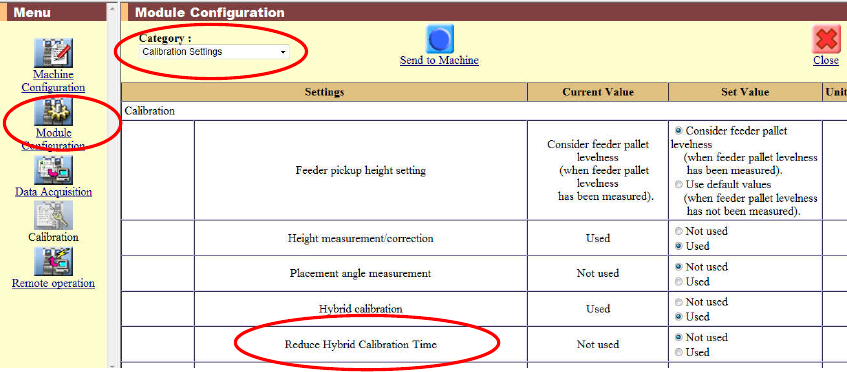
To reduce the time required for hybrid calibration, specify the module and then specify
"Used" for [Reduce hybrid calibration time] in the [Calibration Settings] category in the
module configuration.
The default setting is [Not used].