3OM-1064-001.pdf - 第176页
0103-001 2-114-2 Tg0248-PM-ER Error Code Display A Display B 3. T rouble Shooting after Error Display (Reset Procedure in the case of Cause 1) Reset Procedure (1) Follow the steps below to reset the machine to the normal…
0103-001 2-114-1 Tg0248-PM-ER
Error Code Display A Display B
3. Trouble Shooting after Error Display
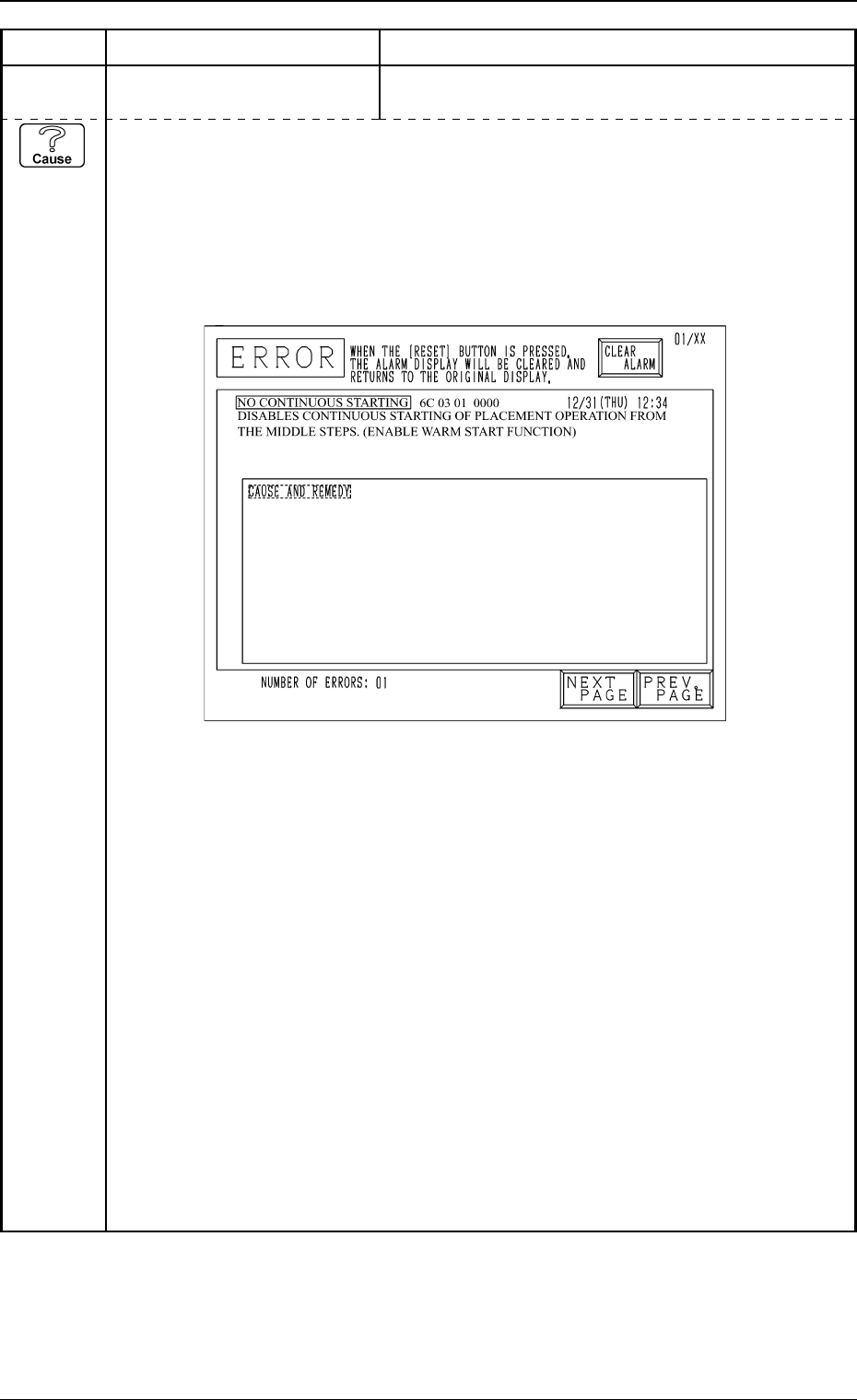
6C 03 01 NO CONTINUOUS STARTING
DISABLES CONTINUOUS STARTING OF PLACEMENT OPERATION
FROM THE MIDDLE STEPS.(ENABLE WARM START FUNCTION)
(Cause 1) Self-Diagnostics Error Message
When the normal procedure is followed to re-start the machine, the P.C.B. in the middle
of process is discharged to the output machine, producing a defective P.C.B. Follow the
remedial procedure (described later) to set the machine to the normal condition and re-
start the machine.
Example of “ERROR” Display (NO CONTINUOUS STARTING)
(NEXT PAGE)
0103-001 2-114-2 Tg0248-PM-ER
Error Code Display A Display B
3. Trouble Shooting after Error Display
(Reset Procedure in the case of Cause 1)
Reset Procedure
(1) Follow the steps below to reset the machine to the normal condition.
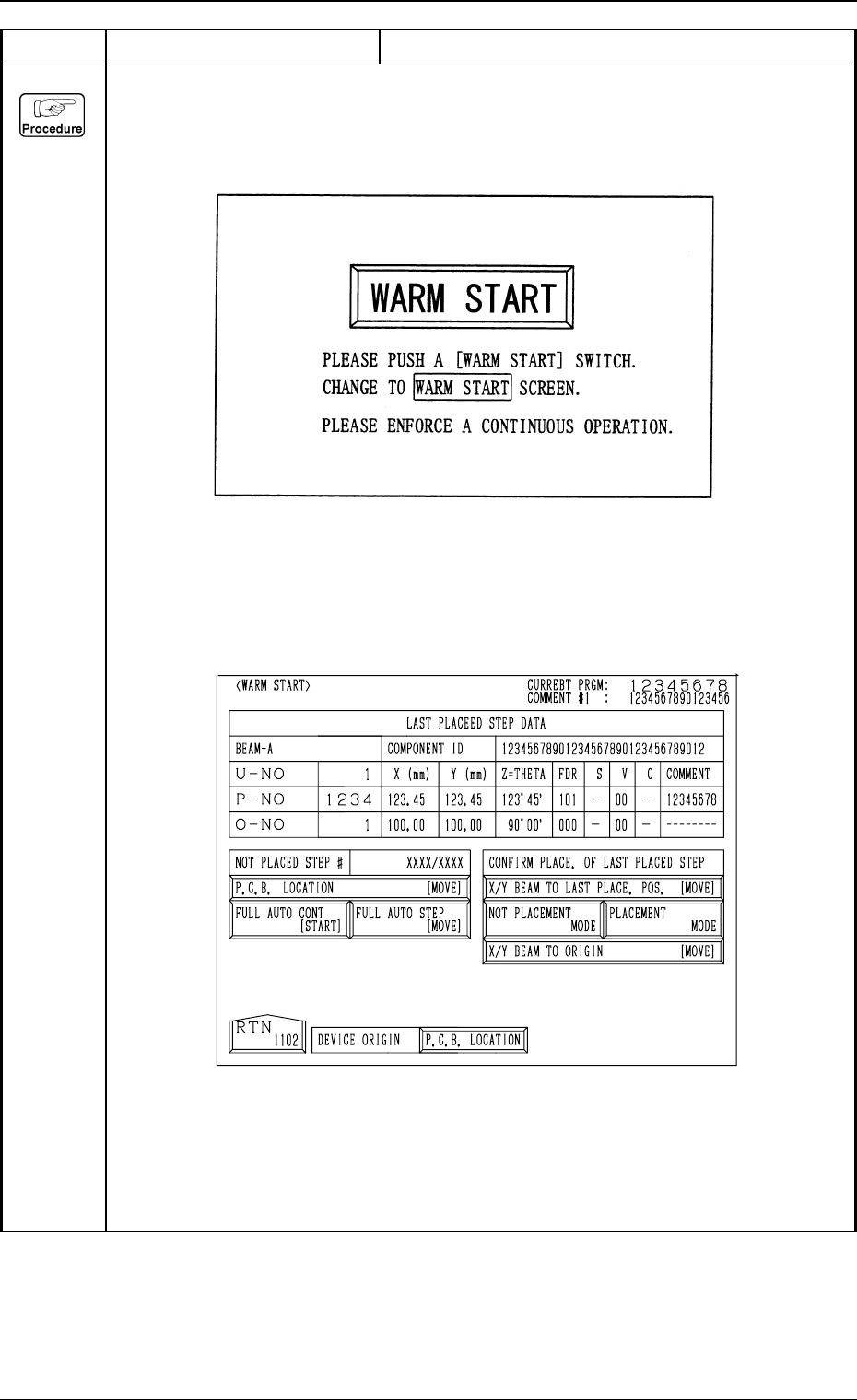
(2) When the [RESET] botton is pressed, the following display appears on the screen.
(3) Press the [WARM START] button.
The following “WARM START” display appears. After zeroing all the devices, perform the
warm start operation to complete the unfinished P.C.B.
Refer to “4.3 Warm Start of Section 3 in Volume 1” for details.
0103-003 2-115 Tg0248-PM-ER
Error Code Display A Display B
3. Trouble Shooting after Error Display
(Cause 1) This is the device's self-diagnostic message.
(Reset Procedure in the case of Cause 1)
Reset Procedure
(1) Press the [CLEAR ALARM] key and the buzzer stops sounding.
(2) Press [SYS CLR] button.
(3) Press the [ZERO] button to return all the axes to their original positions.
(4) Re-start.
(5) If the device can't be re-started, contact our service personnel.
6C 04 01 INTERNAL DATA ERROR INTERNAL DATA UNUSUALLY OCCURRED.
6C 04 02 INTERNAL DATA ERROR THERE WAS A FAILURE INCLUDING READING OF
TEXT DATA.
(Cause 1) There is a possibility that text data are not installed or damaged.
(Reset Procedure in the case of Cause 1)
Reset Procedure
(1) Press the [CLEAR ALARM] key and the buzzer stops sounding.
(2) Re-install CPU1 program.
(3) Press the [ZERO] button to return all the axes to their original positions.
(4) Re-start.
(5) If the device can't be re-started, contact our service personnel.
6C 03 02 NO CONTINUOS STARTING
DISABLES CONTINUOUS STARTING OF PLACEMENT OPERATION
FROM THE MIDDLE STEPS.(ENABLE SEMI-AUTOMATIC OPERATION)
(Cause 1) This is the device's self-diagnostic message.
(Reset Procedure in the case of Cause 1)
Reset Procedure
(1) Check other error message with the message.
(2) Press the [SYS CLR] button after the cause of an error is removed.
(3) Re-start the placement operation from the middle step by Semi-Automatic Operation.