3OM-1064-001.pdf - 第269页
0103-001 4-54-2 Tg0248-PM-ER 5. Component Recognition Error Code and List of Error Messages Error Code Display A Display B 20672081 COMPONENT DETECTION ERROR CONTRAST BETWEEN COMPONENT AND BACK- GROUND IS TOO LOW . 20672…
0103-001 4-54-1 Tg0248-PM-ER
5. Component Recognition Error Code and List of Error Messages
Error Code Display A Display B
20672043 COMPONENT DETECTION
ERROR
WIDTH OF LEAD EXCEEDS THE TOLERANCE.
This error occurs when "MANUAL" is set in the "RECOG DATA SET" data box, "ENBL
(AUTO)" or "ENBL (MNL)" in the "LEAD WIDTH DETN" data box, and the lead width exceeds
its tolerance.
When "ENBL (AUTO)" is set in the "LEAD WIDTH DETN" data box, the tolerance is automati-
cally set.
(Cause 1) The lead width is not suitable.
(Cause 2) The lead ends are not shining uniformly.
(Reset Procedure in the case of Cause 1)
Reset Procedure
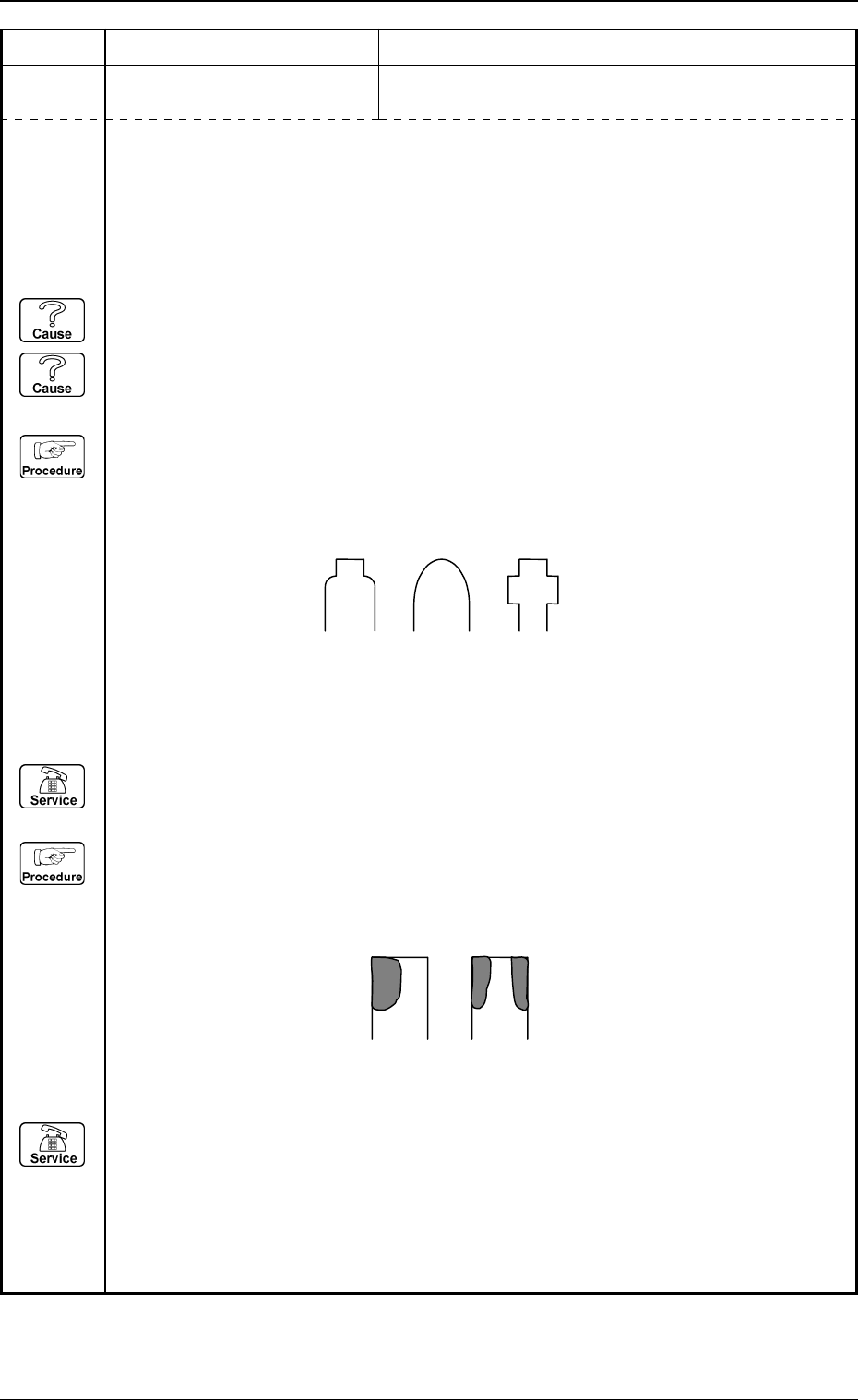
(1) This error occurs easily when the shape of the lead at the end looks as illustrated below.
When the shape of the lead looks as one of the followings, set "DISABLE" in the "LEAD
WIDTH DETN" data box.
(2) Press the [ZERO] button to return all the axes to their original positions.
(3) Re-start.
(4) If the device can’t be re-started, contact our service personnel.
(Reset Procedure in the case of Cause 2)
Reset Procedure
(1) This error may occur when the lead ends do not shine uniformly or are partly cracked as
shown below in the case of "Front Lighting". In this case, set "DISABLE" in the "LEAD
WIDTH DETN" data box or "MANUAL (FRONT LTG)" in the "LTG MODE" data box to
increase the brightness of the lighting and perform the recognition.
(2) Press the [ZERO] button to return all the axes to their original positions.
(3) Re-start.
(4) If the device can’t be re-started, contact our service personnel.
0103-001 4-54-2 Tg0248-PM-ER
5. Component Recognition Error Code and List of Error Messages
Error Code Display A Display B
20672081 COMPONENT DETECTION
ERROR
CONTRAST BETWEEN COMPONENT AND BACK-
GROUND IS TOO LOW.
20672082 COMPONENT DETECTION
ERROR
THE OUTLINE CANNOT BE DETECTED AD-
EQUATELY.
20672083 COMPONENT DETECTION
ERROR
EDGE OF ELECTRICAL CONTACT NOT FOUND.
(Cause 1) The lighting is not ON.
(Cause 2) The camera shutter speed is not suitable.
(In normal cases, the speed should be "5.0 to 11.0 ms".)
(Cause 3) The gain and level of the camera are not suitable.
(In normal cases, the gain should be "160 to 190" and the level "0 to 10".)
(Reset Procedure in the case of Causes 1, 2 and 3)
Reset Procedure
(1) Press the [ZERO] button to return all the axes to their original positions.
(2) Re-start.
(3) If the device can’t be re-started, contact our service personnel.
(Cause 1) The lighting is not ON.
(Reset Procedure in the case of Cause 1)
Reset Procedure
(1) Press the [ZERO] button to return all the axes to their original positions.
(2) Re-start.
(3) If the device can’t be re-started, contact our service personnel.
(Cause 1) No component is picked up.
(Cause 2) An improper parameter is set in the "X" or "Y" data box of the label "MOLD SIZE".
(Cause 3) The lighting is not ON.
(Reset Procedure in the case of Causes 1, 2 and 3)
Reset Procedure
(1) Press the [ZERO] button to return all the axes to their original positions.
(2) Re-start.
(3) If the device can’t be re-started, contact our service personnel.
0103-001 4-54-3 Tg0248-PM-ER
5. Component Recognition Error Code and List of Error Messages
Error Code Display A Display B
20672085 COMPONENT DETECTION
ERROR
COMPONENT OUTWARD LENGTH Y WAS OUT OF
TOLERANCE.
20672084 COMPONENT DETECTION
ERROR
COMPONENT OUTWARD LENGTH X WAS OUT OF
TOLERANCE.
20672090 COMPONENT DETECTION
ERROR
RECOGNTION ABORTED BECAUSE OF IMPROPER
COMPONENT HANDLING.
20672086 COMPONENT DETECTION
ERROR
COMPONENT OUTLINE NOT FOUND.
(Cause 1) An improper parameter is set in the "X" or "Y" data box of the label "MOLD SIZE".
(Cause 2) Too small parameters are set in the "X" and "Y" data boxes of the label "MOLD SIZE
TOLERANCE".
The parameters set in the "X" and "Y" data boxes of the "MOLD SIZE TOLERANCE"
become valid when "MANUAL" is set in the "RECOG DATA SET" and "MOLD SIZE
TOLERANCE SET" data boxes.
(Reset Procedure in the case of Causes 1 and 2)
Reset Procedure
(1) Press the [ZERO] button to return all the axes to their original positions.
(2) Re-start.
(3) If the device can’t be re-started, contact our service personnel.
(Cause 1) The lighting is not ON.
(Reset Procedure in the case of Cause 1)
Reset Procedure
(1) Press the [ZERO] button to return all the axes to their original positions.
(2) Re-start.
(3) If the device can’t be re-started, contact our service personnel.
(Cause 1) This is the device’s self-diagnostic message.
(Reset Procedure in the case of Cause 1)
Reset Procedure
(1) Press the [ZERO] button to return all the axes to their original positions.
(2) Re-start.
(3) If the device can’t be re-started, contact our service personnel.