00193687-04.pdf - 第26页
3 In stal la tio n des S IPLAC E Expl ore r Inst all atio ns - und Konfi gu rat ions anle itun g SI PLA CE Exp lor er 3. 1 E rst inst allat ion v on S IPL ACE Exp lorer 2.0 SP 1 Au sga be 12 /2 005 DE 26 3. 1. 1. 3 Lin e…
Installations- und Konfigurationsanleitung SIPLACE Explorer 3 Installation des SIPLACE Explorer
Ausgabe 12/2005 DE 3.1 Erstinstallation von SIPLACE Explorer 2.0 SP1
25
Hardware-Voraussetzungen:
– Rechner mit 2.4 GHZ CPU-Takt
– 2 GB Hauptspeicher
– 30 GB freie Festplattenkapazität
3
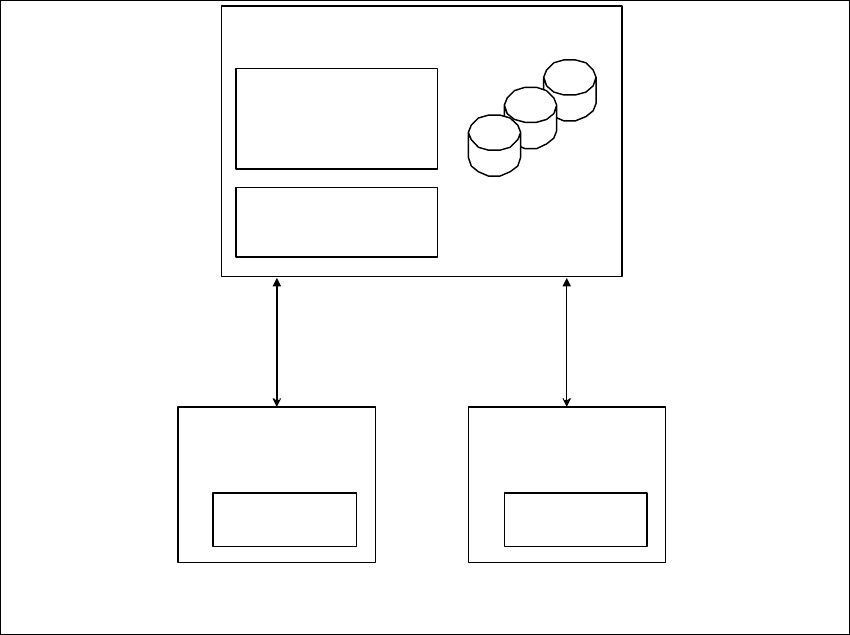
Abb. 3 - 1 Installations-Variante: Server
5 Applikationen m it bis
zu 20 Maschinen
SIPLACE
Explorer Host
- RTE
- Java 2 JRE
SIPLACE
Explorer Host
- RTE
- Java 2 JRE
Zentraler Datenbank-/Web-Server
- MS SQL
- Tomcat
- Werks-Konfiguration
- Java 2 JRE
Berichts-Generierung:
- MSXM
- Excel
alle Datenbanken, alle
Linien-Datenbanken

3 Installation des SIPLACE Explorer Installations- und Konfigurationsanleitung SIPLACE Explorer
3.1 Erstinstallation von SIPLACE Explorer 2.0 SP1 Ausgabe 12/2005 DE
26
3.1.1.3 Line
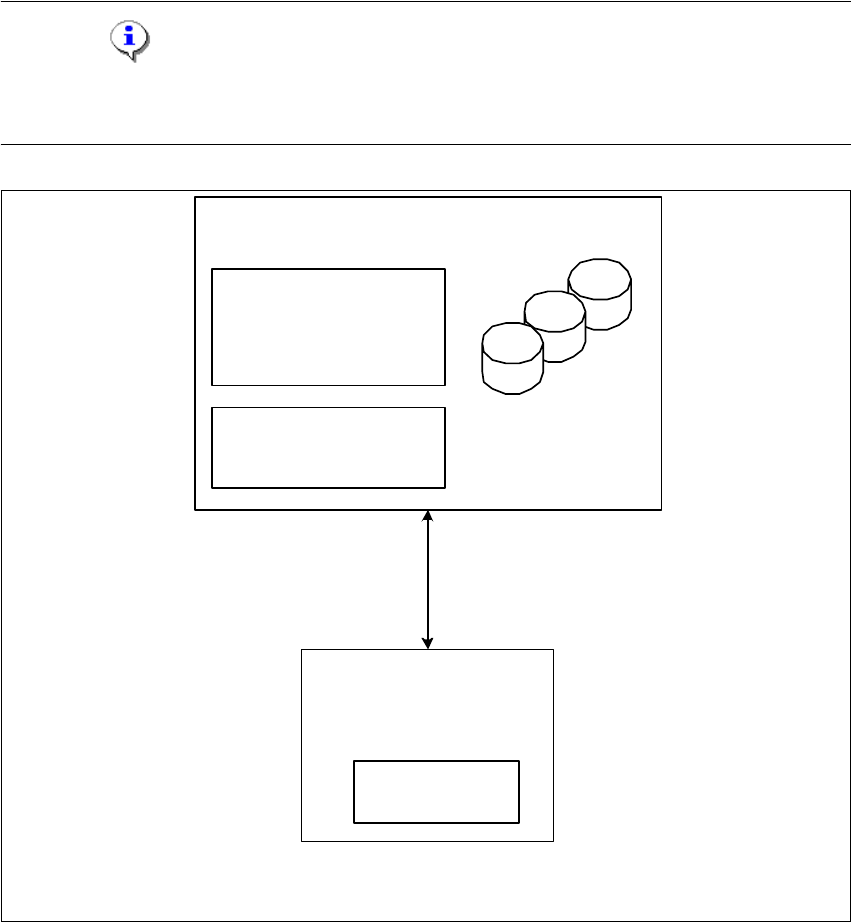
Bei dieser Installations-Variante kann ein vorhandener SIPLACE Line Server als SIPLACE
Explorer Host verwendet werden. Zusätzlich muss ein separater Computer als zentraler
Datenbank-/Web-Server vorhanden sein.
3
Software-Voraussetzungen SIPLACE Line-Server:
– Systemumgebung, eine der nachfolgenden Versionen:
– Windows 2000 Workstation mit SP3 oder SP4
– Windows XP Professional mit SP2
– MS SQL-Server (nicht MSDE), auf dem Computer, der als zentraler Datenbank-Server
eingesetzt wird.
– Explorer-Installation:
– Runtime Environment
– Java 2 JRE
Hardware-Voraussetzungen SIPLACE Line-Server:
– alle Voraussetzungen des schon vorhandenen SIPLACE Line-Servers
– Rechner mit 2.4 GHZ CPU-Takt
– 2 GB Hauptspeicher
– 10 GB freie Festplattenkapazität
3
Software-Voraussetzungen Zentraler Datenbank-/Web-Server:
– Systemumgebung, eine der nachfolgenden Versionen:
– Windows 2000 Server mit SP4
– Windows 2003 Server mit SP1
– MS SQL-Server (nicht MSDE), auf dem Computer, der als zentraler Datenbank-Server
eingesetzt wird.
– Explorer-Installation:
– Tomcat Webserver
–JAVA 2 JRE
– Werks-Konfiguration
Installations- und Konfigurationsanleitung SIPLACE Explorer 3 Installation des SIPLACE Explorer
Ausgabe 12/2005 DE 3.1 Erstinstallation von SIPLACE Explorer 2.0 SP1
27
Hardware-Voraussetzungen Zentraler Datenbank-/Web-Server:
– alle Voraussetzungen des schon vorhandenen SIPLACE Line-Servers
– Rechner mit 2.4 GHZ CPU-Takt
– 2 GB Hauptspeicher
– 30 GB freie Festplattenkapazität
HINWEIS
Achten Sie darauf, dass Sie bei dieser Installations-Variante den SIPLACE Explorer Host nur für
eine Applikation verwenden können. 3
3
Abb. 3 - 2 Installations-Variante: Line
nur für 1 Applikation pro
Linie
SIPLACE Line Server
(sc hon v orhanden)
- RTE pro Linie
- Java 2 JRE
Zentraler Datenbank-/Web-Server
- MS SQL
- Tomcat
- Werks-Konfiguration
- Ja va 2 JRE
Berichts-Generierung:
- MSXM
- Excel
alle Datenbanken, alle
Linien-Datenbanken