YSi-X_Ope_E.pdf - 第43页
1-2 1 Part names and functions Alarm buzzer T his buzzer sounds if an error or abnormal operation occurs. (The buzzer v olume can be adjusted by turning the buzzer ring right or left.) Safety door T his door is locked du…
1-1
1
Part names and functions
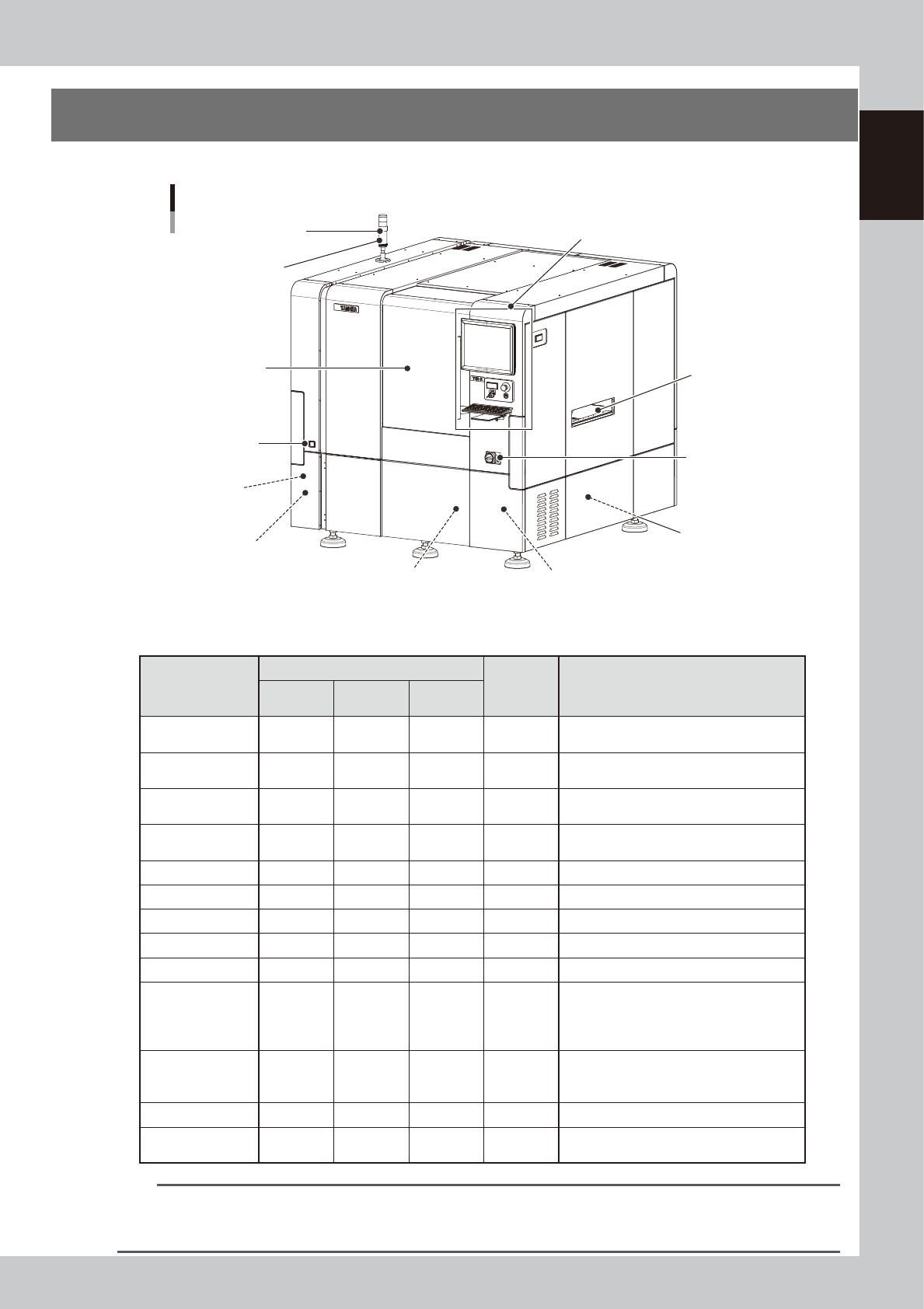
1. Machine main unit
This section describes names and functions of major parts of the YSi-X main unit.
Signal light
(signal tower)
Operation display and data input unit
Main switch
Pressure gauge
Board conveyor
entrance/exit
USB connector
(behind panel)
Air supply/shutoff switch
(behind panel)
Alarm buzzer
Safety door
Power connection terminals
(behind panel)
YSi-X main unit
UPS (behind panel)
UPS (Type HD/Type HB)
(behind lower rear of panel)
23101-M6-00
n
Signal light (signal tower)
Indicates current operating conditions of the machine with a signal light tower and a buzzer.
Operation status
Default lighting pattern
Buzzer Description
Top (red)
Middle
(yellow)
Bottom
(green)
Standby OFF OFF ON OFF
Waiting for board to be supplied from the
previous stage
Auto inspection OFF OFF ON OFF
Board has been loaded and is being
inspected
Waiting for
judgement
OFF ON OFF ON Waiting the final pass/fail decision input.
Other than AUTO OFF OFF OFF OFF
Machine is in a mode other than "auto
inspection"
Machine error OFF ON OFF ON A machine error has occurred.
Emergency stop ON OFF OFF OFF Machine is in emergency stop.
Returning to origin OFF OFF Flashing OFF Machine is returning to the origin.
Aging in progress OFF OFF ON OFF Machine warm-up is in progress.
CycleStop No control No control No control No control State after cycle stop
Manual Operation OFF Flashing OFF ON
The Unit screen is displayed.
The Warm-up screen is displayed but no
warm-up is performed.
Board is being exchanged.
Pause OFF OFF OFF OFF
Machine is in pause mode. (The [Pause]
button was pressed and the dialog box
displayed.)
Warning OFF ON OFF ON During machine warning
Waiting for External
Judgment
OFF ON OFF ON
Waiting for judgment from Remote
Judgment Station (option)
n
NOTE
To change the color or lighting pattern of the signal light or to set the buzzer, press the [Machine] button, select
“Machine Information” – “Signal Tower Edit”, and make the changes or settings on the Signal Tower Edit screen that
appears. If set to “No control”, the current status is maintained regardless of the operating status of other units.
1-2
1
Part names and functions
Alarm buzzer
This buzzer sounds if an error or abnormal operation occurs. (The buzzer volume can be adjusted by turning the buzzer
ring right or left.)
Safety door
This door is locked during board inspection and cannot be opened. Press the emergency stop button to open this door
during operation. Always use the handle when opening or closing this door.
Board conveyor entrance/exit
Board loading/unloading openings that are connected to the upstream and downstream conveyors.
Pressure gauge
Setting air pressure : 0.40 MPa
Shows green for normal condition and turns red when a pressure drop is detected.
Main switch
Turns on or off the power to the machine. The power is on when turned to the right.
c
CAUTION
Wait about 10 seconds before turning the main power switch back on after turning it off.
n
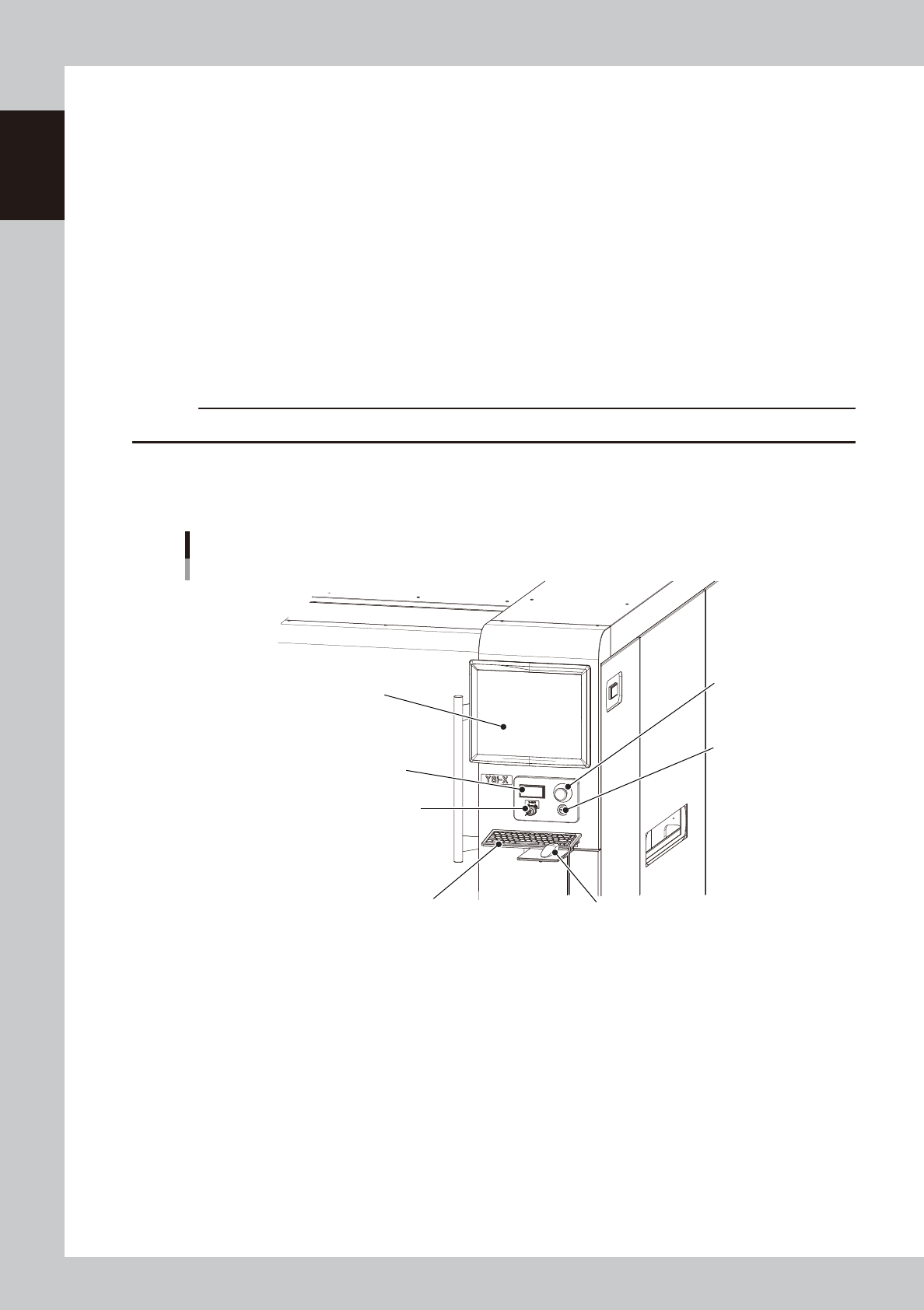
Operation display and data input unit
Standard machines are equipped with a keyboard and a mouse for machine operation and data input.
Keyboard
Mouse
Liquid crystal display
YSi-X main unit
Operation and data input section
X-ray safety switch
X-ray safety switch
READY button
Emergency
stop button
23102-M6-00
Emergency stop button
Pressing this button triggers emergency stop and turns off the servo power. To release the emergency stop button, turn it
to the right.
[READY] button
When emergency stop is canceled, pressing this [READY] button turns on the servo power and the button lights up.
X-RAY indicator
Lights up when the machine servo is ON.
X-RAY safety key
Set this key to “ENABLE” when using X-ray inspection.
1-3
1
Part names and functions
n
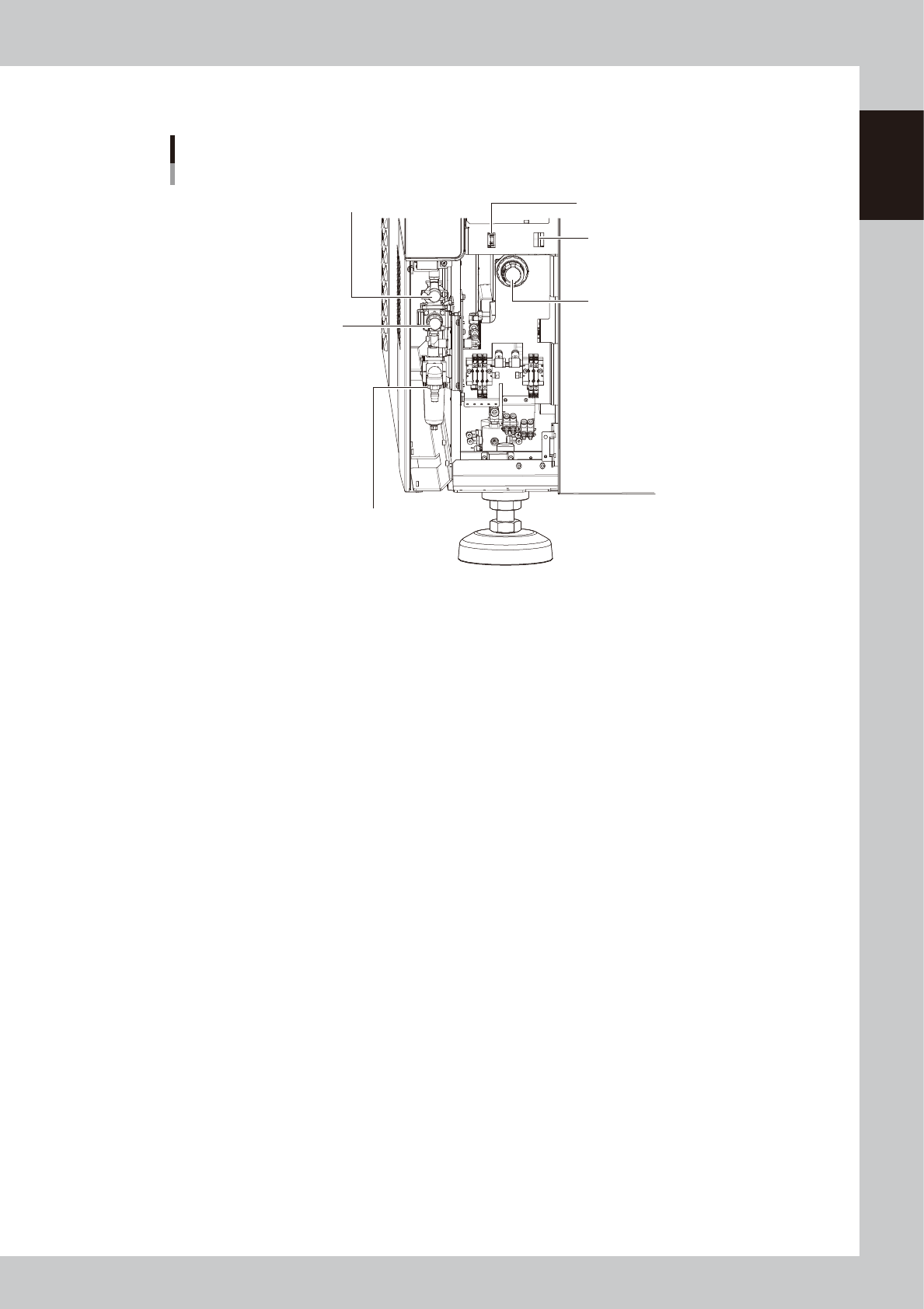
Behind panel (lower left front)
LAN connector
Pressure regulator for shutter
Main pressure regulator
USB port
Air supply/shutoff switch
Source air connector
YSi-X main unit
Behind lower left front panel
23103-M6-00
Air supply/shutoff switch
Turning this switch to the right shuts off air supply and exhausts air that remains in the air path of the main unit.
Main pressure regulator
Adjusts the air pressure supplied to this machine. Turn the knob to adjust the air pressure so that the black needle on the
pressure gauge reads 0.4MPa.
Pressure regulator for shutter
Adjusts the air pressure to drive the shutter. Turn the knob to adjust the air pressure to 0.25MPa.
Source air connector
Prepare an air hose with an inner diameter of at least 8mm having a 30SH socket (Nitto Koki, or equivalent), and connect
it to this connector. Use dry, clean air passed through an air filter.
USB port
Use this USB port when making a backup of data.
LAN connector
This can be used for Ethernet connection.