YSi-X_Ope_E.pdf - 第70页
4-9 4 Maintenance 3.4 Removing the rear center panel T o open and close the rear safety door , the rear center panel should first be removed from the inspection machine. T he following describes the procedure for removin…
4-8
4
Maintenance
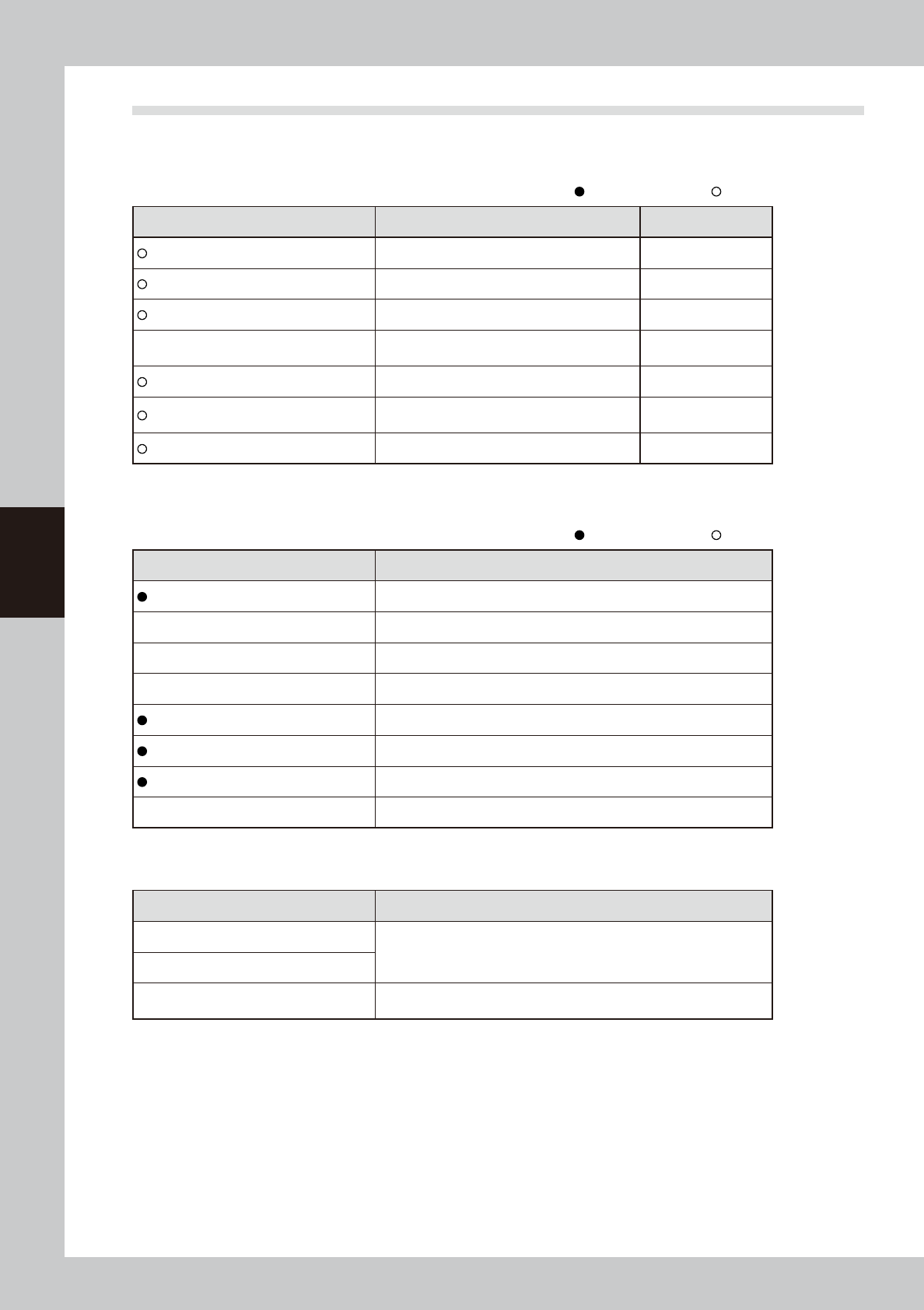
3.3 Required tools
Prepare the following tools and items necessary for maintenance.
n
Tool list
: Supplied with machine, : Options
Name Description Remarks
Phillips screwdriver Large, small D-2
Slotted (flat-blade) screwdriver Large, small
Hex wrench set 1 set HEX, WRENCH SET
Tweezers
Used to remove foreign objects or debris falling
on ball screw or guide.
Grease gun Used to supply grease
Vacuum ASSY
Used to clean belt groove and sensor detection
surface.
Air blow too Used for cleaning
n
Other tool list
: Supplied with machine, : Options
Name Description
Grease (lithium-based grease: NSL) Used to lubricate each axis.
Cleaning cloth Used to clean filter cup.
Cleaning wipe Use lint-free cleaning wipe (for clean room).
Square bandage Used to prevent parts from being lost or contaminated. (2 sheets)
Cotton swab stick Used to clean camera lens, half mirror and lighting unit.
Lens cleaner Used to clean camera lens and lighting unit.
Lens blower brush Used to clean camera lens and lighting unit.
Fine brush (tool brush, etc.) Used to clean the belt groove, etc.
n
Safety goggles and mask
Name Description
Dust-proof goggles
Always wear these goggles and mask when applying grease or when
using an air blow gun
Dust-proof mask
Protective gloves
Always wear protective gloves when applying grease or when removing
optical camera cover.
4-9
4
Maintenance
3.4 Removing the rear center panel
To open and close the rear safety door, the rear center panel should first be removed from the inspection
machine. The following describes the procedure for removing the rear center panel.
n
Required tool
• Phillips screwdriver
e
1
Press the emergency stop button to place the machine in emergency stop.
2
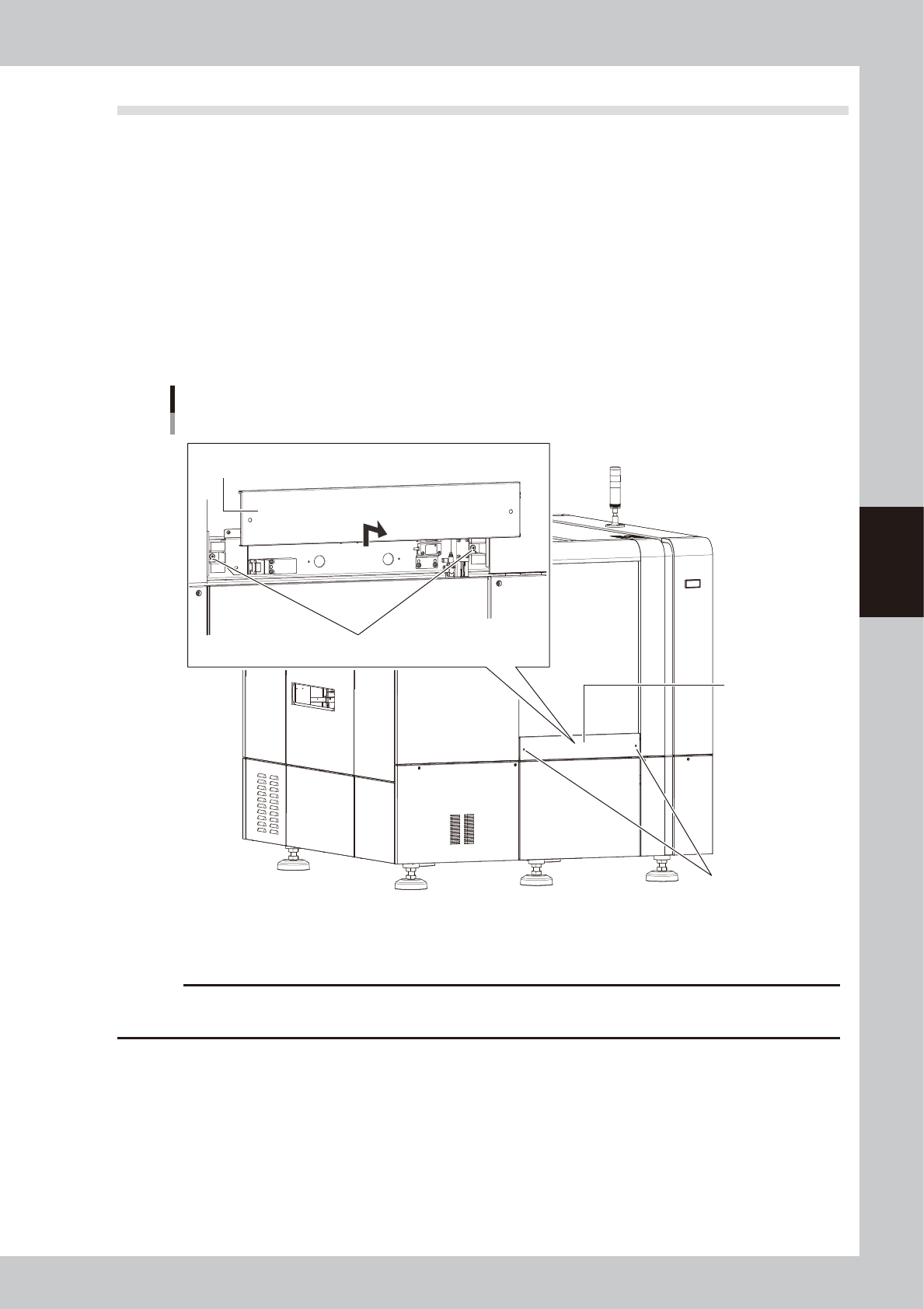
Remove the rear center panel from the machine.
1. Use the Phillips screwdriver to loosen the screws (2 screws) securing the panel.
2. Lift the panel straight upward and then pull it out toward you.
Removing the rear center panel
Rear center panel
Screws securing the panel
Remove the panel by lifting it upward.
Screws securing the panel
53403-M6-10
To reattach the rear center panel, reverse the procedure in step 2.
c
CAUTION
When the maintenance is complete, be sure to reattach the rear center panel. The machine does not operate if the
rear center panel is left removed.
4-10
4
Maintenance
4. Weekly inspection
n
NOTE
Before beginning work, remove the rear center panel by referring to section 3.4 “Removing the rear center panel” in
this chapter so that you can open and close the rear safety door. After finishing the work, reattach the rear center
panel.
4.1 Cleaning the camera lighting unit
Dirt or dust particles sticking to the lighting unit of the optical camera can cause recognition errors during
inspection. Weekly inspection and cleaning are recommended to prevent this problem.
c
CAUTION
Do not apply strong force or shock to the camera unit and lighting unit during cleaning. Optical axis adjustment might
become unreliable.
n
Required tools
• Phillips screwdriver
• Lent-free cleaning wipe
• Optical lens brush
c
CAUTION
The inner side of the camera cover uses lead to shield X-rays. Wear gloves for protection from lead when handling the
camera cover.
e
1
Press the emergency stop button.
The machine must be in emergency stop to
ensure safety during work.
c
CAUTION
To ensure safety, make sure that the machine power
switch is off or the emergency stop button is pressed
before starting work.
2
Open the safety door on the rear of
the machine.
3
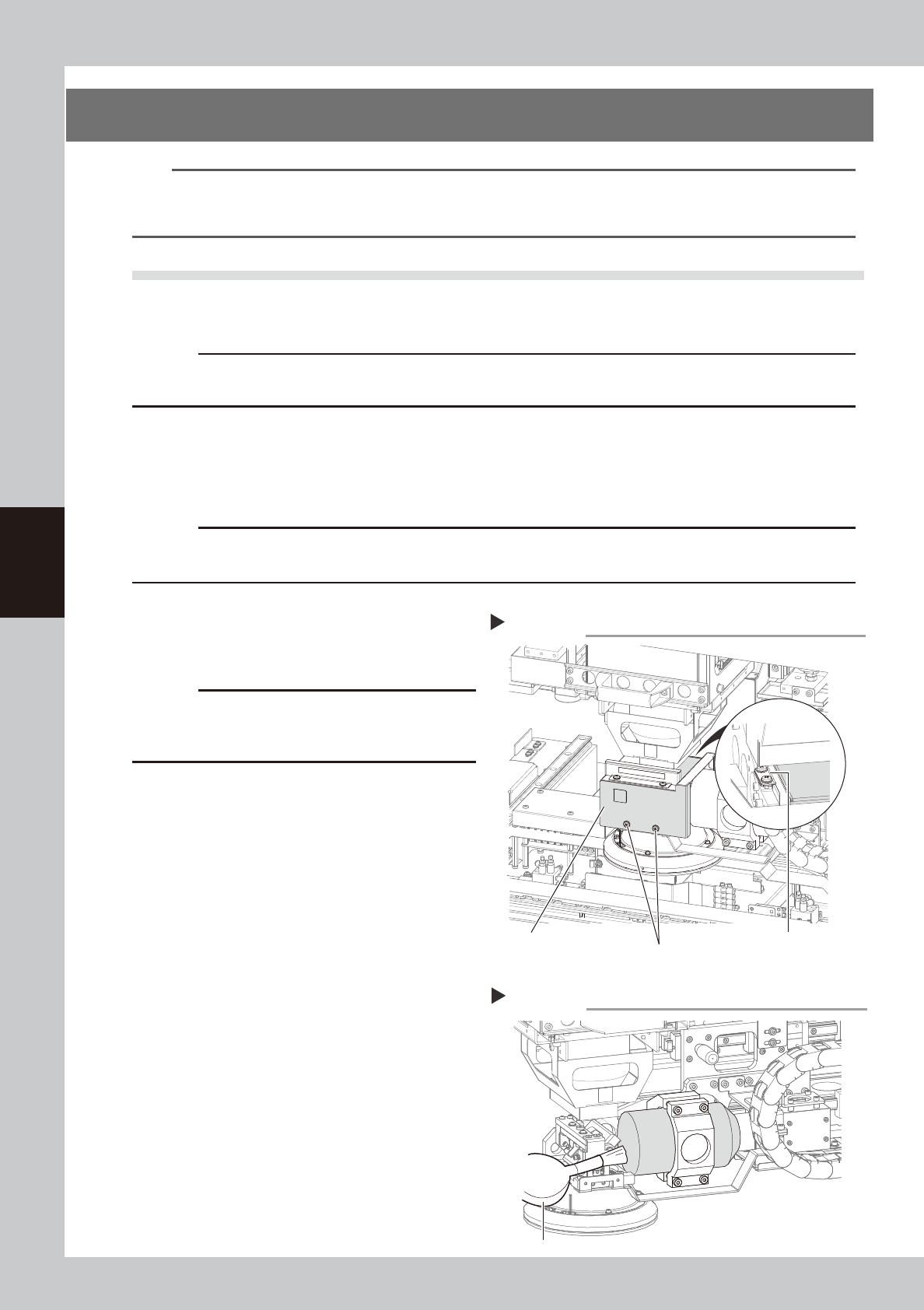
Remove the optical camera cover.
1. Wear gloves for protection from lead and
then use the Phillips screwdriver to
remove the screws securing the camera
cover.
2. Remove the camera cover while being
careful not to drop it and place it on a
flat surface
53404-M6-00
4
Clean the lens surface and mirror
surface.
Use the lens brush to clean dust off the lens
and mirror.
If dust still persists, use lens cleaner to clean
the lens and mirror.
53405-M6-00
5
Reattach the optical camera cover.
To reattach the cover to the optical camera,
reverse the procedure used to remove the
cover.
Removing the optical camera cover
Step 3
Screws securing the cover
(2 screws on outer side)
Screws securing the cover
(2 screws on inner side)
Optical camera cover
Cleaning the lens
Step 4
Optical lens brush