YSi-X_Ope_E.pdf - 第87页
4-26 4 Maintenance 5.5 X-ray generator 5.5.1 Inspecting the X-ray generator T he YSi-X uses an X-ra y generator whic h has a limited service life. Use the self-test function to make periodic chec ks for the service life.…
4-25
4
Maintenance
n
How to adjust the belt tension
When the belt tension needs to be adjusted, follow the procedure below. Adjust the front and rear conveyor belts to the
same tension.
e
1
Press the emergency stop button.
2
Open the front safety door of the
machine.
3
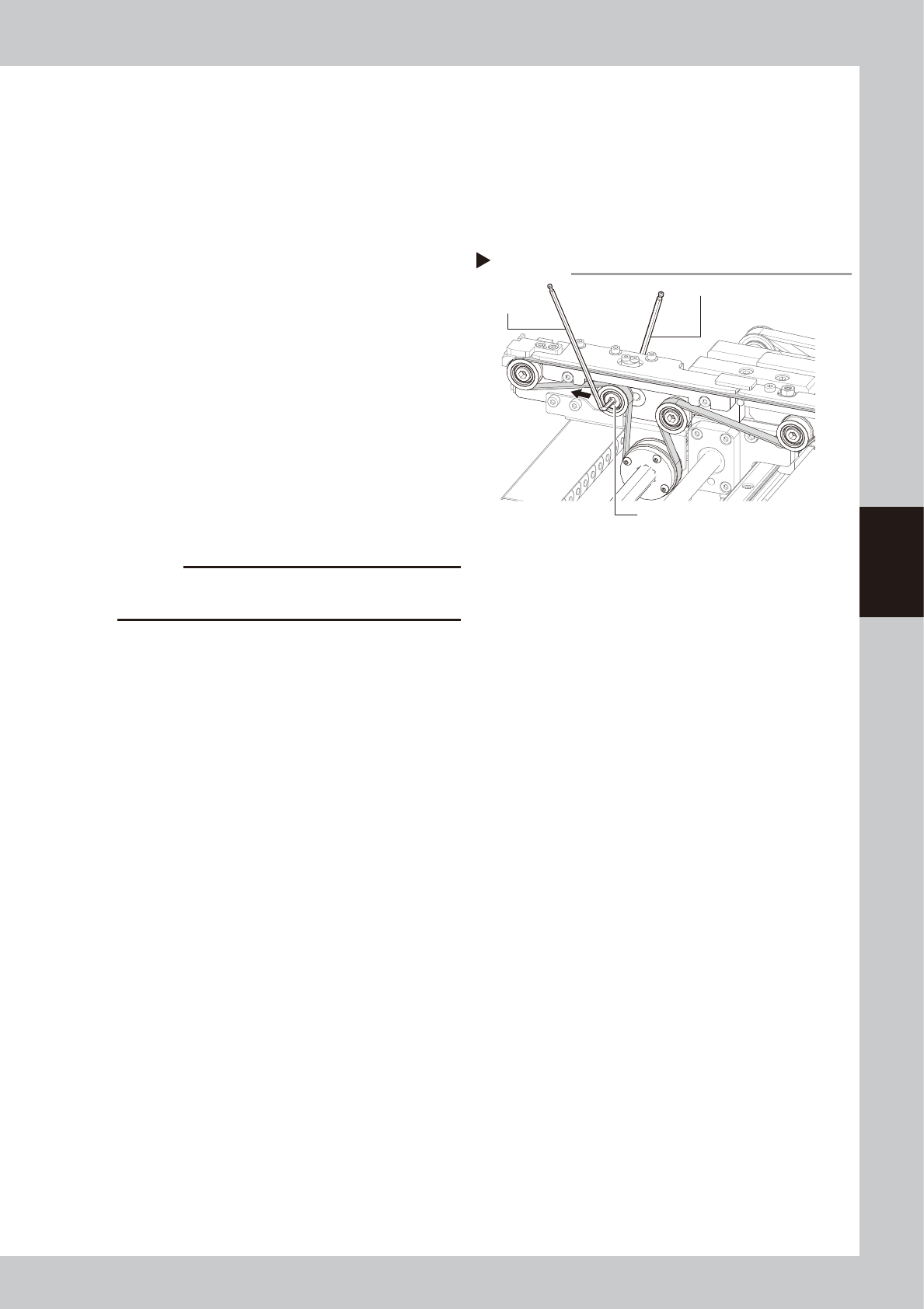
Loosen the tension pulley.
Use the hex wrenches (4 and 5) as shown in
the figure on the right to loosen the tension
pulley.
53440-M6-00
4
Adjust the belt tension.
To increase the belt tension, slide the tension
pulley in the inward direction of the
machine. To decrease the belt tension, slide
the tension pulley to the outward direction
of the machine.
5
Tighten the tension pulley.
Use the hex wrenches (4 and 5) to tighten
the tension pulley.
c
CAUTION
The tightening torque for the tension pulley must be set
to 5.5N•m.
6
Check the belt rotating condition.
1. Turn the hexagonal spline shaft by hand
to rotate the belt and check if the belt
rotates smoothly with no slack.
If there is a large slack in the belt, adjust
the tension pulley position.
2. Close the front safety door of the
machine, release the emergency stop
button, and press the [READY] button.
3. On the [Unit]-[Conveyor] tab, press the [L.
Conv.] or [R. Conv.] button to rotate the
belt.
e
4. Press the emergency stop button, open
the front safety door of the machine,
and check the belt condition. If there is
no problem, the adjustment is complete.
Loosen the belt tension
Step 3
Hex wrench (6)
Tension pulley
Hex wrench (4)
4-26
4
Maintenance
5.5 X-ray generator
5.5.1 Inspecting the X-ray generator
The YSi-X uses an X-ray generator which has a limited service life. Use the self-test function to make periodic
checks for the service life.
1
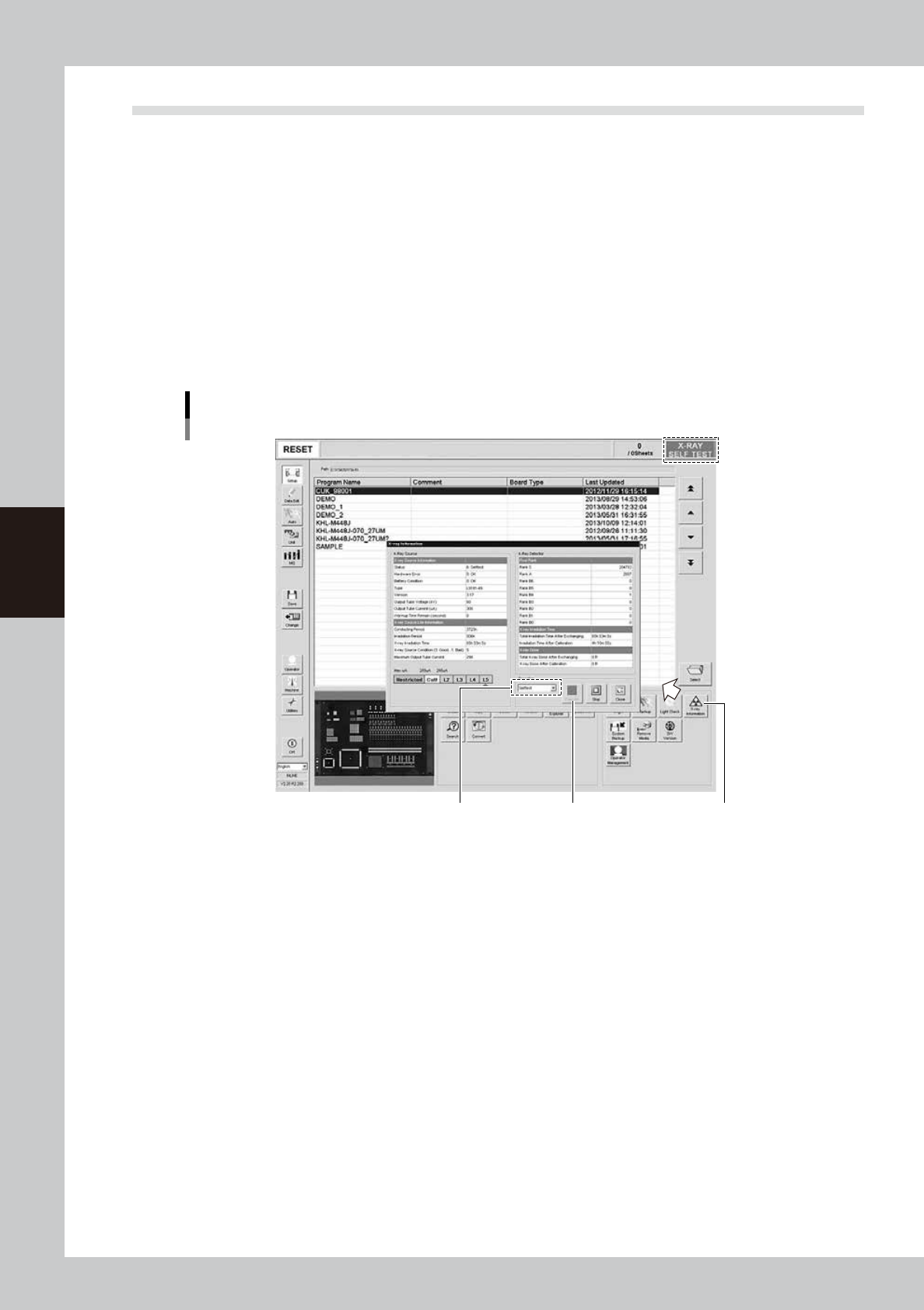
On the Unit screen, press the [X-ray Information] button in the “Utility” group box.
The “X-ray Information” screen appears.
2
Perform self-test.
From the drop-down list in the “Operation" group box, select “Self-test” and press the [Execute] button.
The service life level will be calculated based on the total power-on time and irradiation time. Wait for a
while (about 90 seconds) until the calculation is complete.
During self-test, the message “X-RAY SELF TEST” appears at the right end of the status area.
”X-ray Information” screen
[X-ray Information] button
[Execute] buttonSelect “Self-test”
54404-M6-10
4-27
4
Maintenance
3
Check the self-test results.
When self-test is complete, the message “X-RAY READY” reappears at the right end of the status area.
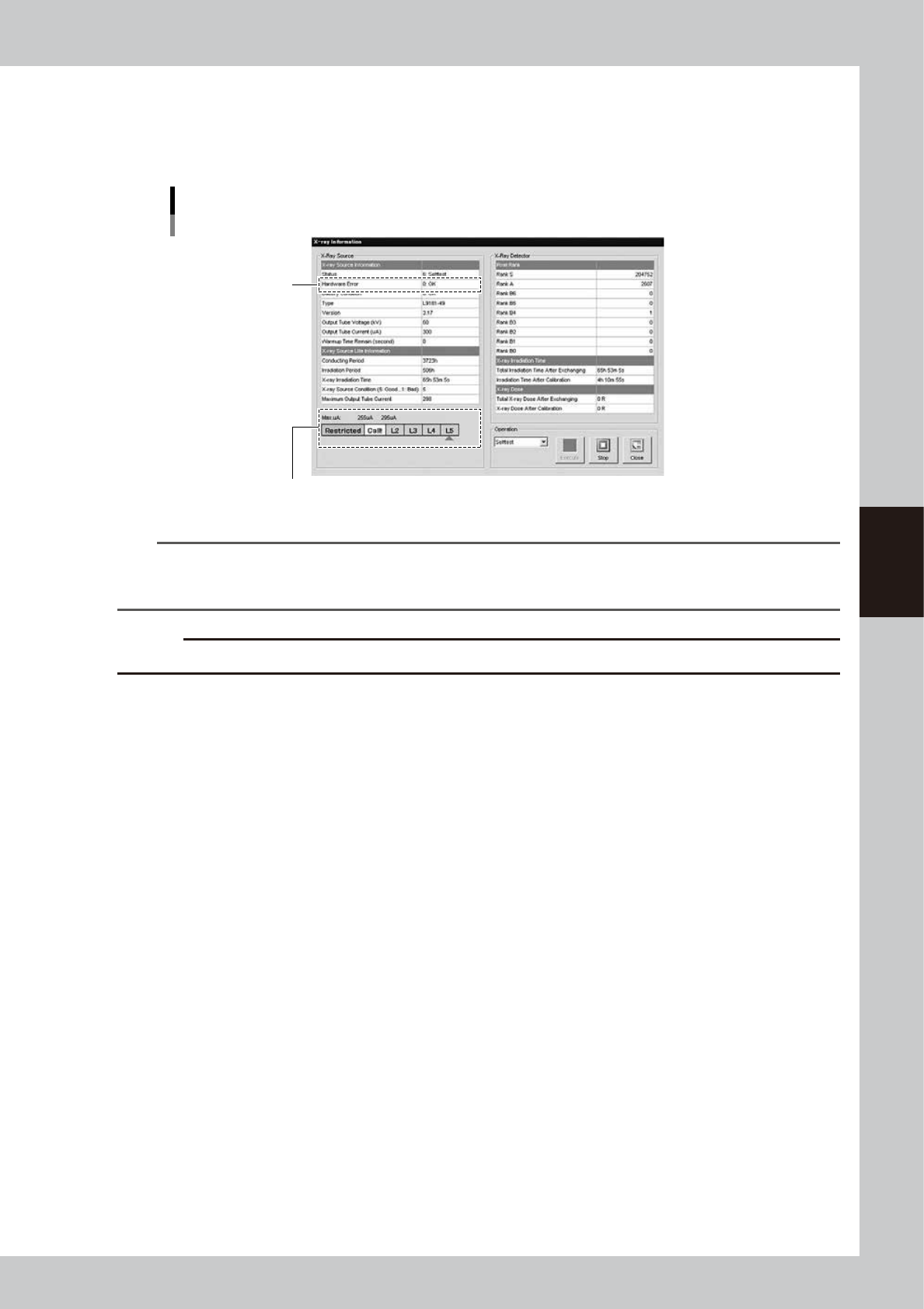
Check the “Max uA” level shown on the “X-ray Information” screen. If the level is “L3” or higher, there is
no problem with the X-ray generator.
Self-test results
Check the “Max uA” level
Hardware error
54405-M6-00
n
NOTE
If the “Max uA” level indicates “L2”, a message appears stating that the X-ray source is approaching the replacement
level and asking you to contact the manufacturer. In this case, contact us. We will replace the X-ray source and also
the X-ray detector. If the “Max uA” level indicates “Call!”, this may adversely affect the inspection results.
c
CAUTION
If an error number is displayed in the “Hardware Error” field, please contact us with the error number.
4
Press the [Close] button to finish the measurement.
The “X-ray Information” screen closes and returns to the Setup screen.