YSi-X_Ope_E.pdf - 第98页
4-37 4 Maintenance 7.1.4 Cleaning and greasing the HS-axis guide n Required tools • Lent-free cleaning wipe • Grease gun • Specified grease (NSL) c CAUTION W ear protective glasses and gloves when handling grease. e 1 Pr…
4-36
4
Maintenance
7.1.3 Cleaning and greasing the HS-axis ball screws
n
Required tools
• Phillips screwdriver
• Lent-free cleaning wipe
• Specified grease (NSL)
c
CAUTION
Wear protective glasses and gloves when handling grease.
e
1
Press the emergency stop button.
The machine must be in emergency stop to
ensure safety during work.
2
Open the safety door on the rear of
the machine.
3
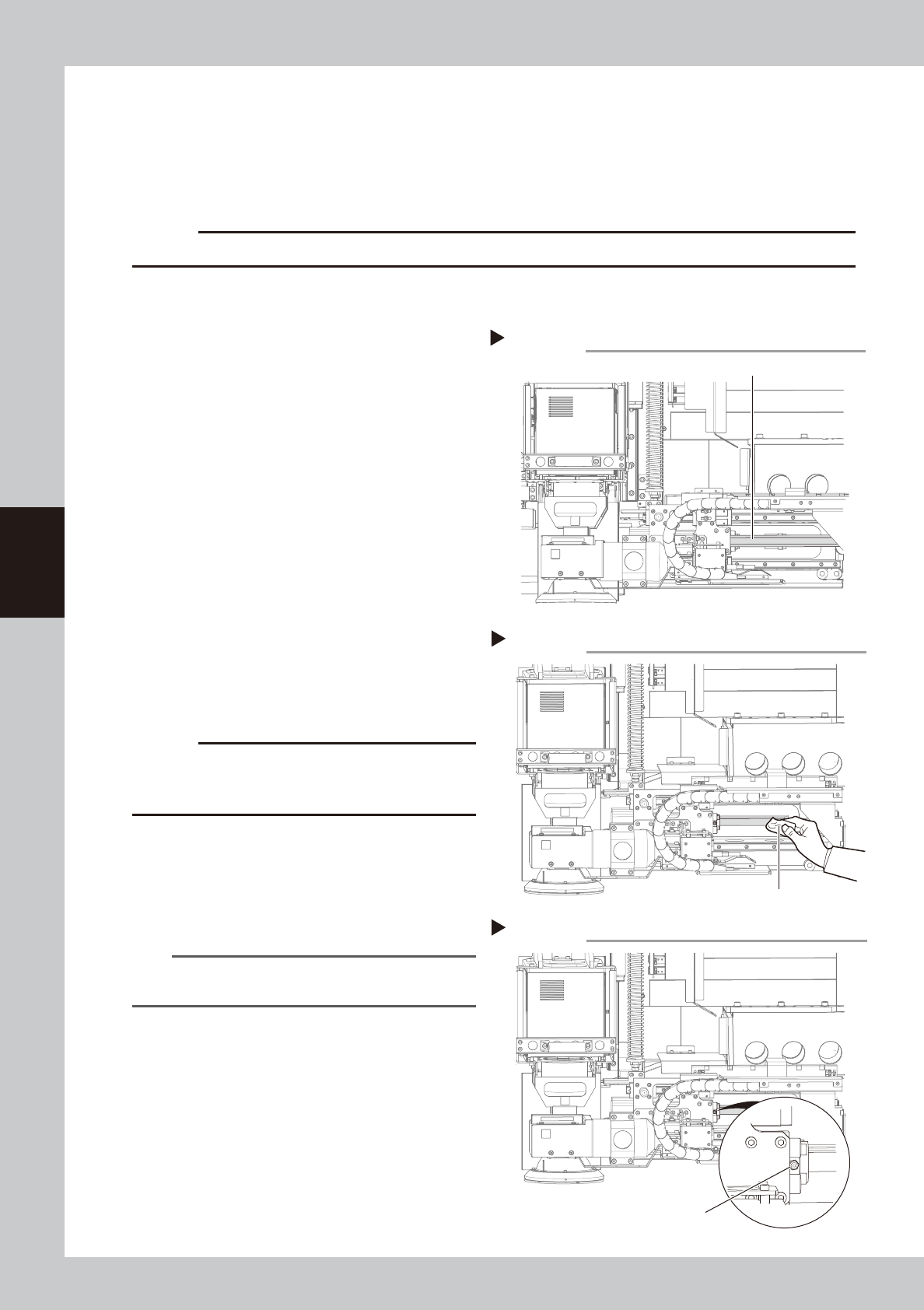
Remove the grease spattering
prevention cover.
1. Use the Phillips screwdriver to remove the
bolts (two each on left and right)
securing the grease spattering
prevention cover.
2. Remove the grease spattering prevention
cover by pulling it left.
53446-M6-00
4
Clean the ball screws.
Move the camera to the left and right by
hand and then wipe away the old grease
and dirt from the entire ball screw with a
paper wipe.
53447-M6-00
c
CAUTION
Wipe away the old grease and dirt in the lead groove
of the ball screw.
Also check that no debris or residue
remains in the lead groove.
5
Inject new grease.
Use the grease gun to inject the specified
grease (NSL) into the grease nipple (1
place).
53448-M6-00
n
NOTE
See Chapter 5, “Lubrication points”, for details on the
lubrication points and grease gun nozzles.
6
Wipe away excess grease
.
Move the camera to the left and right
several times by hand and then wipe away
excess grease with a paper wipe.
7
Reattach the grease spattering
prevention cover.
Reattach the cover using the reverse of the
removal procedure.
Removing grease spattering prevention cover
Step 3
Grease spattering prevention cover
Cleaning the HS-axis ball screw
Step 4
Paper wipe
Lubricating the HS-axis ball screw
Step 5
Grease nipple
4-37
4
Maintenance
7.1.4 Cleaning and greasing the HS-axis guide
n
Required tools
• Lent-free cleaning wipe
• Grease gun
• Specified grease (NSL)
c
CAUTION
Wear protective glasses and gloves when handling grease.
e
1
Press the emergency stop button.
The machine must be in emergency stop to
ensure safety during work.
2
Open the safety door on the rear of
the machine.
3
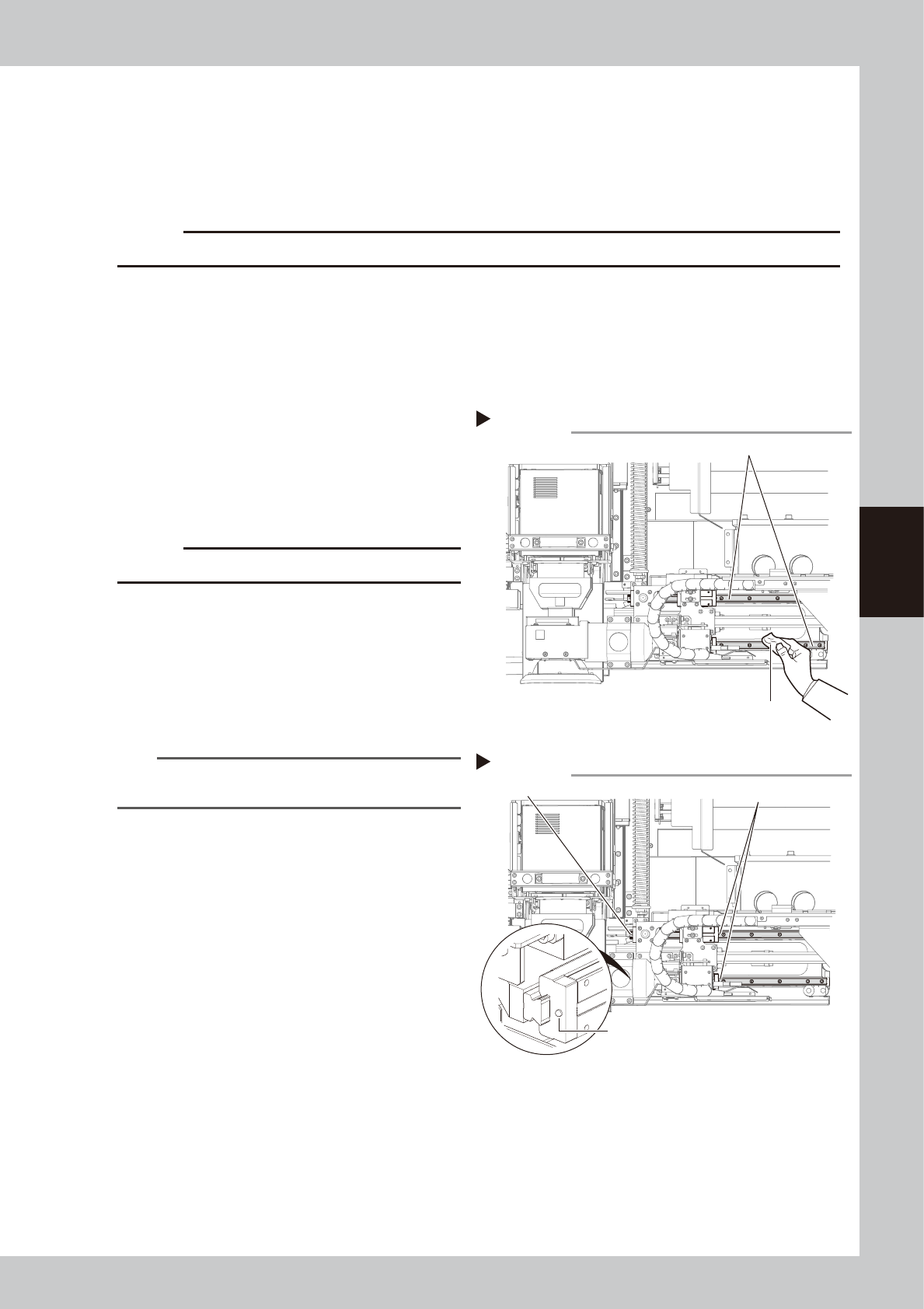
Clean the guides.
Move the camera to the left and right by
hand and then wipe away the old grease
and dirt from the entire guide with a paper
wipe.
53449-M6-00
c
CAUTION
Also wipe clean the slide groove of each guide.
4
Inject new grease.
Use the grease gun to inject the specified
grease (NSL) into the grease nipple.
There are two grease nipples each on the
upper and lower guides (total of 4 grease
nipples).
53450-M6-00
n
NOTE
See Chapter 5, “Lubrication points”, for details on the
lubrication points and grease gun nozzles.
5
Wipe away excess grease
.
Move the camera several times by hand
and then wipe away excess grease with a
paper wipe.
Cleaning HS-axis guide
Step 3
Guide
Paper wipe
Lubricating the HS-axis guide
Step 4
Grease nipples
Grease nipple
Grease nipple
4-38
4
Maintenance
7.2 Cleaning the filter of controller (Type HD/Type HB)
The filter is attached on the controller of the inspection machine. It is required to clean the filter once every 6
months although this frequency may vary depending on the inspection machine condition.
n
Required tools
• Hex wrench (3 mm)
• Vacuum cleaner or vacuum assembly (option)
1
Power off the inspection machine.
2
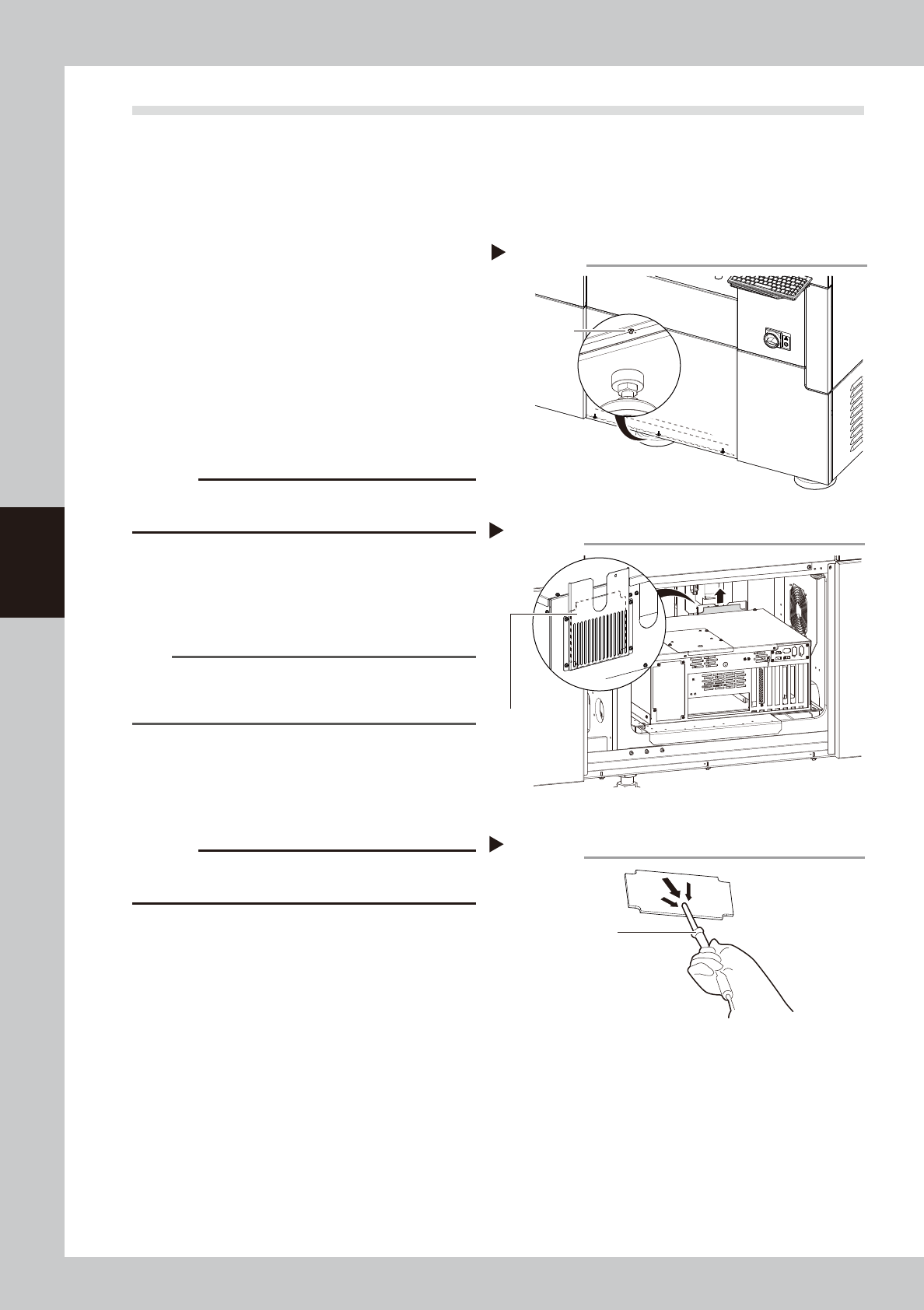
Detach the front panel.
Remove 3 mounting screws on the front
panel with a hex wrench (3 mm).
53456-M6-00
3
Pull out the filter.
Pull out the filter on the rear of the controller
manually.
53457-M6-00
c
CAUTION
The breaker locates near the filter position. Make sure
not to power off the breaker when pulling out the filter.
4
Clean the filter.
Clean the filter with a vacuum cleaner or a
vacuum assembly (option).
53458-M6-00
n
NOTE
If contaminants cannot be removed completely or if
the filter itself deteriorates, replace the filter with a new
one.
5
Return the filter and front panel to
the original position.
1. Insert the filter into the original position.
2. Attach the front panel.
c
CAUTION
The breaker locates near the filter position. Make sure
not to power off the breaker when inserting the filter.
Detaching front panel
Step 2
Cover mounting
screw
Pulling out filter
Step 3
Filter
Cleaning filter
Step 4
Vacuum assembly