00198442-01_UM_TX-V2_EN.pdf - 第206页
5 Tasks at the placement machine User manual SIPLACE TX V2 5.3 Switching on the SIPLACE line From software version 711.1 04/2018 208 5 Fig. 5.3 - 1 "Production" view after loading the station sof tware (example…
User manual SIPLACE TX V2 5 Tasks at the placement machine
From software version 711.1 04/2018 5.3 Switching on the SIPLACE line
207
5.3 Switching on the SIPLACE line
5.3.1 Starting the SIPLACE Pro Line Control GUI program
Start the program on the line computer SIPLACE Pro Line Control GUI
via the Windows Start menu
Start --> Programs --> SIPLACE Pro --> LCGUI
or
with the icon on your desktop.
Enter your user data.
The system connects to the SIPLACE Pro server and opens the user interface.
5.3.2 What to consider before switching on the stations
5
Check whether the stations are connected to the power and compressed air supplies.
Perform a sight check of the stations. Make sure that there are no obstacles in the travel
range of the gantries.
Make sure that the Z axes of all heads are in their uppermost end positions.
5.3.3 Switching on the station and starting the station software user interface
Switch the station on at the main power switch.
After switching on, check whether the manometers show the required operating pressure.
The station computer software is loaded and the "Production" view of the station software is
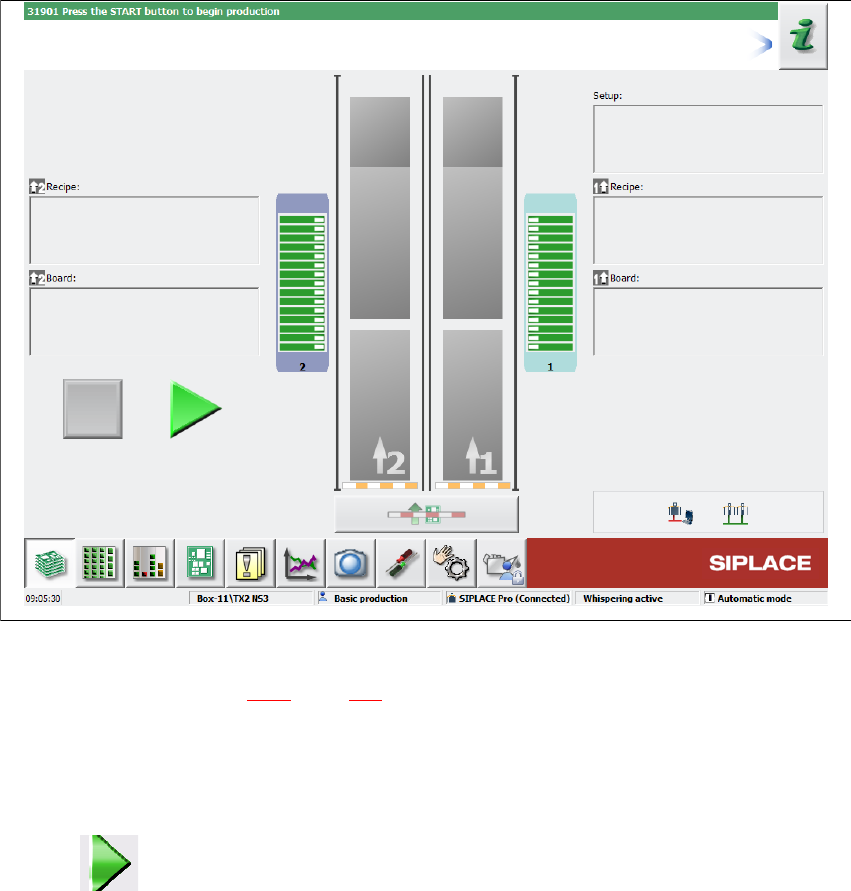
shown for the "Production" operator level (see following diagram).
CAUTION
Before you switch on the stations, please perform the following steps.
5 Tasks at the placement machine User manual SIPLACE TX V2
5.3 Switching on the SIPLACE line From software version 711.1 04/2018
208
5
Fig. 5.3 - 1 "Production" view after loading the station software (example)
The status field (see section 5.5.1, page 213) shows the current status of the station and the action
to be performed.
Press the start button when you see the request "Press Start button".
A reference run will be performed. After completion of this reference run, the station is ready
for operation.
The icon will be shown in the working area of the user interface (enabled).
User manual SIPLACE TX V2 5 Tasks at the placement machine
From software version 711.1 04/2018 5.3 Switching on the SIPLACE line
209
5.3.4 Start button action
The action performed by the start button can be set.
Open the "Check sensors and functions" view (see section 5.5.3, page 214).
The following settings are possible:
Start production automatically 5
Standard setting.
Pressing the start button automatically begins the production process.
Do not change production status 5
This is used, for example, to calibrate and test the placement machine
Pressing the start button simply closes the control circuit; production is not started immediately.
5
5.3.5 "Switching on the SIPLACE line" flow chart
The following flow diagram shows the actions performed after the SIPLACE line has been
switched on.
CAUTION
Placement machine functions can be directly started via the GUI, irrespective of the start
button setting. Once the control system has been switched on, you no longer need to
press the start button on the placement machine.