00198442-01_UM_TX-V2_EN.pdf - 第77页
User manual SIPLACE TX V2 2 Operational safety From software version 711.1 04/2018 2.5 Safety features 77 Protective cover switch for COT ins ert location 1 and 2 (item 2 and 3 in fig. 2.5 - 4 , page 74 ) 2 This position…

2 Operational safety User manual SIPLACE TX V2
2.5 Safety features From software version 711.1 04/2018
76
Start button, green (item 1 in fig. 2.5 - 2, page 72 and item 1 in fig. 2.5 - 3, page 73) 2
After switching on the main switch you will be prompted to press the start button in order to start
the placement machine for placement jobs. The same prompt appears if you open the protective
covers or the press the EMERGENCY STOP button.
Press the start button for at least 200 ms, up to a maximum of 1500 ms, and then let go. The
placement machine is switched on and the protective covers are held mechanically closed
when you let go of the button.
Component counter 2
The number of placed components (component counter) can be read on the station software. For
more information, refer to the Online Help.
EMERGENCY STOP button with forced locking (item 3 in fig. 2.5 - 2, page 72 and item 3 in fig.
2.5 - 3, page 73) 2
The EMERGENCY STOP button is red and latches in the ON position when pressed. When you
press the EMERGENCY STOP button, the switching contact of the EMERGENCY STOP circuit
opens and the safety cutoff (CBS) trips. The intermediate circuit voltage (300 VDC) for the gantry
axes and the intermediate circuit voltage (160 VDC) for the star axes is switched off. The servo
amplifiers for the DP and Z axes are still supplied with 42 VDC. The signaling contact of the
EMERGENCY STOP button opens and the message "EMERGENCY STOP pressed" appears on
the screen. The following modules are deactivated:
– PCB conveyor
– PCB clamping
– Width adjustment
– PCB stopper
– Compressed air supply for empty tape cutter
2
Position switch location 1 and 2 (item 1 and 4 in fig. 2.5 - 4, page 74) 2
This position switch checks whether the protective covers are open or closed. The position
switches on the protective covers trigger the safety cutoff (lock) when a protective cover is
opened. Individual components are disabled or remain enabled (see fig. 2.5 - 6
, page 80 ). The
protective covers are mechanically locked during placement machine operation. The protective
covers can only be opened once the stop button has been pressed.
PLEASE NOTE
Placement is interrupted and can then either be continued or canceled once the place-
ment machine is working correctly again.
User manual SIPLACE TX V2 2 Operational safety
From software version 711.1 04/2018 2.5 Safety features
77
Protective cover switch for COT insert location 1 and 2 (item 2 and 3 in fig. 2.5 - 4, page 74) 2
This position switch checks whether the component trolley is docked onto the COT insert. The po-
sition switch on the COT insert triggers safety cutoff (lock) when one of the component trolleys is
undocked.
2.5.3 Safety cutoff (CSB)
2
2
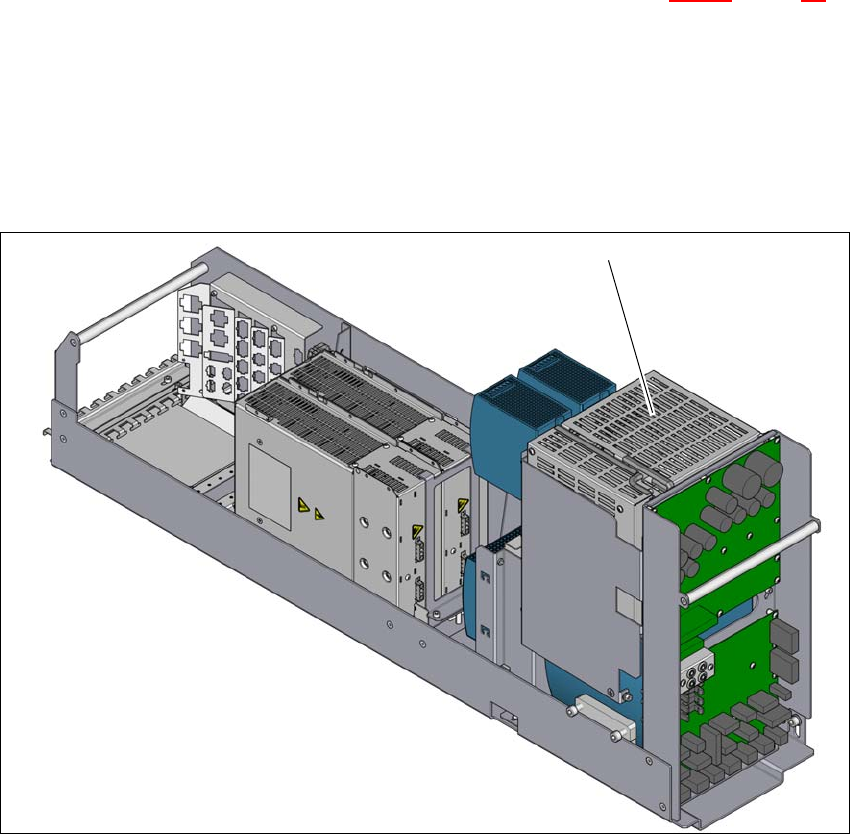
Fig. 2.5 - 5 Position of the safety cutoff (CSB)
2
(1) Safety cutoff (CSB)
(1)
2 Operational safety User manual SIPLACE TX V2
2.5 Safety features From software version 711.1 04/2018
78
Safety cutoff (CSB) (item 1 in fig. 2.5 - 5, page 77) 2
The safety cutoff (CSB) is located in the power supply unit. It is used to lock the protective features
and trigger the EMERGENCY STOP function.
2
There are three conditions that must be fulfilled in order to activate the safety cutoff (CBS):
– The "software release" or "Control ON" signal must be issued.
– All protective features and the EMERGENCY STOP buttons must be released.
– The start button must have been pressed.
Service socket (only installed up to machine number TB070G) 2
The service socket is only installed in the SIPLACE TXV2 up to machine number TB070G.
2
DANGER
Lethal voltages under the safety cutoff (CSB) cover!
Lethal voltages under the safety cutoff (CSB) cover!
Under the cover there are components which could still carry lethal voltages, even when
the placement machine is switched off and the mains plug has been disconnected.After
disconnecting the mains plug, wait 5 minutes until the capacitors have discharged.
Never open the covers.
Only ASM Assembly Systems GmbH&Co.KG service engineers or the placement
machine operating company's service engineers, who have been trained by ASM,
may perform work on the power supply and the safety cutoff (CBS).
PLEASE NOTE
The service socket can only be used in networks with existing and connected
neutral wire.
The service socket may only be used by trained service personnel
.
It is only used to connect service equipment with the relevant
voltage range and for the connectors which fit the service socket.
The available voltage between L and N depends on the mains voltage supply at the in-
stallation site
.
Please observe the applicable local regulations! If the service socket which is fitted
does not comply with local regulations, the service socket may not be used and must be
completely disabled!