00196775-0102_OM_DockingStation_SX_EN.pdf - 第8页
1 Operating Manual Docking Station for SIPLACE SX Changeover Tables 1.6 Serial number of the docking station Operating Manual 4 1.6 Serial number of the docking station The serial number of the docking station for SIPLAC…

3
Docking Station for SIPLACE SX Changeover Tables 1 Operating Manual
Operating Manual 1.4 Overview of Release Versions
1.4 Overview of Release Versions
Manual Software version Edition
First edition Operating Manual … 02/2010
1. Change Operating Manual … 03/2010
1.5 Abbreviations
ESD Electrostatic sensitive devices
EMC Electromagnetic compatibility
ESD Electrostatic sensitive device
GND Ground
IC Integrated circuit
PCB Printed-circuit board
MC Machine controller
SMD Surface-mounted device
WLAN Wireless local area network
1 Operating Manual Docking Station for SIPLACE SX Changeover Tables
1.6 Serial number of the docking station Operating Manual
4
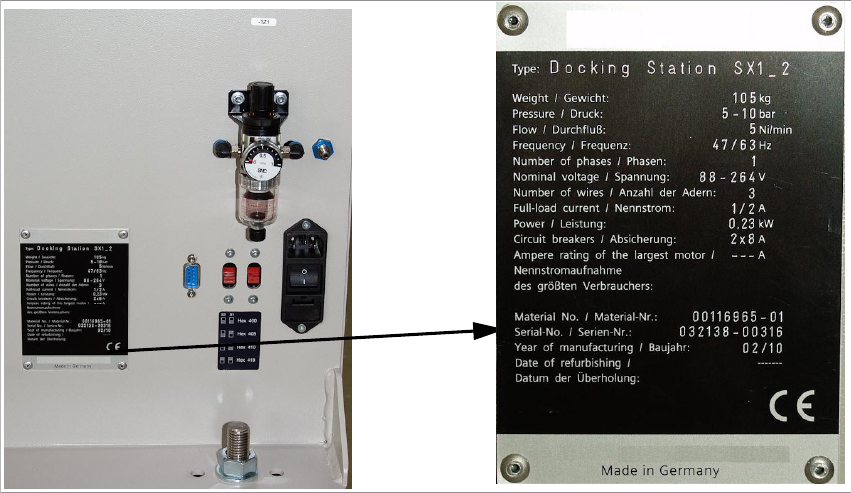
1.6 Serial number of the docking station
The serial number of the docking station for SIPLACE SX changeover tables can be found at the
following location.
Fig. 1 - 1 Serial number

5
Docking Station for SIPLACE SX Changeover Tables 2 Operating Safety
Operating Manual 2.1 Safety Information
2 Operating Safety
2.1 Safety Information
2.1.1 Hazard Symbols Convention
This manual contains information that you must observe for your personal safety and to avoid
property damage. This information is emphasised by warning triangles and shown, depending on
the severity, as follows:
DANGER or
In this operating manual means that death, serious injury or considerable damage will occur if this
danger warning is ignored.
WARNING or
In this operating manual means that death, serious injury or considerable damage may occur if
this warning is ignored.
CAUTION or
in this operating manual means that slight injury or damage may occur if this caution is ignored.
NOTE
In this operating manual is important information on the product or the respective section of the
manual that the user should actively be aware of.
2.1.2 Operating Modes
You can operate the machine in “normal mode” and “special mode”.
Normal Mode
In normal mode, all functions and tasks for which the machine has been designed are executed
automatically. Normal mode also includes the removal of, e.g., jammed PCBs from areas of the
machine that can be accessed through doors and covers without the use of tools. If a tool is
necessary to correct a problem (e.g., to unscrew a cover), this falls under special mode.