00196775-0102_OM_DockingStation_SX_EN.pdf - 第9页
5 Docking Station for SIPLACE SX Changeover Tables 2 Operating Safety Operating Manual 2.1 Safety Information 2 Operating Safety 2.1 Safety Information 2.1.1 Hazard Symbols Convention This manual contains information tha…
1 Operating Manual Docking Station for SIPLACE SX Changeover Tables
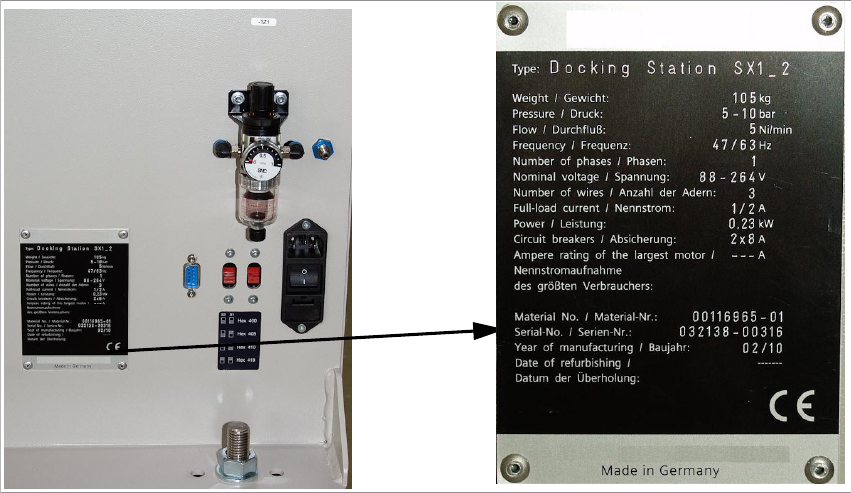
1.6 Serial number of the docking station Operating Manual
4
1.6 Serial number of the docking station
The serial number of the docking station for SIPLACE SX changeover tables can be found at the
following location.
Fig. 1 - 1 Serial number

5
Docking Station for SIPLACE SX Changeover Tables 2 Operating Safety
Operating Manual 2.1 Safety Information
2 Operating Safety
2.1 Safety Information
2.1.1 Hazard Symbols Convention
This manual contains information that you must observe for your personal safety and to avoid
property damage. This information is emphasised by warning triangles and shown, depending on
the severity, as follows:
DANGER or
In this operating manual means that death, serious injury or considerable damage will occur if this
danger warning is ignored.
WARNING or
In this operating manual means that death, serious injury or considerable damage may occur if
this warning is ignored.
CAUTION or
in this operating manual means that slight injury or damage may occur if this caution is ignored.
NOTE
In this operating manual is important information on the product or the respective section of the
manual that the user should actively be aware of.
2.1.2 Operating Modes
You can operate the machine in “normal mode” and “special mode”.
Normal Mode
In normal mode, all functions and tasks for which the machine has been designed are executed
automatically. Normal mode also includes the removal of, e.g., jammed PCBs from areas of the
machine that can be accessed through doors and covers without the use of tools. If a tool is
necessary to correct a problem (e.g., to unscrew a cover), this falls under special mode.

2 Operating Safety Docking Station for SIPLACE SX Changeover Tables
2.1 Safety Information Operating Manual
6
Special Mode
Special mode encompasses all tasks that are not part of normal mode. This includes setup,
maintenance and cleaning, troubleshooting requiring tools, and repair of the machine.
2.1.3 User Roles
To ensure safety, we put certain requirements on persons using the machine that absolutely have
to be fulfilled. Only persons meeting these requirements are authorized to work on the machine.
Persons using the machine refer to any person who is working with the machine. As the
requirements for these persons highly depend on their tasks, we distinguish the following user
roles:
Operator
The operator is the contract partner of the manufacturer. The manufacturer can legally bind the
operator to fulfil certain conditions when it purchases the machine.
The operator is responsible for proper use of the machine and authorizes individuals to work on
the machine in one of the defined user roles. The operator is also responsible for training the
users.
Service Technician
The service technician is an employee of the manufacturer who services the machine in special
mode for troubleshooting and when bringing the machine into service. The service technician is
obliged to apply any available transport and mounting locks, if applicable, before starting any work
on the machine.
He is an expert having mechanical or electrical professional qualifications.
NOTE
Work on the machine and its controller may only be carried out by service technicians of the
manufacturer or its authorized personnel.