N7201A652E.pdf - 第143页
NPM- TT2 EJM1EE-MB-02 O-04 Chec king the tr ay a ttac hment condition 1 (tray feeder) Operating procedure 2-4-5 Prepara- tions before produc- tion Preparatio n 2-4-5 -1 Replaces the tray of the selected pallet. G F A B C…
NPM-TT2 EJM1EE-MB-02O-04
Checking the feeder
attachment condition 3
(intelligent feeder)
Operating procedure
2-4-4
Prepara-
tions
before
produc-
tion
2-4-4-5
C
H
EDBA
GF
K J I
A
B
C
H
I
J
K
G
F
D
E
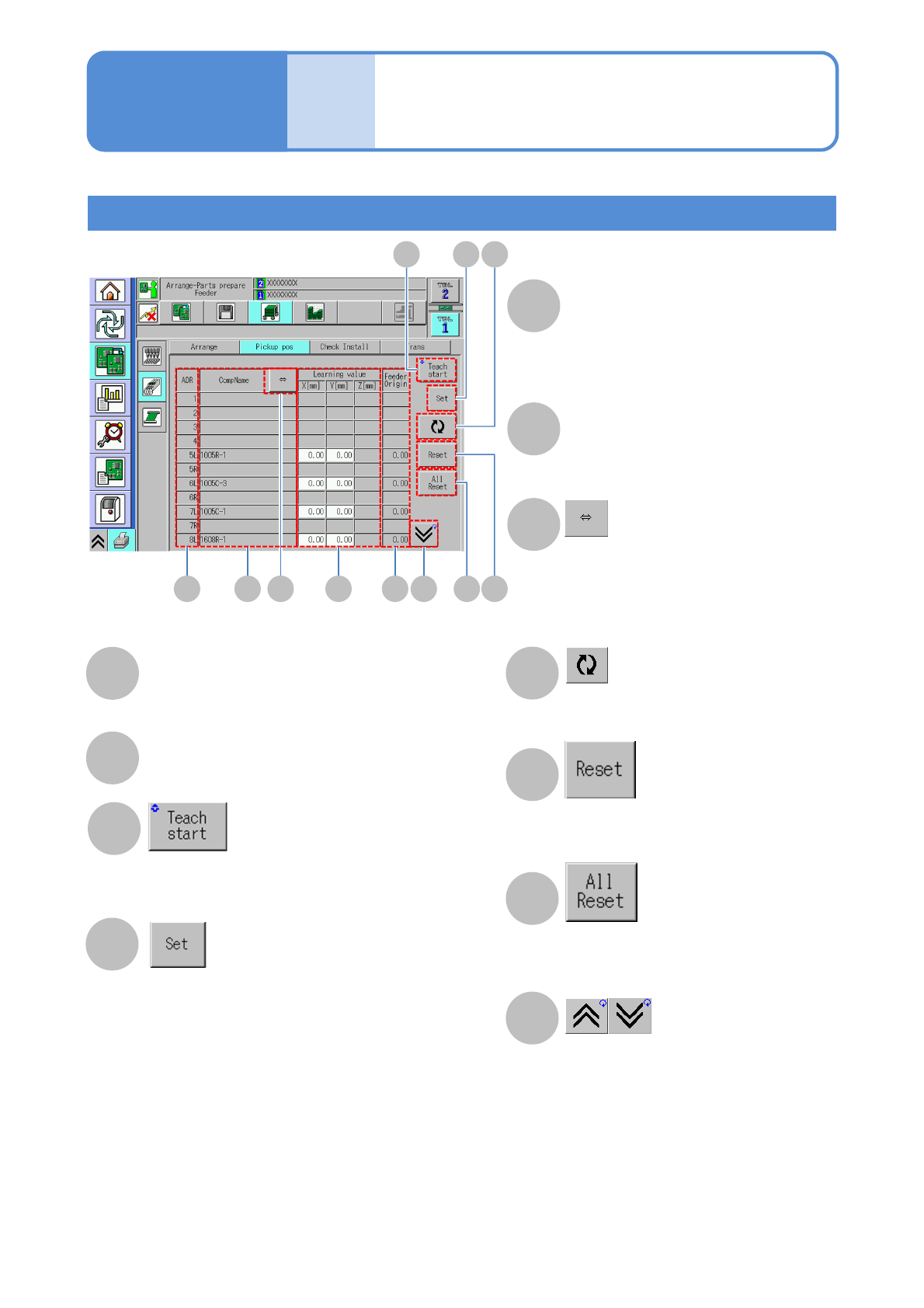
Pickup pos screen
ADR
The number of the address of an
arranged feeder and the side (L/R) of
the feeder on which a component is
arranged
CompName
Displays the hidden portion of a
component name when the name is too
long to be shown
Redisplays
Resets the correction value the cursor is
currently sitting over
Resets the correction values for all
addresses
Scrolls up and down the list
Selects a target component(s) for the pickup
position (teach)
[All parts]:
・All components
[Auto parts]:
・Components for which the pickup position
automatic teach is set
[Manual parts]:
・Components for which the pickup position
automatic teach is not set
[Auto parts continuous]:
・Performs continuous teach for those components
with the pickup position automatic teach set for
them.
<Pickup pos (teach)> screen display
(→For details, see
“4-2-8 Pickup position learning teach”)
Learning value X[mm] Y[mm] Z[mm]
Pickup position learning value
● Z[mm] not in use
Feeder Origin
NPM-TT2 EJM1EE-MB-02O-04
Checking the tray
attachment condition 1
(tray feeder)
Operating procedure
2-4-5
Prepara-
tions
before
produc-
tion
Preparation
2-4-5-1
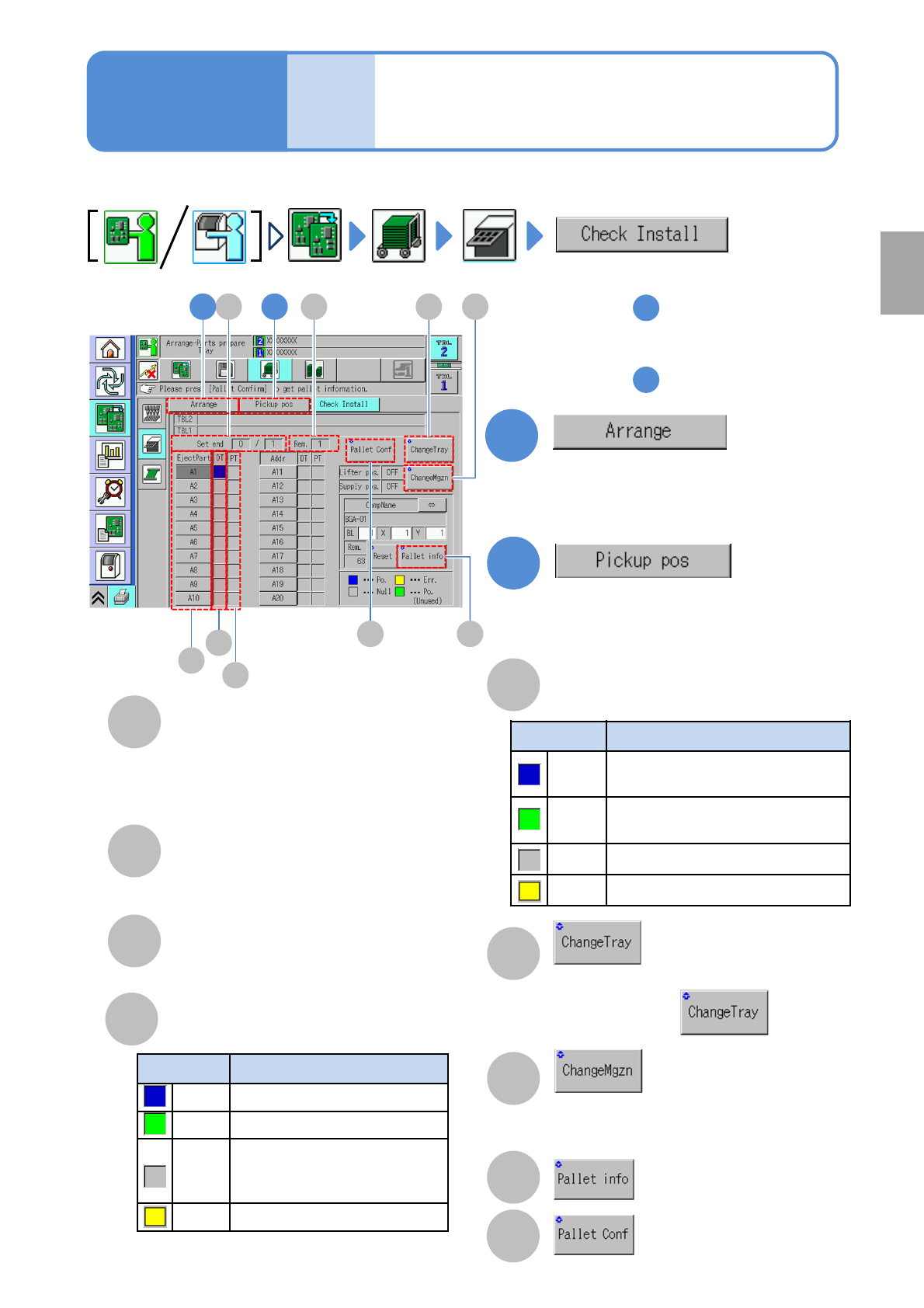
Replaces the tray of the selected pallet.
GFA B
C
D
A
Set end
number of trays have already been
installed/ The total number of trays that
need to be installed/the
●Trays that are not used in production
are not included in the count.
B
Rem.
The remaining number of trays to be
installed.
C
EjectPart
Select the ejection pallet from among the
pallets 1 through 20.
D
Production data condition (DT)
E
Pallet condition (PT)
F
G
Unlocks the magazine door.
●Trays in a pickup position or supply
position are stored in the magazine.
E
Color Data status
Blue
Data used in production
Green Data not used in production
Gray
Data in which no trays are
arranged in terms of
production data
Yellow Error
Color Pallet condition
Blue
Tray that exists in production
data
Green
Tray that does not exist in
production data
Gray
No tray exists
Yellow
Error
●When pressing , a tray
comes out.
1
1
2
2
1 2
I H
H
I
Displays <Detailed pallet
information screen>
Updates the attachment
condition.
Check that the condition of the trays being arranged in production data coincides with the one
of those being actually attached.
■When they do not coincide
To step
■To confirm the pickup position
To step
●Confirms the condition of trays being
arranged on the table and parts
information
(→P.2-4-5
-2 ‘Arrangement screen’)
●Confirms the correction value per tray
address obtained using the pickup pos
learning during production
(→P.2-4-5
-3 ‘Pickup pos. screen’)
NPM-TT2 EJM1EE-MB-02O-04
Operating procedure
2-4-5
Prepara-
tions
before
produc-
tion
2-4-5-2
Checking the tray
attachment condition 2
(tray feeder)
JG
A B
C D
K N
E
L M
F
H I
A
B
C
D
E
F
G
M
L
H
I
J
K
N
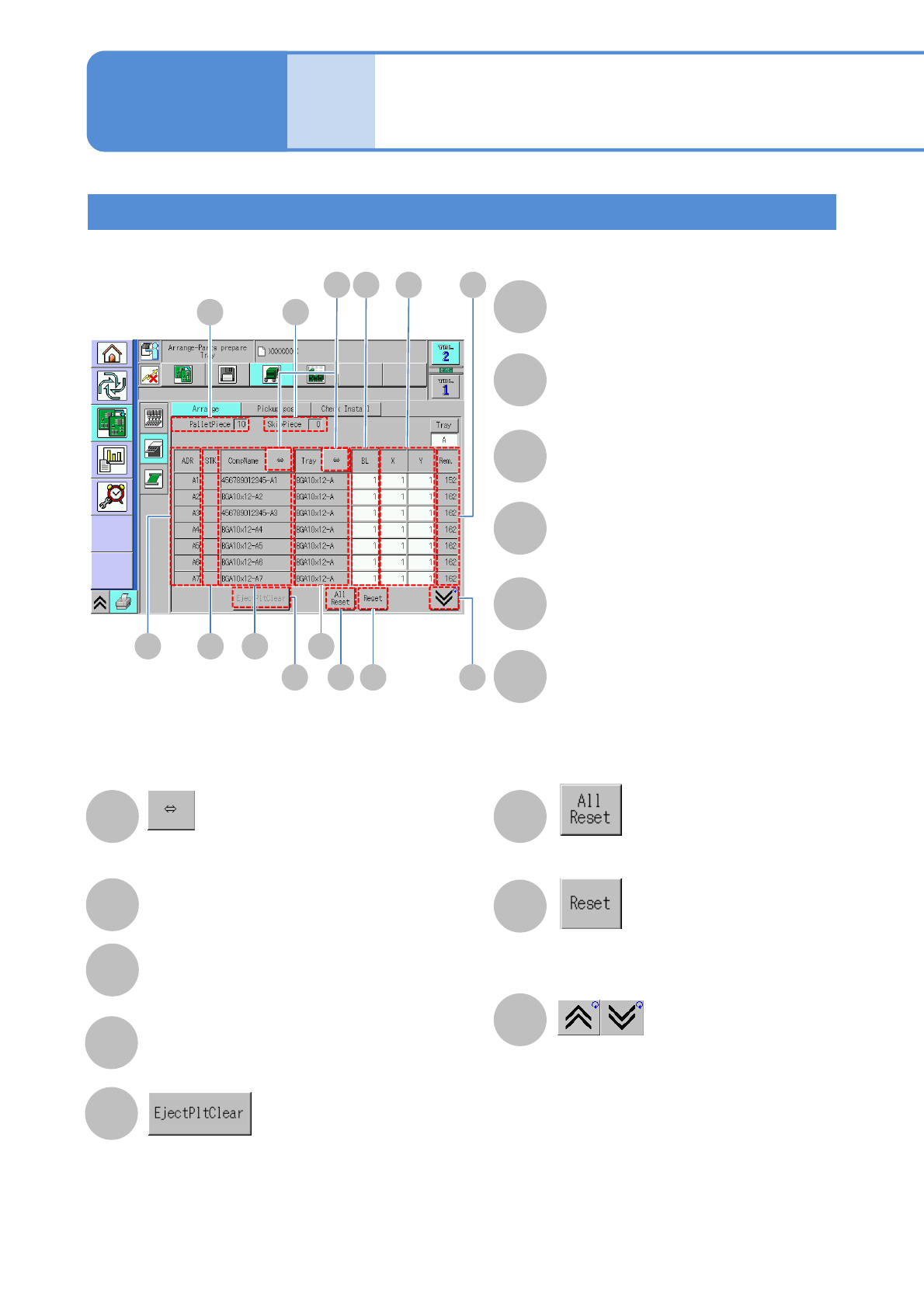
Arrangement screen
PalletPiece
The total number of arranged tray
pallets
Skip Piece
The number of tray pallets set as
skipped
ADR
The number of the address of an
arranged tray
STK
Components of the same part number
make a stock component each other
CompName
Tray name
Initializes the number of remaining
components on the tray the cursor is
currently sitting over
Initializes the number of remaining
components on all trays
Scrolls up and down the list
Displays the hidden portion of a component
name when the name is too long to be shown
BL
The block number of the component
X , Y
The location of the component on a
tray pallet
Rem.
The number of remaining components
Clears the number of components having
been ejected into the eject pallet back to zero