N7201A652E.pdf - 第47页
NPM- TT2 EJM1EE-SF-01N-05 1-3-3 -2 NOTICE ● Be sure to connect the device or the conveyor satisfied the mac hine safety require ments such as ISO13849-1 or IEC6201. ● Keep the safety distance of 600 mm or more from the o…
NPM-TT2 EJM1EE-SF-01N-05
Safety
manage-
ment
1-3-3
-1
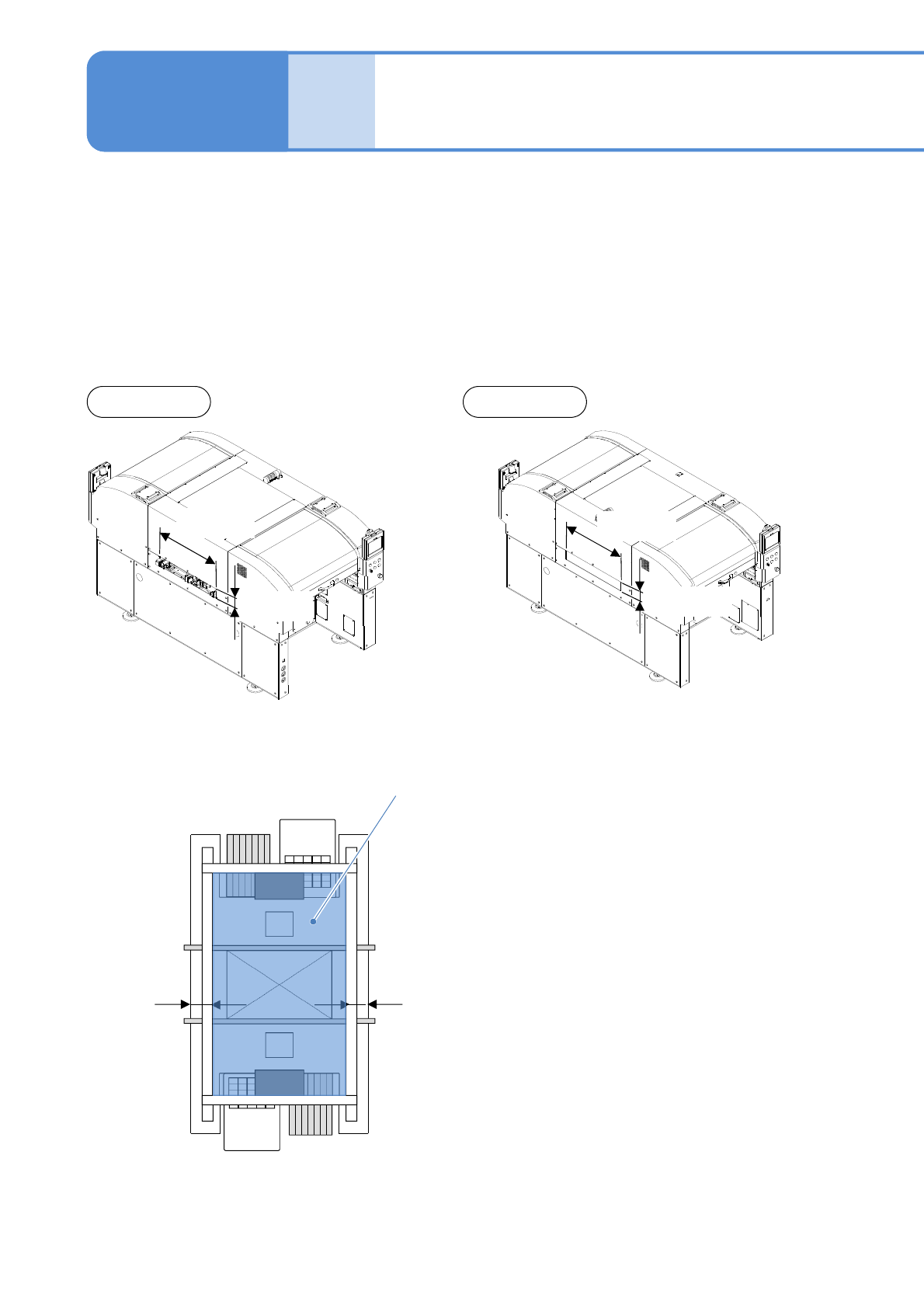
The NPM-TT2 has a PCB transfer opening on the left and right sides. Since the front and rear heads in the
machine move within the area shown below at high-speed, it is very dangerous if you insert your hands into
the machine. If you couple a device or a conveyor prepared on your own, be sure to provide safety
measures.
■When a device or a conveyor prepared on your own is coupled
1-3-3
Front side Rear side
747 mm
107 mm
747 mm
107 mm
Head movable area
125 mm
125 mm
Connecting a device or a
conveyor prepared by
customer
NPM-TT2 EJM1EE-SF-01N-05
1-3-3-2
NOTICE
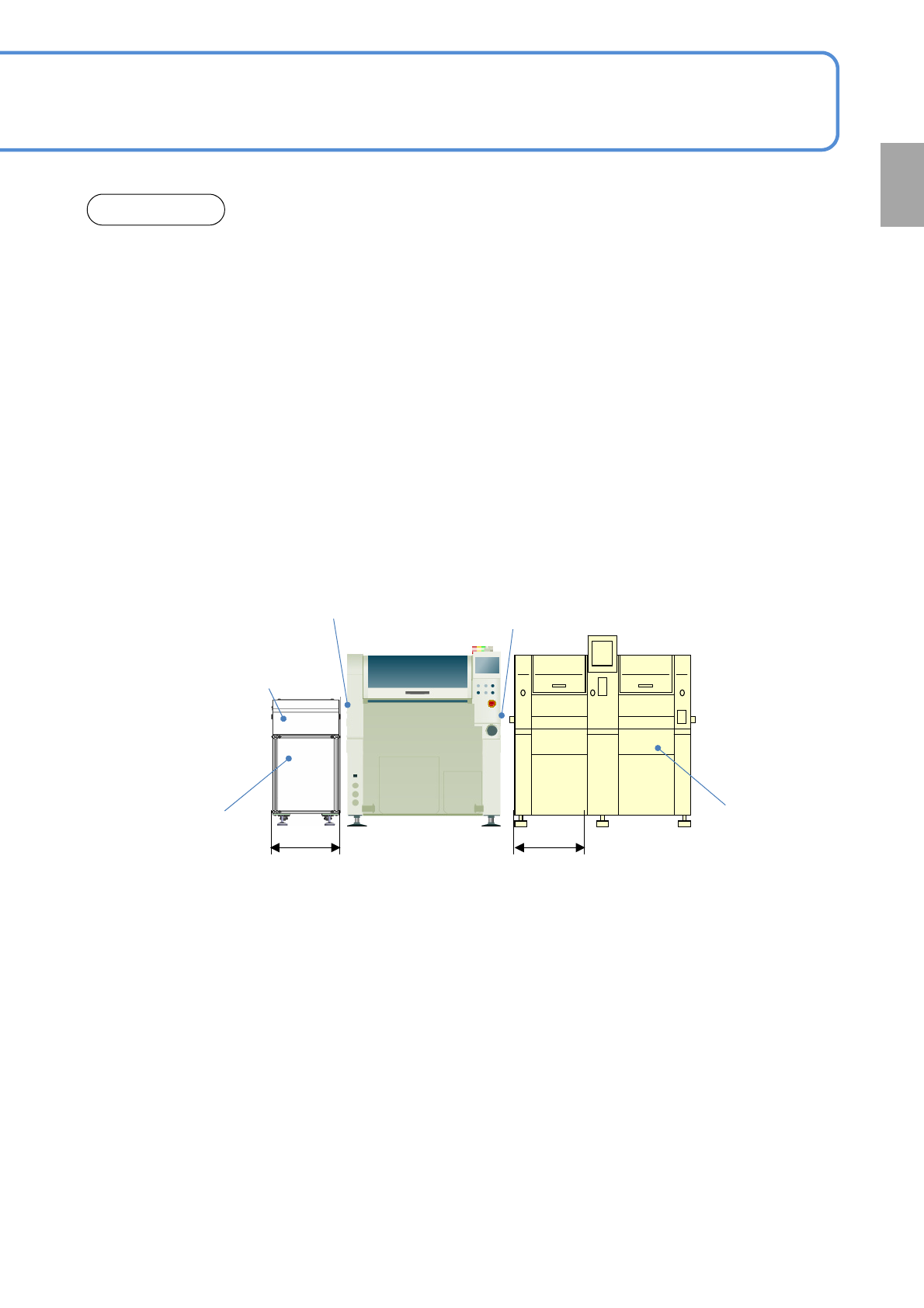
●Be sure to connect the device or the conveyor satisfied the machine safety requirements such as
ISO13849-1 or IEC6201.
●Keep the safety distance of 600 mm or more from the opening in order not to reach hands into the
opening of the NPM-TT2 from the adjacent device or conveyor. (Reference (1))
●If you can keep only the safety distance of 400 to 600 mm from the opening of the NPM-TT2, install the
safety sensor on the PCB transfer opening, and output the safety support signal to the NPM-TT2.
(Reference (2))
●Take measures not to insert hands or fingers from the space between the NPM-TT2 and the device or
the conveyor.
●Install the full cover that usually you cannot open or close, to the transfer rail of the device or the
conveyor.
If you can reach the PCB transfer opening with the open/close cover installed, install the safety switch,
and output the safety support signal to the NPM-TT2 while the cover is open. When the cover is open,
the NPM-TT2 stops for confirming safety.(Reference (3))
●About detailed conditions regarding machine safety or safety about connection with machines
manufactured by us (CM series), please ask us.
PCB transfer opening
PCB transfer opening
Peripheral
equipment
(conveyor)
Peripheral equipment
(placement machine)
(1) 600 mm or more
(2) If the space is only 400 mm to
600 mm, the transfer opening
sensor is necessary
(1) 600 mm or more
(2) If the space is only 400 mm to
600 mm, the transfer opening
sensor is necessary
(3) Full cover
●Safety switch is
required for the
open/close cover
Confirmation

NPM-TT2 EJM1EE-SF-01N-05
1-4-1
Precautions 1
1-4
Precautions in use
●Do not move noise sources such as welders close to equipment. A malfunction may occur.
●During the operation of equipment, avoid turning OFF the power switch of the main controller, the servo
switch and the air unnecessarily.
Because equipment operates independently without being controlled, breakage may occur.
●During instruction or when moving a unit with the servo free from stress, be sure that there is no
interference. Breakage may occur.
●The tray feeder cover is locked with a cylinder. Forcing open the cover may cause breakage of the cover
or the cylinder.
●Do not take apart or alter the main body of equipment or the unit. It may affect the level of safety and
quality control of products.
●Data should only be changed by authorized personnel, who have received special training.
A malfunction may occur due to improper input.
●Do not block the fan outlet and inlet. Abnormal action arising from the increase in temperature inside the
control box may occur.
●Do not turn OFF the servo switch during operation. It may cause machine to malfunction. Turn it OFF
when the machine is in a temporary stop state (single stop or cycle stop) or operation stop state.
●Pay attention to water quality when using a spray or humidifier. In humidifiers, ultrasonic humidifiers in
particular, depending on the water quality though, not only calcium and magnesium (as the primary
components of water hardness) but also silica, carbonate, iron, and others are released into the air in form
of floating dust and gradually deposited on the machine in form of dust, which causes the sliding part or
optical system of the machine to malfunction.
●Do not use in an atmosphere where low molecular siloxones released from silicon-based materials
(silicone adhesive, silicon oil or powder, etc.) in gaseous form are present. Depositing of low molecular
siloxane on the electric contact or optical part of the machine causes a contact fault or malfunction.
●We have no responsibility regarding the followings.
・ Improper usage, and trouble and damage due to inappropriate repair or remodel
・ Accidental damage arising from the machine use or fail such as loss of business interests, or change
or deletion of memory data
・ Trouble or damage caused by relocation, transportation or drop of the machine after purchased
・ Trouble or damage caused by fire, an earthquake, flood damage, lighting strike or any other act of
providence, and environmental pollution, salt pollution, gas pollution (corrosive gas, halogen gas, etc.),
abnormal voltage and power supplies, other than specified (voltage, frequency)
・ Trouble and damage arising when transported by vehicles and ships
・ Damage arisen from not being observed described matters in the manuals included in this product
Precautions for Maintenance and Inspection
■Follow the instruction manual when engaged in maintenance or inspection.
●Refer to the Operating procedure and the Maintenance, which come with equipment, for maintenance and
inspection.
●Turn OFF the main power switch and the pneumatic source (cock) before maintenance or inspection.
Locking is recommended to ensure your safety.
●When cleaning parts of the equipment not mentioned in the instruction manual, wipe with a soft dry cloth.
For dirty spots, dampen a cloth with a neutral detergent diluted with water, and wipe the spots after
wringing out the wet cloth.
After cleaning with the damp cloth, dry with a dry cloth.
●When cleaning inside the clean room, use cleaning implements provided for the clean room.
●Do not use an organic solvent or the like because it contributes to the following.
・Cracking or deterioration of plastic parts
・Rapid decline in antistatic effect