User Manual SIPLACE Linear Dipping Unit 2 X.pdf - 第52页
4 Operation 4.1 Settings in SIPLACE Pro 52 User Manual SIPLACE Linear Dipping Unit 2 X 05/2020 4.1.11 Setting the cicatrization time of the flux If longer standstill (inactive) times during the production run can be expe…
4 Operation
4.1 Settings in SIPLACE Pro
User Manual SIPLACE Linear Dipping Unit 2 X 05/2020 51
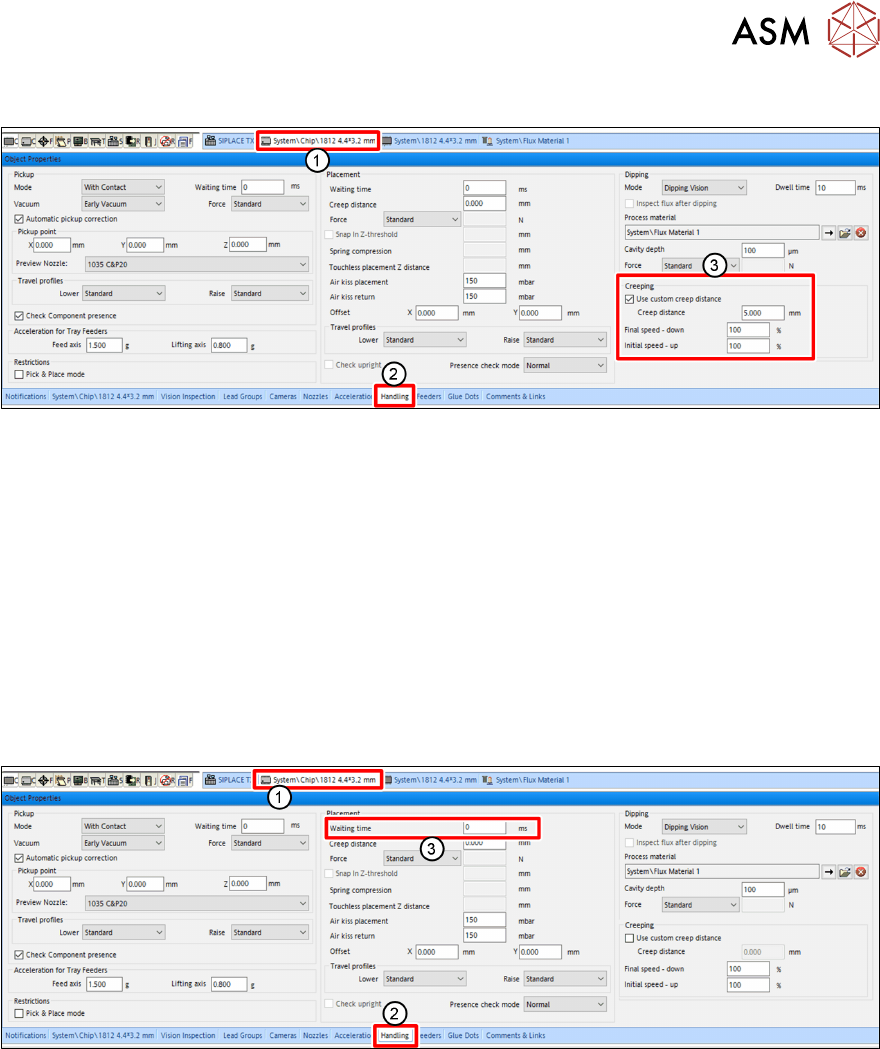
4.1.9 Setting the creep distance
► In SIPLACE Pro, click on the tab of the component shape of the desired component(1).
► Click on the Handling tab(2) in the Object Properties view.
► Enable the Use custom creep distance option(3) under Creeping(3) in the Dipping area.
► Enter the desired length of the creep distance in the Creep Distance entry field.
► In the Speed down end entry field, enter the desired speed down.
► In the Speed up start entry field, enter the desired speed up.
For more information to creep distance, speed down and speed up, see chapter 3.3.7 "Creep dis-
tance" [}38].
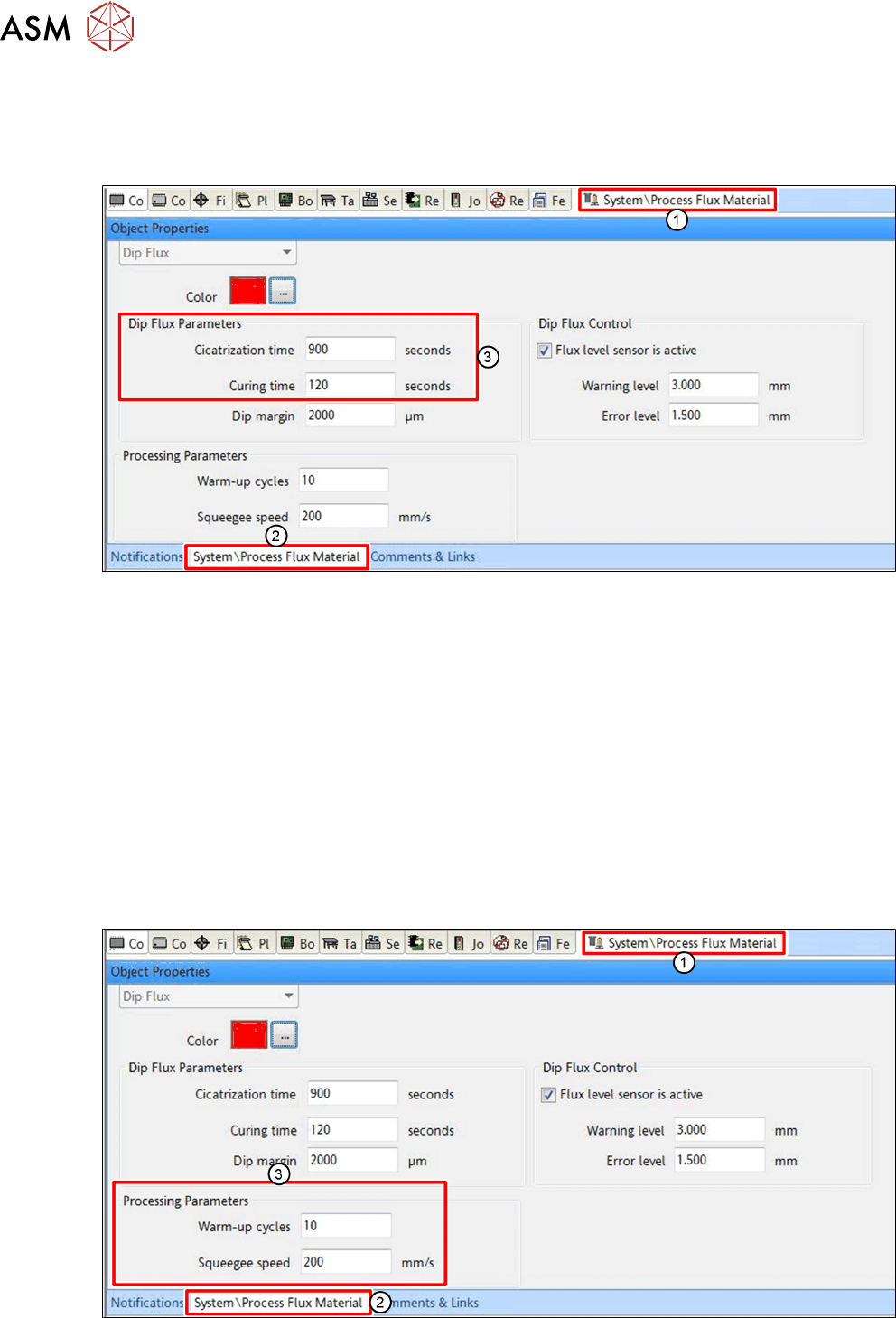
4.1.10 Setting the waiting time
Depending on the component and the flux used, it can be advantageous to hold the component on
the PCB for a short waiting time during the placement process.
► In SIPLACE Pro, click on the tab of the component shape of the desired component(1).
► Click on the Handling tab(2) in the Object Properties view.
► Enter the Waiting time in milliseconds [ms] in the Waiting Time entry field (3) in the Place-
ment area.
4 Operation
4.1 Settings in SIPLACE Pro
52 User Manual SIPLACE Linear Dipping Unit 2 X 05/2020
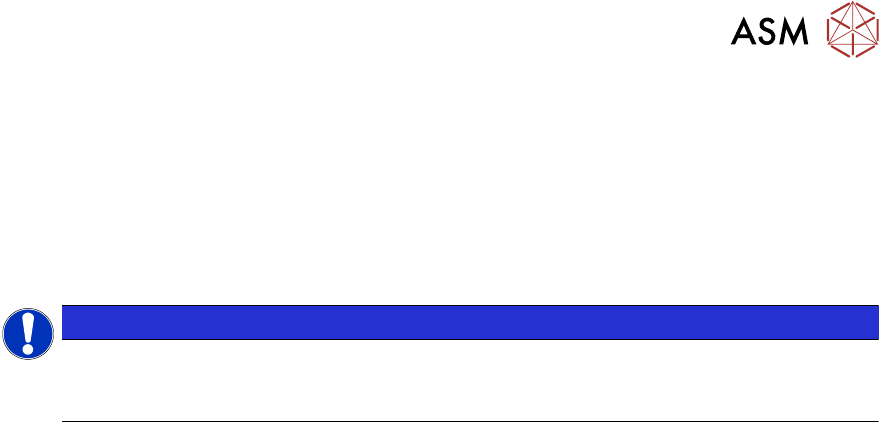
4.1.11 Setting the cicatrization time of the flux
If longer standstill (inactive) times during the production run can be expected, you should set the ci-
catrization time of the flux used. The LDU will then perform an application run after this period has
expired.
► In SIPLACE Pro, click on the tab of the relevant flux(1).
► Click on the tab of the flux(2) in the Object Properties view.
► Enter the cicatrization time of the flux used in seconds [s] in the Cicatrization time entry field
in the Dip Flux Parameters
area(3).
► Enter the curing time of the flux used in seconds[s] in the Curing time entry field in the Dip
Flux Parameters area(3).
Curing time defines the maximum time that must not be exceeded between dipping and pla-
cing a component.
For more information on the cicatrization time of fluxes, see chapter 3.3.3 "Cicatrization time" [}36].
4.1.12 Setting the warm-up cycles and the squeegee speed
During the warm-up cycle, the LDU performs a set number of squeegee processes to prepare the
flux.
The squeegee speed is the speed with which the squeegee axis applies the flux in the cavity.
► In SIPLACE Pro, click on the tab of the relevant flux(1).
4 Operation
4.2 Performing planarity check
User Manual SIPLACE Linear Dipping Unit 2 X 05/2020 53
► Click on the tab of the flux(2) in the Object Properties view.
► Enter the number of squeegee processes which are to be performed during the warm-up
cycle in the Warm-up cycles
entry field in the Processing Parameters area (3).
► Enter the squeegee speed in millimeter per second [mm/s] in the Squeegee speed entry field
in the Processing Parameters
area (3).
4.2 Performing planarity check
NOTICE
Target group: setup operator
The procedure described is a task that occurs irregularly and should only be carried out by
a trained operator with special knowledge (setup operator).
To ensure that the components can be dipped into the medium over the entire dipping area, it is
important that the dipping area is not tilted. You therefore need to align the LDU parallel to the
gantry or to the placement head of the placement machine. The LDU has two adjustment screws
for this purpose. The correct position of the cavity can be checked with the help of the measure-
ment run in the station software.
The measurement run sets the dipping plate parallel to the gantry. It does NOT determine the level
of the dipping plate compared to the ground. It is therefore important that the machine in which the
LDU is used is standing absolutely level. This is important, if thin flux should not run out of the cav-
ity. If the machine is not level and the dipping plate is aligned parallel to the gantry, the dipping
plate will then not be level in relation to the ground.
Planarity check procedure
The placement head moves over the first measuring point in the cavity of the dipping plate. After
this, the Z-axis moves slowly downwards until the nozzle springs into place and the Z‑axis sensor
reports that the nozzle is now down on the dipping plate. The Z-axis then moves up again. The sys-
tem calculates the absolute height of the first measuring point.
The gantry now moves to the second measuring point. The Z-axis performs height measurement
again and now determines the relative height difference to the first measuring point. If the measure-
ment for the second measuring point is positive, measuring point2 is higher than measuring point
1. If it is negative, this means that it is lower. If the relative measurement is zero, this means that
both measuring points are at the same height. The same procedure is applied to the third measur-
ing point.
Definitions
●
Measuring point 1: reference point.
●
Absolute height [µm]: the measured height of the respective measuring point.
●
Relative height [µm]: the deviation of the absolute height of measuring point 2 or 3 to the ab-
solute height of the reference point. This value is always 0 for the reference point.
Preconditions
► The placement machine must be exactly level to the ground.
► The cavity of the dipping plate must be free of flux.
► There must be a nozzle on the placement head.