00197198-02_XML-Import-SetupCenter-5.1.pdf - 第10页
Setup Center 5. 1 - X ML Import 10 of 22 To test whether the im port function perf orm s , open the pack aging unit ed itor via the m enu “ Options/Edit packagin g unit… ” . (1) Enter one of th e imported p ackaging ID…
Setup Center 5.1 - XML Import
9 of 22
Manufacturer="Manufacturer02" ManufactureDate="2004-01-01T14:44:56+01:00"
ExpiryDate="2010-12-31T14:44:56+01:00" Supplier="Supplier02" BatchId="Batch02"
DeliveryNote="Serial01" MsdLevel="1" MsdOpenDate="1900-01-01T00:00:00+01:00"
Extra1="Extra01" Extra2="Extra02" Extra3="Extra03" Comment="This is a comment" />
<Packaging IdPackaging="X0000018" ComponentName="Component06"
ComponentBarcode="Component06" OriginalQuantity="600" Quantity="600"
Manufacturer="Manufacturer02" ManufactureDate="2004-01-01T14:44:56+01:00"
ExpiryDate="2010-12-31T14:44:56+01:00" Supplier="Supplier03" BatchId="Batch03"
DeliveryNote="Serial01" MsdLevel="1" MsdOpenDate="1900-01-01T00:00:00+01:00"
Extra1="Extra01" Extra2="Extra02" Extra3="Extra03" Comment="This is a comment" />
</PackagingList>
After processing the file Setup Center will delete the XML file. XML files which have been
completely and successfully processed will be copied to the \Import\XML-OK folder. Faulty or
partially processed files will be copied to the \Import\XML-NotOK folder and an additional text file
with the name of the XML file and the postfix ".error.txt" will be created. This text file contains the
detailed error messages. 4
4
Setup Center 5.1 - XML Import
10 of 22
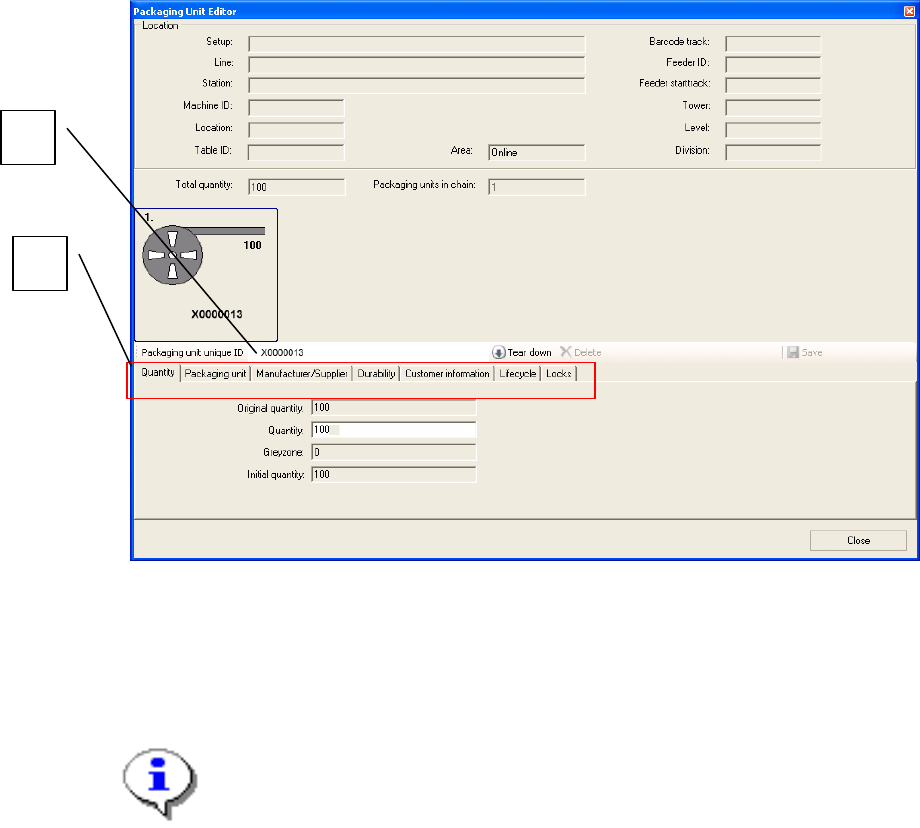
To test whether the import function performs, open the packaging unit editor via the menu
“Options/Edit packaging unit…”.
(1) Enter one of the imported packaging IDs in the field “Packaging unit unique ID”,
for example “X0000013”.
(2) To display all details open the respective tab.
Note:
The error file “.error.txt” contains information corresponding to the line number of
the import file. Therefore it is recommended to create import files which have for
each packaging unit a new line.
2
1
Setup Center 5.1 - XML Import
11 of 22
3 XML Import files
3.1 Schema of XML import files
The following XSD file shows the structure of the XML files, which will be accepted by the XML
Import:
<?xml version="1.0" encoding="utf-8"?>
<xs:schema id="SiplaceSetupCenterXmlImport"
targetNamespace="http://www.siplace.com/SiplaceSetupCenterXmlImport.xsd"
elementFormDefault="qualified"
xmlns="http://www.siplace.com/SiplaceSetupCenterXmlImport.xsd"
xmlns:mstns="http://www.siplace.com/SiplaceSetupCenterXmlImport.xsd"
xmlns:xs="http://www.w3.org/2001/XMLSchema">
<xs:complexType name="PackagingType">
<xs:attribute name="IdPackaging" type="xs:string" use="required" />
<xs:attribute name="OriginalQuantity" type="xs:integer" use="optional" />
<xs:attribute name="Quantity" type="xs:integer" use="optional" />
<xs:attribute name="ManufactureDate" type="xs:dateTime" use="optional" />
<xs:attribute name="ExpiryDate" type="xs:dateTime" use="optional" />
<xs:attribute name="MsdOpenDate" type="xs:dateTime" use="optional" />
<xs:attribute name="MsdLevel" type="xs:string" use="optional" />
<xs:attribute name="BatchId" type="xs:string" use="optional" />
<xs:attribute name="Comment" type="xs:string" use="optional" />
<xs:attribute name="ComponentBarcode" type="xs:string" use="required" />
<xs:attribute name="ComponentName" type="xs:string" use="required" />
<xs:attribute name="Extra1" type="xs:string" use="optional" />
<xs:attribute name="Extra2" type="xs:string" use="optional" />
<xs:attribute name="Extra3" type="xs:string" use="optional" />
<xs:attribute name="Supplier" type="xs:string" use="optional" />
<xs:attribute name="Manufacturer" type="xs:string" use="optional" />
<xs:attribute name="DeliveryNote" type="xs:string" use="optional" />
<xs:attribute name="PackageId" type="xs:string" use="optional" />
<xs:attribute name="ManufacturerPartNumber" type="xs:string" use="optional" />
<xs:attribute name="OrderingCode" type="xs:string" use="optional" />
<xs:attribute name="ManufacturerLocation" type="xs:string" use="optional" />
<xs:attribute name="RevisionLevel" type="xs:string" use="optional" />
<xs:attribute name="AdditionalPartInformation" type="xs:string" use="optional" />
<xs:attribute name="RoHS" type="xs:string" use="optional" />
<xs:attribute name="PurchaseOrderNumber" type="xs:string" use="optional" />
<xs:attribute name="ShippingNoteNumber" type="xs:string" use="optional" />
<xs:attribute name="DeliveryNote" type="xs:string" use="optional" />
<xs:attribute name="Batch2" type="xs:string" use="optional" />
<xs:attribute name="SupplierData" type="xs:string" use="optional" />
<xs:attribute name="BrightnessClass" type="xs:string" use="optional" />
</xs:complexType>
<xs:complexType name="PackagingListType">
<xs:choice minOccurs="1" maxOccurs="unbounded">
<xs:element name="Packaging" type="PackagingType" />
<xs:element name="PackagingChain" type="PackagingChainType" />
</xs:choice>
<xs:attribute name="ImportVersion" type="xs:string" use="optional" />
</xs:complexType>
<xs:complexType name="PackagingChainType">
<xs:sequence>
<xs:element name="Packaging" type="PackagingType" maxOccurs="3" minOccurs="1" />
</xs:sequence>
</xs:complexType>
<xs:element name="PackagingList" type="PackagingListType" />
</xs:schema>