00197198-02_XML-Import-SetupCenter-5.1.pdf - 第8页
Setup Center 5. 1 - X ML Import 8 of 22 2.3 Import Functionality W hen the following file is copied to the im port folder , Setup Ce nter will read out t he file during the next period and process the data. <? xml v e…
Setup Center 5.1 - XML Import
7 of 22
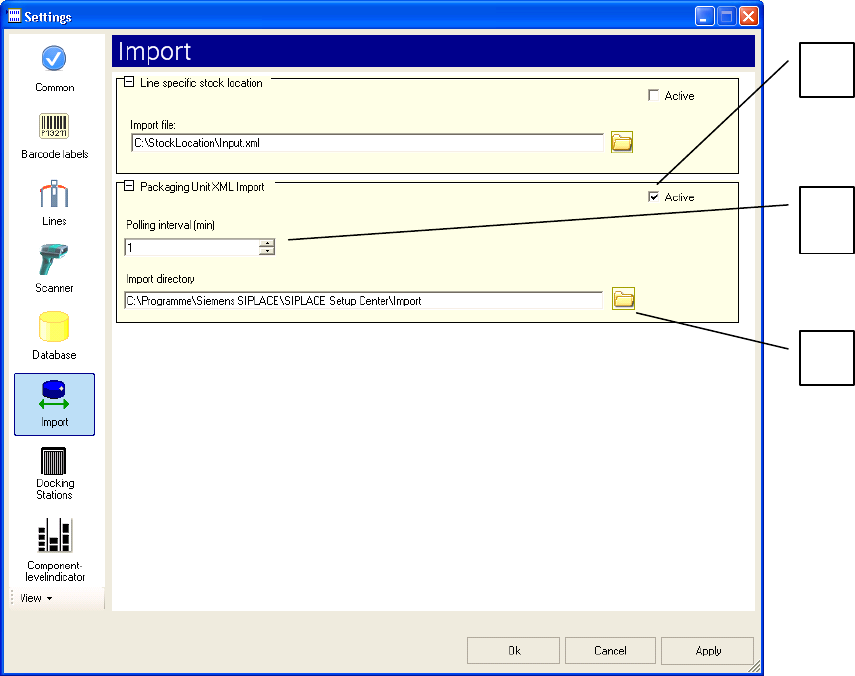
2.2 Configuration of the Import Function in Siplace Setup Center GUI
You can change the default settings for importing XML data in the Settings => Import dialog box of
SIPLACE Setup Center.
Key:
(1) Activates the XML Batch import of packaging units
(2) Time period for importing XML files in minutes
(3) Absolute path of the import folder. The default import folder "Import" is created by the
installation process
2
1
3
Setup Center 5.1 - XML Import
8 of 22
2.3 Import Functionality
When the following file is copied to the import folder, Setup Center will read out the file during the
next period and process the data.
<?xml version="1.0" encoding="utf-8" ?>
<PackagingList ImportVersion="1.0.3.1">
<Packaging IdPackaging="X0000013" ComponentName="Component01"
ComponentBarcode="Component01" OriginalQuantity="100" Quantity="100"
Manufacturer="Manufacturer01" ManufactureDate="2004-01-01T14:44:56+01:00"
ExpiryDate="2010-12-31T14:44:56+01:00" Supplier="Supplier01" BatchId="Batch01"
DeliveryNote="Serial01" MsdLevel="1" MsdOpenDate="1900-01-01T00:00:00+01:00"
Extra1="Extra01" Extra2="Extra02" Extra3="Extra03" Comment="This is a comment" />
<Packaging IdPackaging="X0000014" ComponentName="Component02"
ComponentBarcode="Component02" OriginalQuantity="200" Quantity="200"
Manufacturer="Manufacturer01" ManufactureDate="2004-01-01T14:44:56+01:00"
ExpiryDate="2010-12-31T14:44:56+01:00" Supplier="Supplier02" BatchId="Batch02"
DeliveryNote="Serial01" MsdLevel="1" MsdOpenDate="1900-01-01T00:00:00+01:00"
Extra1="Extra01" Extra2="Extra02"
Extra3="Extra03" Comment="This is a comment" />
<Packaging IdPackaging="X0000015" ComponentName="Component03"
ComponentBarcode="Component03" OriginalQuantity="300" Quantity="300"
Manufacturer="Manufacturer01" ManufactureDate="2004-01-01T14:44:56+01:00"
ExpiryDate="2010-12-31T14:44:56+01:00" Supplier="Supplier03" BatchId="Batch03"
DeliveryNote="Serial01" MsdLevel="1" MsdOpenDate="1900-01-01T00:00:00+01:00"
Extra1="Extra01" Extra2="Extra02" Extra3="Extra03" Comment="This is a comment" />
<Packaging IdPackaging="X0000016" ComponentName="Component04"
ComponentBarcode="Component04" OriginalQuantity="400" Quantity="400"
Manufacturer="Manufacturer02" ManufactureDate="2004-01-01T14:44:56+01:00"
ExpiryDate="2010-12-31T14:44:56+01:00" Supplier="Supplier01" BatchId="Batch01"
DeliveryNote="Serial01" MsdLevel="1" MsdOpenDate="1900-01-01T00:00:00+01:00"
Extra1="Extra01" Extra2="Extra02" Extra3="Extra03" Comment="This is a comment" />
<Packaging IdPackaging="X0000017" ComponentName="Component05"
ComponentBarcode="Component05" OriginalQuantity="500" Quantity="500"
Setup Center 5.1 - XML Import
9 of 22
Manufacturer="Manufacturer02" ManufactureDate="2004-01-01T14:44:56+01:00"
ExpiryDate="2010-12-31T14:44:56+01:00" Supplier="Supplier02" BatchId="Batch02"
DeliveryNote="Serial01" MsdLevel="1" MsdOpenDate="1900-01-01T00:00:00+01:00"
Extra1="Extra01" Extra2="Extra02" Extra3="Extra03" Comment="This is a comment" />
<Packaging IdPackaging="X0000018" ComponentName="Component06"
ComponentBarcode="Component06" OriginalQuantity="600" Quantity="600"
Manufacturer="Manufacturer02" ManufactureDate="2004-01-01T14:44:56+01:00"
ExpiryDate="2010-12-31T14:44:56+01:00" Supplier="Supplier03" BatchId="Batch03"
DeliveryNote="Serial01" MsdLevel="1" MsdOpenDate="1900-01-01T00:00:00+01:00"
Extra1="Extra01" Extra2="Extra02" Extra3="Extra03" Comment="This is a comment" />
</PackagingList>
After processing the file Setup Center will delete the XML file. XML files which have been
completely and successfully processed will be copied to the \Import\XML-OK folder. Faulty or
partially processed files will be copied to the \Import\XML-NotOK folder and an additional text file
with the name of the XML file and the postfix ".error.txt" will be created. This text file contains the
detailed error messages. 4
4