CP-842E-842ME System Reference-SYS-CP842-10E.pdf - 第129页
Commands >> Command Hierarchy SYS-CP842-1.0E 5-1 5. Commands This part contains the co mmand hierarchy and a list of all the co mmands on the machine. 5.1 Command Hierarchy This chapter gives the co mmand hierarchy…

Machine System >> Panel ID Read Function (Option)
4-92
SYS-CP842-1.0E
MEMO:
Commands >> Command Hierarchy
SYS-CP842-1.0E 5-1
5. Commands
This part contains the command hierarchy and a list of all the commands on the
machine.
5.1 Command Hierarchy
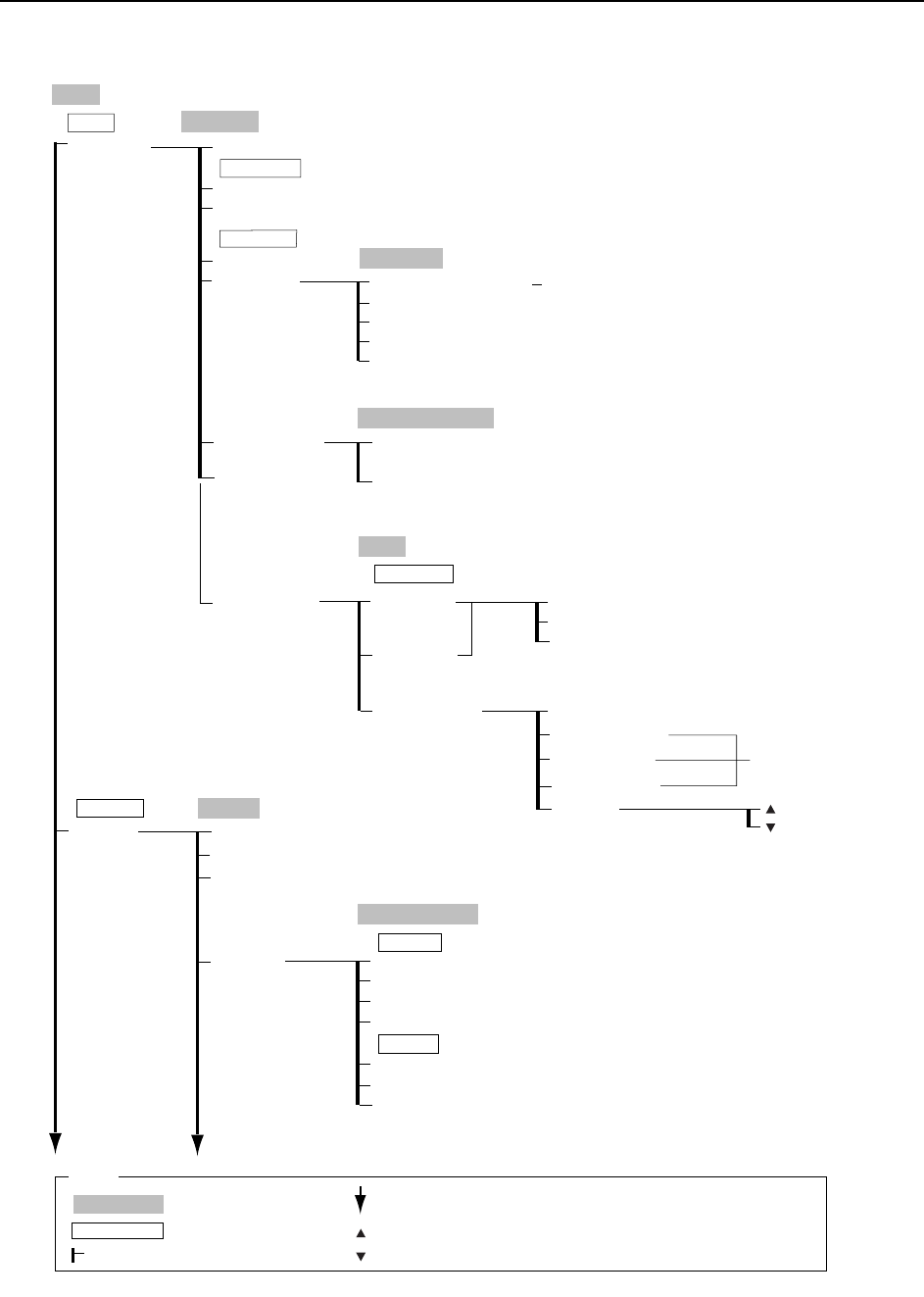
This chapter gives the command hierarchy of the commands on the machine.
The command hierarchy is designed to provide the operator with an easy and under-
standable overview of the commands and their hierarchical relationship.
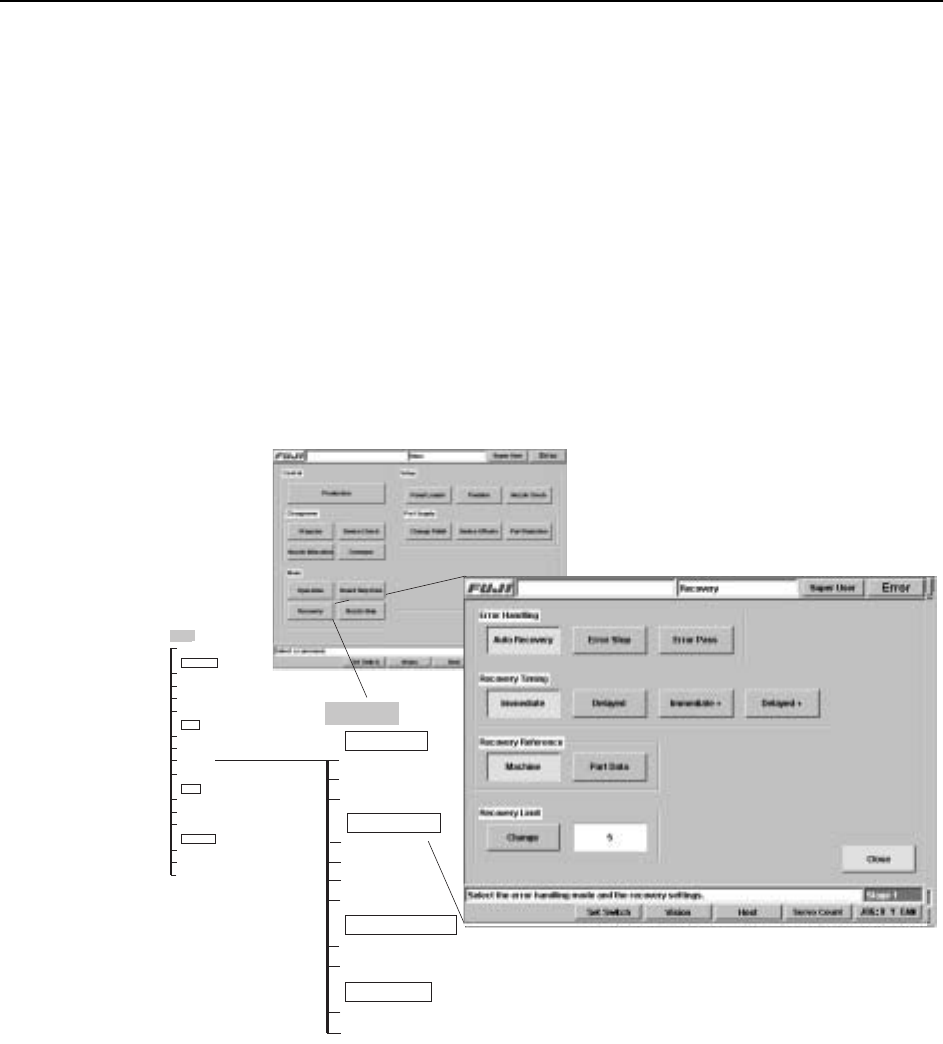
Each of the machines touch screens contains a number of commands, and these are
represented as a single branch (or vertical line) in the command hierarchy.
The correlation between the commands as they occur at the interface and as they are
represented in the command hierarchy is shown in the figure below.
As can be seen, the name of the each screen is given in a shaded box at the top of the
branch. In certain screens commands are positioned in functionality related groups,
which are demarcated on the machine interface by a thin line and a group name.
These section names display in the command hierarchies in clear boxes, e.g., Error
Handling in the example above.
Main
Production
Auto Recovery
Error Stop
Machine
Close
Recovery Reference
Error Handling
Error Pass
Immediate
Recovery Timing
Delayed
Immediate +
Delayed +
Part Data
Change
Recovery Limit
Main
Program
Device Check
Nozzle Allocation
Changeover
Conveyor
Operation
Board Skip Data
Recovery
Mode
Nozzle Skip
Panel Loader
Position
Nozzle Check
Setup
Change Pallet
Device Offsets
Part Rejection
Part Supply
Recovery
CR7SC001a
Commands >> Command Hierarchy
5-2
SYS-CP842-1.0E
Production
Main
Automatic
ST1 ST16
Step
Disabled
Mark Editor
Production
Close
Remote Start
Production Start Number
→ Numeric Keypad
Control
Operation Mode
Start Sequence
Clear Completed Panels → OK
Chg Scheduled Panels → Numeric Keypad
Program
Changeover
Program
Change Pallet → To Change Pallet Screen
Finsh Current Panels
Finish All Panels
Skip Reading
1 (Sequence Number)
Close
Station
Enter
Mark Editor
[START button]
Loader Data
Auto
Nozzle Data
Production Info
Change Panel
Timescale → Numeric Keypad
Nozzle Error Rate
C73SC002Ed
Close
[START button]
Slot Error Rate
Parts Error Rate
Error log
Warning Level
→ Numeric Keypad
Hide Revision
Sort/Find
Name Descending
Name Ascending
Date Descending
Input → Virtual Keyboard
All
Date Ascending
Enter/Close
Find Name
Sort Order
Starting Sequence
Sort Order / Find
Production
Operation Mode
: Command name
: Screen name
Production
: Command group
: Continued on the next page
: Press to scroll upwards
Legend
: Press to scroll downwards
( )
: General description
[ ]
: Push button
→
: Displays separate dialog box