CP-842E-842ME System Reference-SYS-CP842-10E.pdf - 第54页
Machine System >> Basic Operation 4-18 SYS-CP842-1.0E Skipping a Nozzle Manually (Changing Nozzle St atus) Users can manually change the stat us of a nozzle at the machine. There are five noz- zle statuses.. OK: Th…
Machine System >> Basic Operation
SYS-CP842-1.0E 4-17
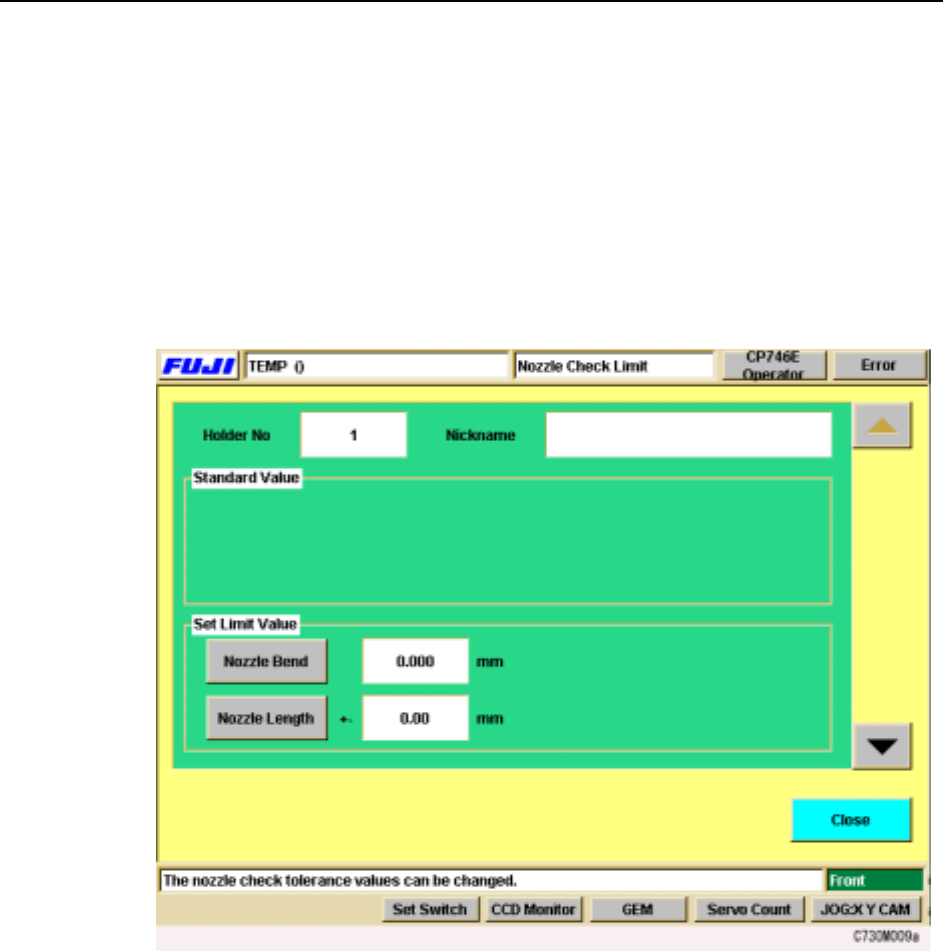
Specifying Nozzle Tolerance Values at the Machine
You can set the tolerances values for the various nozzle checks at the [Nozzle Check
Limits] screen. The settings made at this screen are used to determine whether noz-
zles are acceptable for production or not.
Procedure
1 At the [Main] screen, press [Nozzle Check]. The [Nozzle Check] screen displays.
2 From the [Nozzle Check] screen, press [Nozzle Check Limits]. The following
screen displays.
3 The screen for holder 1 tolerance values displays first. Use the up and down
arrows on the right to move between the nozzle holders.
4 In the “Set Limit Value” section, select the tolerance to be set. When you select
a command, the numeric keypad displays. Input the tolerance limit (the input
range displays at the numeric keypad), and press [OK] to enter the setting.
5 When your settings are complete, press [Close] to return to the [Nozzle Check]
screen.
Machine System >> Basic Operation
4-18
SYS-CP842-1.0E
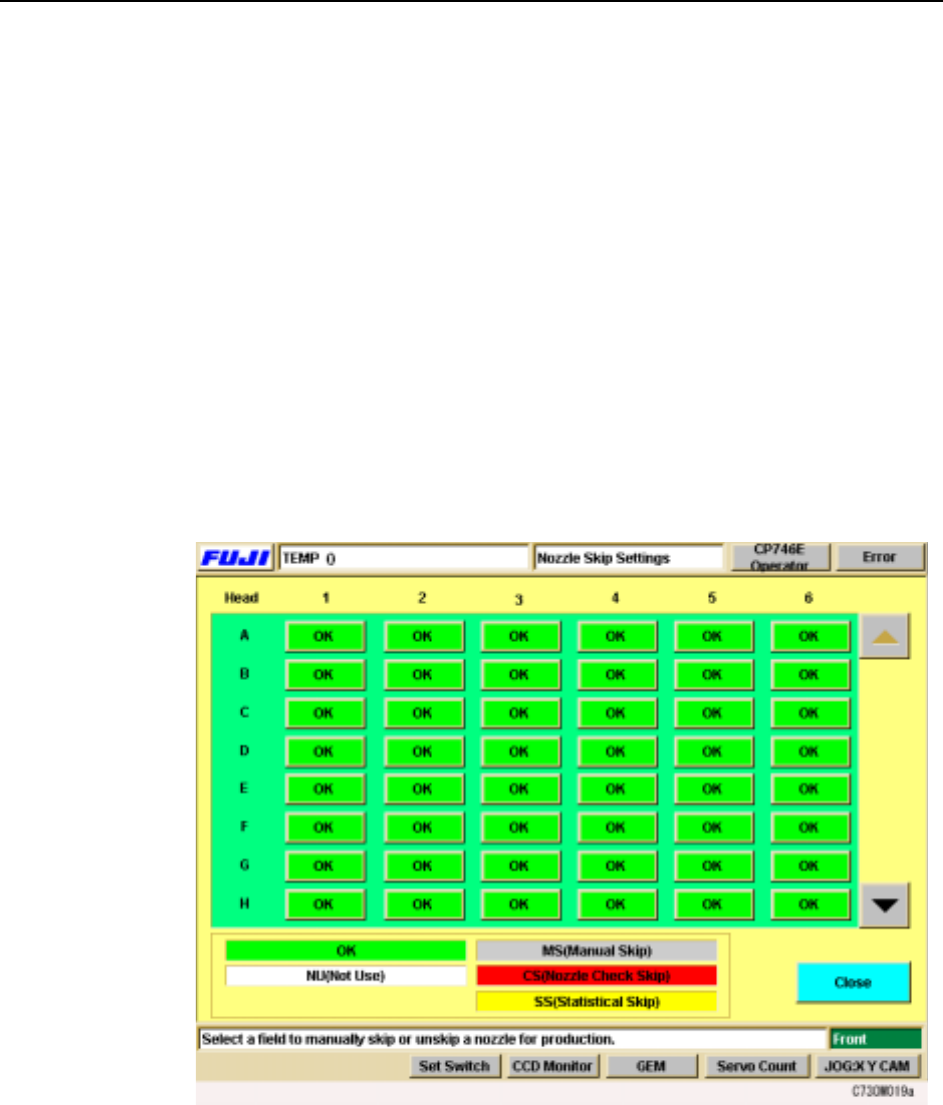
Skipping a Nozzle Manually (Changing Nozzle Status)
Users can manually change the status of a nozzle at the machine. There are five noz-
zle statuses..
OK: The condition of the nozzle is acceptable for production.
NU (Not Used): There is no nozzle in that position.
MS (Manual Skip): The operator has manually eliminated that nozzle from
assembly.
CS (Check Skip): The nozzle was rejected during a nozzle check.
SS (Statistical Skip): The nozzle was eliminated from assembly through statistical
processing.
The operator can manually skip a nozzle using the following procedure. This proce-
dure can also be used to change the other nozzle statuses.
Procedure
1 Press [Nozzle Skip] at the [Main] screen. The [Nozzle Skip] screen displays.
2 There is one button for each nozzle and the status of the nozzle is indicated by
its color. A key to the status colors is shown below the table.
3 To skip a nozzle manually press the [OK] button for that nozzle. “OK” switches
to “MS” (Manual Skip). Manually skipped nozzles or nozzles automatically
skipped can be returned to an [OK] status by pressing the button for that [MS],
[CS], or [SS] status nozzle.

Machine System >> Basic Operation
SYS-CP842-1.0E 4-19
Skipping Nozzles Automatically (Statistical Processing)
The machine can be set to automatically skip nozzles which have a high rate of error.
Users can set a limit to the rate of errors (pick-up or inspection) caused by a particular
nozzle. If this limit is reached, the nozzle is skipped.
Nozzle statistical processing is based on a cumulative nozzle error count which is
cleared if the nozzle in question performs 16 consecutive successful pick and place
attempts. If the error limit is reached before the error count is cleared, that nozzle is
skipped.
Consider the following example where the error limit has been set to 4. Nozzle cycles
where a pick-up or inspection error occurred are marked with 5, nozzle cycles where
the part is successfully picked and placed are marked with 3.
In the case above, the nozzle in question is skipped when the fourth error occurs. The
machine can be set to automatically test the skipped nozzle again (Reject Nozzle
Check).
✓
✓
✕
✕
✓
✓
✓
✓
✓
✓
✓
✓
✓
✓
✓
✓
✓
✓
✓
✓
✓
✕
✓
✕
✓
✓
✓
✓
✕
✓
✓
✕
1
2
0
0
1
2
3
4
5
6
7
8
9
10
11
12
13
14
15
16
1
0
1
0
1
2
3
4
0
1
2
0
0
0
1
2
2
2
2
2
2
2
2
2
2
2
2
2
2
2
2
2
0
1
1
2
2
2
2
2
3
3
3
4
Part
Status
Successful
Attempt Count
Error
Attempt Count
16 consecutive successful
attempts clears the error count.
4 errors occur before the error
count is cleared, and the nozzle
is skipped.
C73OM024