CP-842E-842ME System Reference-SYS-CP842-10E.pdf - 第70页
Machine System >> Basic Operation 4-34 SYS-CP842-1.0E 2 When the [Styl e] button is pre ssed, the ST ART button becomes enabled. If the ST ART button is then pressed, all panels are unloaded from the ma chine. Note…
Machine System >> Basic Operation
SYS-CP842-1.0E 4-33
4.1.11Changing the Conveyor Width
On machines equipped with an automatic conveyor width changing mechanism, the
conveyor width can be automatically changed in 0.1 mm increments by commands
executed from the machine.
Automatic Conveyor Width Change Function
The automatic conveyor width change function is used to facilitate changeovers. To
use this function, enter the panel width (for the post-changeover production program)
at the [Conveyor Width] screen shown below. The conveyor then automatically moves
to that width.
Note: Be sure to remove the backup pins before performing width changes.
Procedure
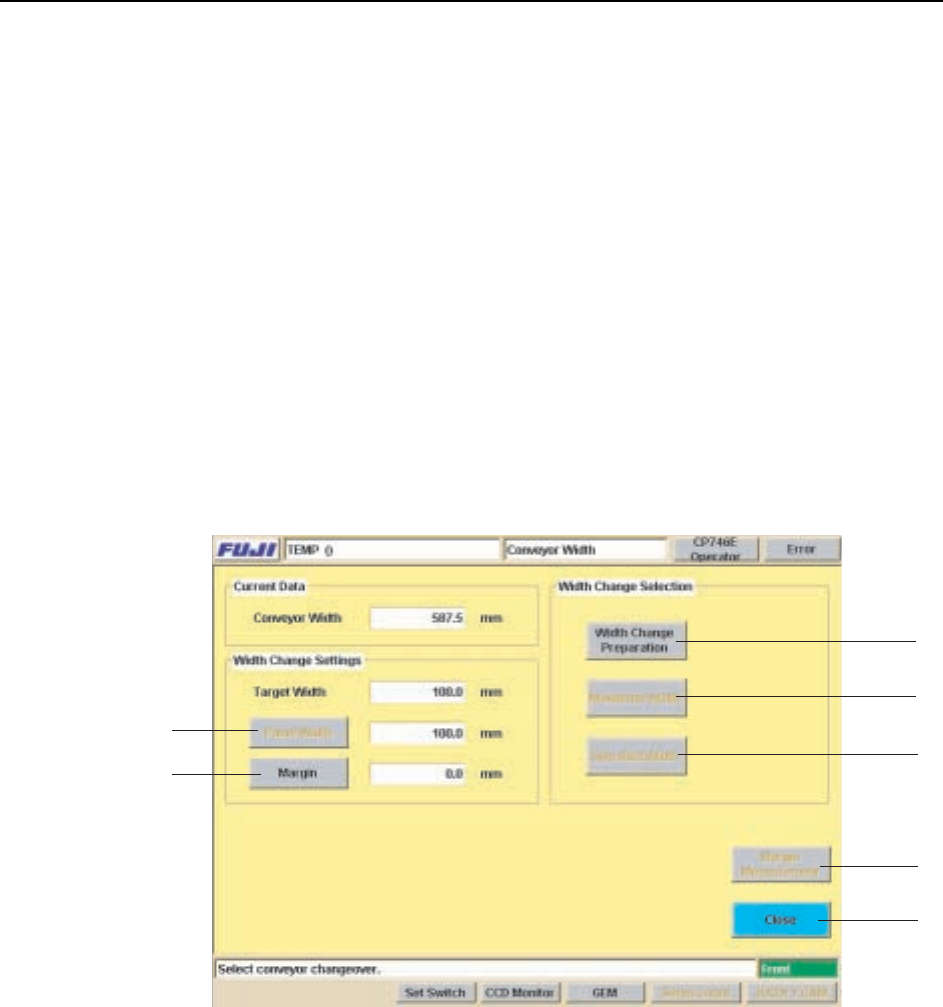
1 At the [Main] screen’s “Changeover” area, select the [Conveyor] item to display
the [Conveyor Width Select] screen, then press the [Conveyor Width] button to
display the [Conveyor Width] screen shown below.
Screen Button Explanations
A. [Panel Width]: Specifies the Y-direction size of the production program panel.
B. [Margin]: Specifies the clearance between the conveyor and panel.
C. [Style]: Prepares for a conveyor width change (panel unloading, conveyor rail
linkage, etc.).
D. [Maximum Width]: Adjusts the conveyor to its maximum width minus 1 mm.
E. [Specified Width]: Adjusts the conveyor to the specified width.
F. [Margin Measurement]: Oeasures the margin (clearance between conveyor and
panel).
G. [Close]: Returns to the [Main] screen.
A
B
C
D
E
F
G

Machine System >> Basic Operation
4-34
SYS-CP842-1.0E
2 When the [Style] button is pressed, the START button becomes enabled. If the
START button is then pressed, all panels are unloaded from the machine.
Note: When set so that panels are not being transferred to a next stage, the last unloaded
panel remains on the conveyor. In this case, be sure to remove the panel from the
conveyor by hand before using inching or conveyor width change commands.
3 Press the [Panel Width] or [Margin] button to display a numeric keypad, then
entire the desired setting values. The total of the “Panel Width” + “Margin” val-
ues displays as the “Target Width”.
4 The START button is enabled when either the [Specified Width] or [Maximum
Width] button is pressed.
5 Press the START button to perform the conveyor width change.
Machine System >> Basic Operation
SYS-CP842-1.0E 4-35
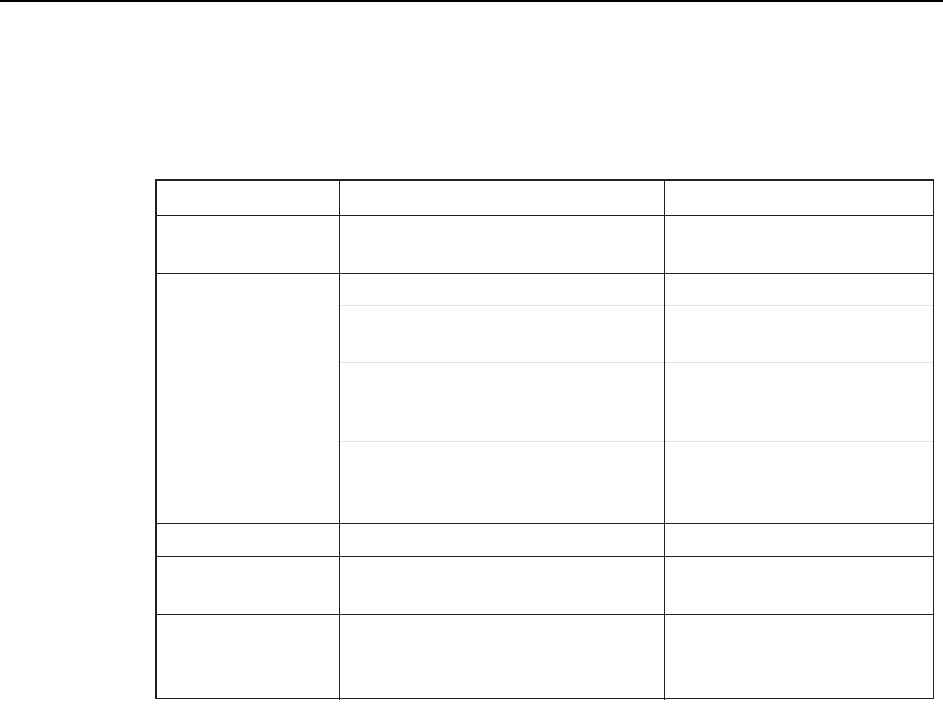
Troubleshooting
The following table shows the corrective actions for errors which may occur during
automatic conveyor width adjustments.
Next-Stage Follow-Up Control
CP-842E/842ME do not support follow-up control related to conveyor width changes.
For example, if a conveyor width change is performed at the previous stage machine in
the line, the operator must perform the same conveyor width change on the CP-842E/
842ME.
CP-842E/842ME do not support follow-up control related to conveyor width changes.
For example, if a conveyor width change is performed at the previous stage machine in
the line, the operator must perform the same conveyor width change on the CP-842E/
842ME.
On the other hand, if the next stage machine supports follow-up control related to con-
veyor width changes, this follow-up control can be enabled by adding a follow-up dog
to the CP-842E/842ME.
Error Cause Corrective Action
T011E
Internal error in the conveyor
width change shell
"Panel check" error
during automatic
conveyor width change
Operation error
Backup pin detection
Conveyor control board failure at start-up,
etc.
Conveyor motion interference. Remove the obstacle.
Backup pins were detected. Remove the backup pins.
Cover is open
The cover at the previous or next stage
machine is open.
Close the cover at the previous or
next stage machine.
Backup pin detection problem.
Press the EMERGENCY STOP
button, then remove the backup pins.
Software limit was reached during operation.
Perform inching to bring the
conveyor width back within its
prescribed motion range.
A [Maximum Width] or [Specified Width]
command was executed when the conveyor
width was outside the software limits.
Perform inching to bring the
conveyor width back within the
software limits.
The "panel check" sensor detected the
presence of a panel in the loader during
a conveyor width change.
Remove the panel from the loader,
or check the sensor.
Perform a "data trace" operation,
then contact your Fuji representative.