00192231-09_VD_SSW 407.05_de en.pdf - 第101页
Software Version Description, Station Software Version 407.05 07/2008 Edition 9.4.4 Conversion of Machine Data The version converter for the machine data (local files) is always started by MC -Installation. The converter…
Software Version Description, Station Software Version 407.05 07/2008 Edition
Main Installation
Choose Next to start the MC installation.
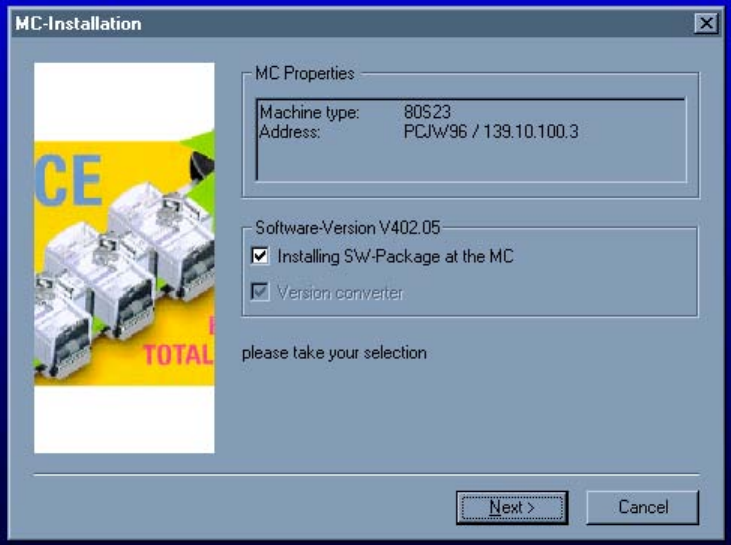
⇒ MC-Installation is prepared to carry out the data preparation on the station computer and the machine
controller. In the Silent mode, the welcoming dialog will not be displayed.
⇒ In the Properties window [MC Properties], die machine type to be installed and the computer name along
with the associated IP address are displayed.
⇒ In the software version frame [Software version VXXX.YY], the software version to be installed is
displayed.
(on the meaning of the SW version, see Chapter "Installation of SIPLACE Software")
⇒ In the Installation Menu [Software-Version VXXX.YY], the selection of the installation
steps takes place involving the following menu options:
• Installing SW-Package at the MC (menu option activating the MC installation)
• Version converter (menu option is permanently active; cannot be deactivated)
100 of 104
Software Version Description, Station Software Version 407.05 07/2008 Edition
9.4.4 Conversion of Machine Data
The version converter for the machine data (local files) is always started by MC-Installation. The converter
checks whether file are to be converted and if so, which ones, and then carries out any necessary
conversions. If the machine was installed in standalone mode, you must switch to the programming system
used. This supplies the machine with the current machine configuration (ideal.ma).
101 of 104
Software Version Description, Station Software Version 407.05 07/2008 Edition
102 of 104