00192231-09_VD_SSW 407.05_de en.pdf - 第18页
Software Version Description, Station Software Version 407.05 07/2008 Edition The view is divided into three logical sections: 1. List of magazines in the nozzle changer and associated functions: The following informatio…

Software Version Description, Station Software Version 407.05 07/2008 Edition
5.5 New Functions in 407.04
Software version 407.04 is based on Version 407.03 and comprises all the functions and error corrections
for this version together with the service packs created for Version 407.03. Version 407.04 of the software
also incorporates the following new features and changes:
• Software support for the "Nozzle splitting" option
• Revised traceability "Trace +"
• Embedded software 2321m for ICOS MVS 340
• Maintenance operations and elimination of errors
5.5.1 Software support for the "Nozzle splitting" option
Note:
The option for nozzle splitting has to be activated at first.
The "Nozzle splitting" option was created for version 407.02.SP0. This option has been incorporated in the
current version (Order number: 00117520.01).
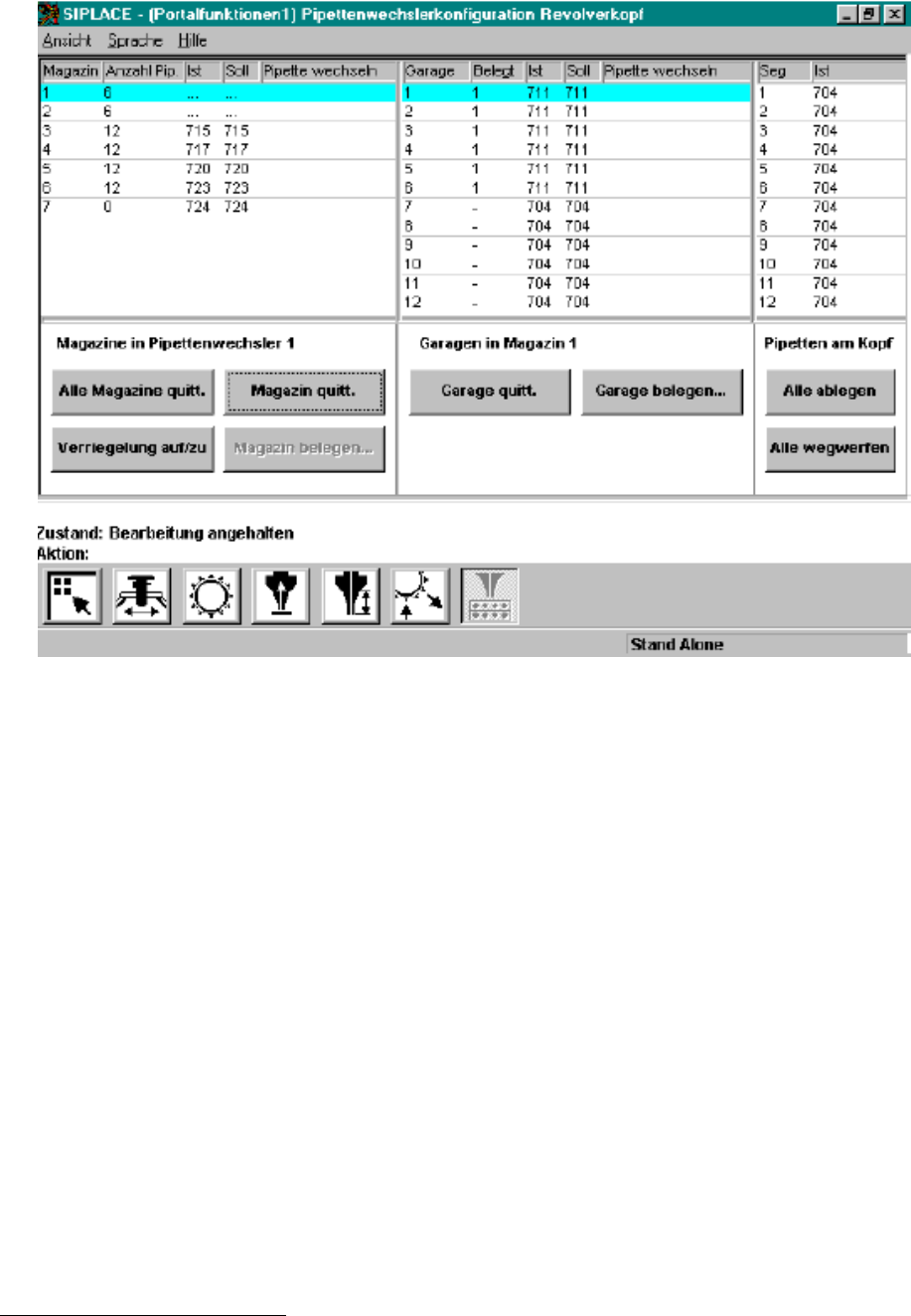
The option allows the nozzle changer magazines for 12-segment heads to be occupied by different nozzle
types. In this context, the "Nozzle Changer Configuration Revolver Head" view was redesigned in the GUI
and a number of new functions were added.
17 of 104
Software Version Description, Station Software Version 407.05 07/2008 Edition
The view is divided into three logical sections:
1. List of magazines in the nozzle changer and associated functions:
The following information is displayed in the list for all the magazines of the nozzle changer:
- Magazine number
- Number of nozzles in the magazine
- Nozzle number of the nozzle currently occupying the magazine
1
- Nozzle number of the specified nozzle
- Indication if the specified occupancy deviates from the actual occupancy and reconfiguration of
the magazine is necessary.
1
If there are several different nozzle types in the magazine, "..." is displayed instead of the nozzle number. If no nozzle
type has been specified for a magazine, 0 is displayed.
18 of 104

Software Version Description, Station Software Version 407.05 07/2008 Edition
New functions:
- "Alle Magazine quittieren" (Confirm all magazines):
The operator confirms that he/she has reconfigured all magazines of the nozzle changer according
to the specification.
- "Magazine belegen..." (Occupy magazines...) (Was previously "Refill magazine"):
In a dialog box, the operator can specify the number of nozzles contained in a magazine which is not
completely filled. The prerequisite for this is that the garages of the magazine are filled with no gaps
starting at position 1.
Note:
This button is only active if a magazine is not occupied by mixed nozzles and if it does not need to
be reconfigured.
2. Garage occupancy and associated functions
The following information is displayed in the list for all the garages of the selected magazine:
- Garage number
- Garage occupancy (-: empty / 1: occupied)
- Nozzle number of the nozzle currently occupying the magazine
2
- Nozzle number of the specified nozzle
- Indication if the specified occupancy deviates from the actual occupancy and reconfiguration of the
garage is necessary.
New functions:
- "Garage quittieren" (Confirm garage) - (previously only for C&P6 magazines):
The operator confirms that he/she has reconfigured the garage according to the specification.
- "Garage belegen..." (Occupy garage...) (new):
A dialog box allows the operator to set the selected garage to full or empty.
3. Head occupancy:
When switching to the view "Nozzle changer configuration, revolver head", all the nozzles of the relevant
head are no longer returned automatically. Instead, the nozzle configuration on the head is displayed in a
separate list. The operator has the option of returning or discarding the nozzles manually with the following
functions:
2
If no nozzle type has been specified for a garage, 0 is displayed. If a garage is not occupied, "-" is displayed.
19 of 104