00191099-01.pdf - 第42页
Retrofitting I nstructions SIPLACE 80 / S-23 (HM) / HS-50 Component Bar-Code Scanner (Optional) 2.7 Component Bar-Code Scanner on S-20/F4/F4-6/F5 (HM) and S-23 (HM) Issue 06/00 42 Fig. 2.7.1 Attaching the Component Sca…

Component Bar-Code Scanner (Optional) Retrofitting Instructions SIPLACE 80 / S-23 (HM) / HS-50
Issue 06/00 2.7 Component Bar-Code Scanner on S-20/F4/F4-6/F5 (HM) and S-23 (HM)
41
&RPSRQHQW%DU&RGH6FDQQHURQ6)))
+0DQG6+0
+DUGZDUH,QVWD OODWLRQIRU3&&DUULHUVDQG
Å Turn the machine OFF and isolate it from the mains (details -> see DANGER text in Section
2.2).
Å Leave the safety hoods closed.
Å Unplug the plug-and-socket connections on the back of the station monitor.
Å Lift the station monitor off the carrier.
Å Attach the bar-code bracket to the carrier from below (see Fig. 2.7.1) with the 2 socket hex
head cap screws M4 and the 4 washers provided (place 2 washers A4.2, DIN 125, under each
screw).
NOTE:
The signal filter should be as far DOWN on the PC carrier as possible (see Fig. 2.7.1) so that it
can be properly positioned on the PC carrier.
Å Use the self-adhesive Velcro fastener from the set of cables for the hand-held scanner (see
Section 2.3.1).
Å Glue part of the Velcro fastener to PC carrier 3 (position: see Fig. 2.7.1).
Å Glue the other part of the Velcro fastener to the signal filter and fasten the signal filter to the
PC carrier.
Å Make certain that the warning labels bearing the symbol for a laser and technical data are on
the hand-held scanner (see Section 2.2).
Å Clamp the cable of the hand-held scanner in the strain relief (see Fig. 2.7.1 -> 7) and place the
hand-held scanner into the bracket.
Å Unplug the keyboard cable from the station computer.
Å Plug the SHORT cable from the set of cables for the hand-held scanner into the "Keyb" con-
nection of the signal filter.
Å Connect the other end of the SHORT cable to the existing keyboard cable.
Å Connect the LONG cable to the "CRT" connection of the signal filter and the station computer.
Å Pick up the station monitor and put it back on the carrier.
Å Restore the plug-and-socket connections on the back of the station monitor.
Retrofitting Instructions SIPLACE 80 / S-23 (HM) / HS-50 Component Bar-Code Scanner (Optional)
2.7 Component Bar-Code Scanner on S-20/F4/F4-6/F5 (HM) and S-23 (HM) Issue 06/00
42
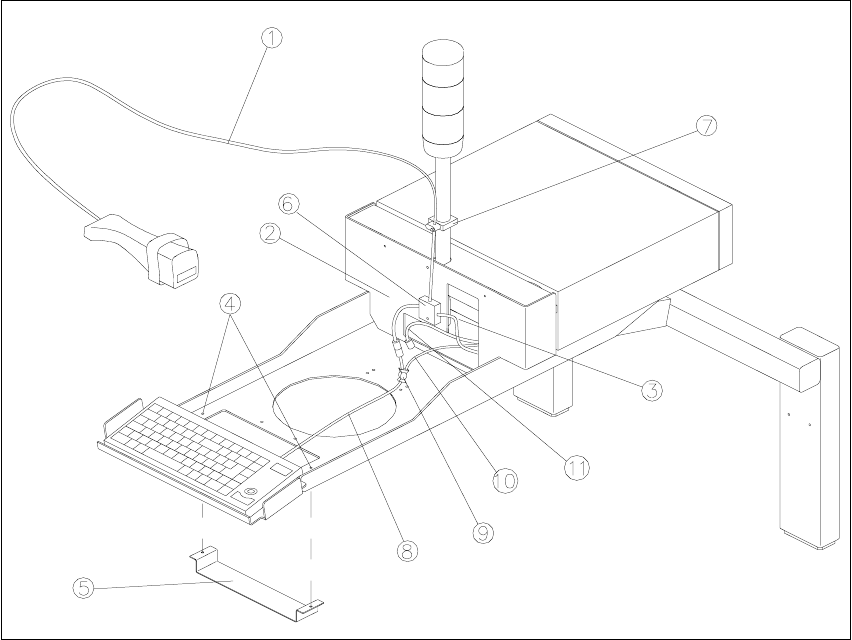
Fig. 2.7.1 Attaching the Component Scanner to PC Carriers 2 and 3
Key:
1. Hand-held scanner
2. Short cable
3. Long cable
4. Holes to fasten the bar-code bracket
5. Bar-code bracket
6. Signal filter and Velcro fastener
7. Strain relief
8. Keyboard cable
9. Splitting of keyboard cable and trackball cable
10. Trackball cable
11. Cable to the Machine Controller
The signal filter must be fastened as far DOWN as possible: see illustration.
Component Bar-Code Scanner (Optional) Retrofitting Instructions SIPLACE 80 / S-23 (HM) / HS-50
Issue 06/00 2.7 Component Bar-Code Scanner on S-20/F4/F4-6/F5 (HM) and S-23 (HM)
43
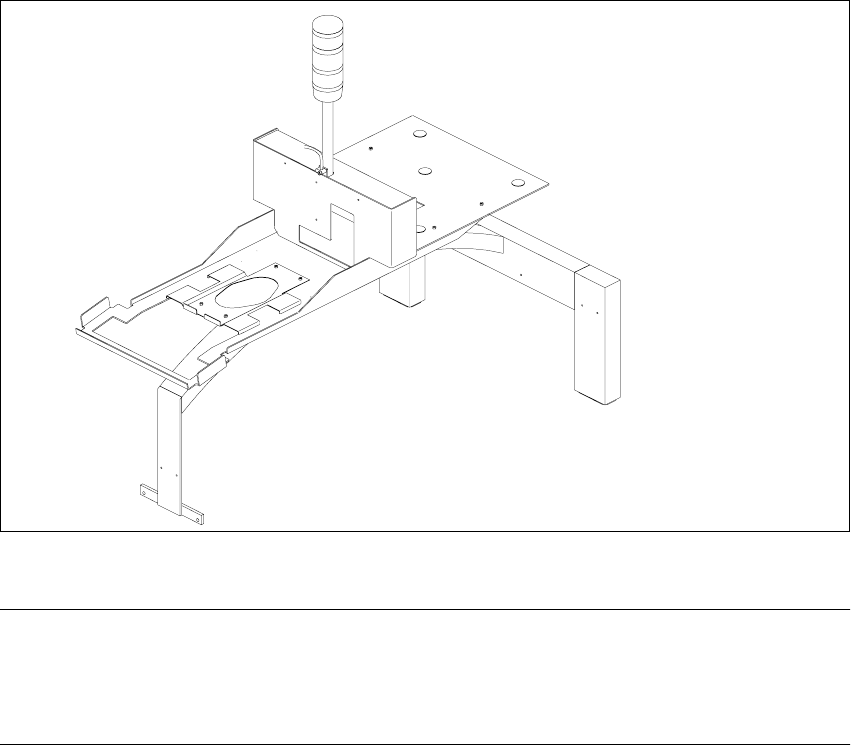
Fig. 2.7.2 PC Carrier 4 for F4 / F4-6 / F5 (HM) / S-20 / S-23 (HM)
NOTE:
If the PC carrier 4 shown above has already been installed on the machine, fasten the bar-code
bracket including the remaining assembly and cabling of the hand-held scanner as described for
PC carriers 2 and 3 (see Fig. 2.7.1).
+DUGZDUH,QVWDOODWLRQIRU3&&DUULHU
Å Turn the machine OFF and isolate the machine from the mains (for details, see: DANGER text
in Section 2.2).
Å Leave the safety hoods closed.
Å Unplug the plug-and-socket connections on the back of the station monitor.
Å Lift the station monitor off the carrier.
Å Attach the bar-code bracket to carrier 1 from below (position: see Fig. 2.7.3) with the 2 socket
hex head cap screws M4 and the 4 washers provided (place 2 washers A4.2, DIN 125, under-
neath each screw).
Å Glue one part of the Velcro fastener (from the retrofit kit) to the side of PC carrier 1 (position:
see Fig. 2.7.3).