00191099-01.pdf - 第46页
Retrofitting I nstructions SIPLACE 80 / S-23 (HM) / HS-50 Component Bar-Code Scanner (Optional) 2.8 Component Bar-Code Scanner on SIPLACE 80 S-15/F3 Issue 06/00 46 &RPSRQH QW%DU&RGH6F DQQHURQ6,3/$&(…
Component Bar-Code Scanner (Optional) Retrofitting Instructions SIPLACE 80 / S-23 (HM) / HS-50
Issue 06/00 2.7 Component Bar-Code Scanner on S-20/F4/F4-6/F5 (HM) and S-23 (HM)
45
Å Cover the middle of the safety hoods with a cloth so that no chips can pass through the gaskets
of the safety hoods.
Å Make an M4 threaded hole in the side of PC carrier 1 (see Fig. 2.7.3 -> 7) to fasten the cable
clamp (from the retrofit kit).
Å Take the signal filter out of the retrofit kit (see Section 2.3.2) and attach the other part of the
Velcro fastener to the bottom of the signal filter.
Å Fasten the signal filter from the retrofit kit (see Section 2.3.2) to PC carrier 1.
Å Make certain that the warning labels bearing the symbol for a laser and technical data are on
the hand-held scanner (see Section 2.2).
Å Place the hand-held scanner into the bracket.
Å Fasten the cable of the hand-held scanner with the cable clamp from the retrofit kit (1 washer
A4.3 and 1 socket hex head cap screw M4 x 6).
Remember: There must be strain relief on the cable at the signal filter.
Å Unplug the keyboard cable from the station computer.
Å Plug in the SHORT cable from the hand-held scanner’s cable set at the connection "KBD" (=
keyboard) at the signal filter.
Å Connect the other end of the SHORT cable to the existing keyboard cable.
Å Connect the LONG cable with the "CRT" connection of the signal filter and the station com-
puter.
Å Carefully remove the cover (cloth) on the safety hoods and thoroughly clean the entire area of
the safety hoods with the vacuum cleaner.
Å Lift the station monitor back onto the carrier.
Å Re-attach the plug-and-socket to the back of the station monitor.
.H\ERDUG6HWWLQJV
As the scanner is connected to the keyboard in parallel, it has to match the set keyboard driver in
the PC.
If a German keyboard driver is set, the scanner must be set to "Keyboard German". If an American
keyboard driver is set, the scanner must be set to "Keyboard US".
Retrofitting Instructions SIPLACE 80 / S-23 (HM) / HS-50 Component Bar-Code Scanner (Optional)
2.8 Component Bar-Code Scanner on SIPLACE 80 S-15/F3 Issue 06/00
46
&RPSRQHQW%DU&RGH6FDQQHURQ6,3/$&(
6)
+DUGZDUH,QVWDOODWLRQ
Å Turn the machine OFF and isolate the machine from the mains (for details: see DANGER text
in Section 2.2).
Å Leave the safety hoods closed.
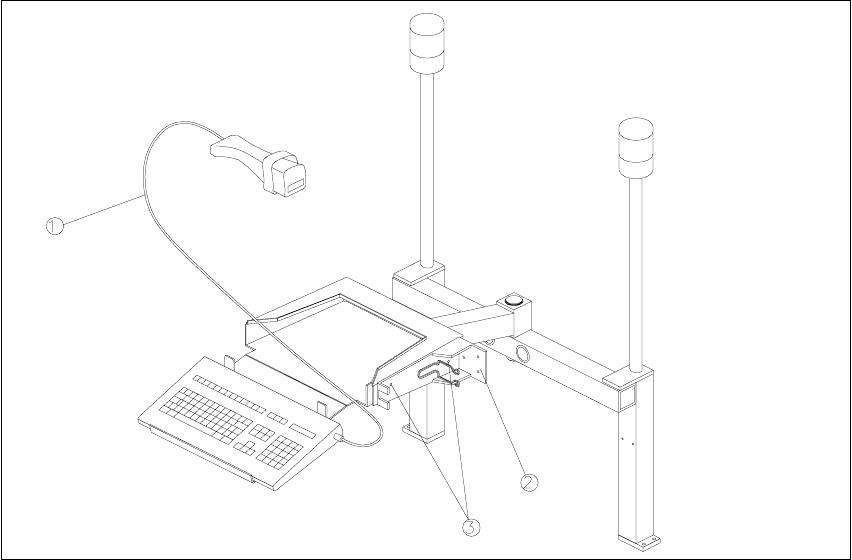
Fig. 2.8.1 PC Carrier for S-15/F3
Key:
1. Hand-held scanner with cable
2. Hand-held scanner bracket
3. Holes to attach the bracket for the hand-held scanner
Å Unplug the plug-and-socket connections on the back of the station monitor.
Å Lift the station monitor off the carrier.
Å Place the bar-code scanner from the retrofit kit (see Section 2.3.3) against the side of the mon-
itor carrier as shown in Fig. 2.8.1 and mark the hole locations on the monitor carrier.

Component Bar-Code Scanner (Optional) Retrofitting Instructions SIPLACE 80 / S-23 (HM) / HS-50
Issue 06/00 2.8 Component Bar-Code Scanner on SIPLACE 80 S-15/F3
47
CAUTION
During the following drilling, do not let any chips drop into the machine and do not damage any
cables.
The safety hoods must remain closed and covered with a cloth so that no chips can pass through
the gaskets of the safety hoods.
Å Cover the middle of the safety hoods with a cloth.
Å Make a hole with an M4 thread at each of the 2 positions marked.
Å Mount the bar-code bracket on the side of the monitor carrier (see Fig. 2.8.1):
2 socket hex head cap screws M4 x 6 DIN 912 and, for each, 2 washers A4.3 DIN 125.
Å EXCHANGE the existing keyboard for the keyboard in the retrofit kit (see Section 2.3.3).
Å Make certain that the warning labels bearing the symbol for a laser and technical data are on
the hand-held scanner (see Section 2.2).
Å Lift the station monitor back onto the carrier.
Å Carefully remove the cover (cloth) on the safety hoods and thoroughly clean the entire area of
the safety hoods with the vacuum cleaner.
Å Place the hand-held scanner on the side of the keyboard (Fig. 2.8.1).
Å Reconnect the plug-and-socket connections on the back of the station monitor.
.H\ERDUG6HWWLQJ
Currently, the keyboards are set to Laser Emulation as standard. To use them on SIPLACE S-15/
F3 machines, however, they have to be changed to Wand Emulation.
Å Turn the little red switch (SW 1) on the bottom of the keyboard from "Programming off" to "Pro-
gramming on".
Å Press the "F9" key (select bar-code scanner type).
Å Press the key combination "Crtl S". This switches the bar-code to Wand Emulation.
Å Set the red switch back to "Programming off".
Å Read the information regarding the bar-code setting in Section 2.8.3 and, if necessary, set an-
other bar-code.