00198765-02_VD_SSW_713.1_R20-1_EN_DE - 第20页
Station Software 713.1 (R 20-1) / V ersion Description 05/2020 Edition 20 5 Features of the 713.0 Station Software Version 5.1 Support of S IPLACE SX V3 The SIPLACE SX V3 placement machine is supported. 5.2 Smart Pin S u…
Station Software 713.1 (R20-1) / Version Description 05/2020 Edition
19
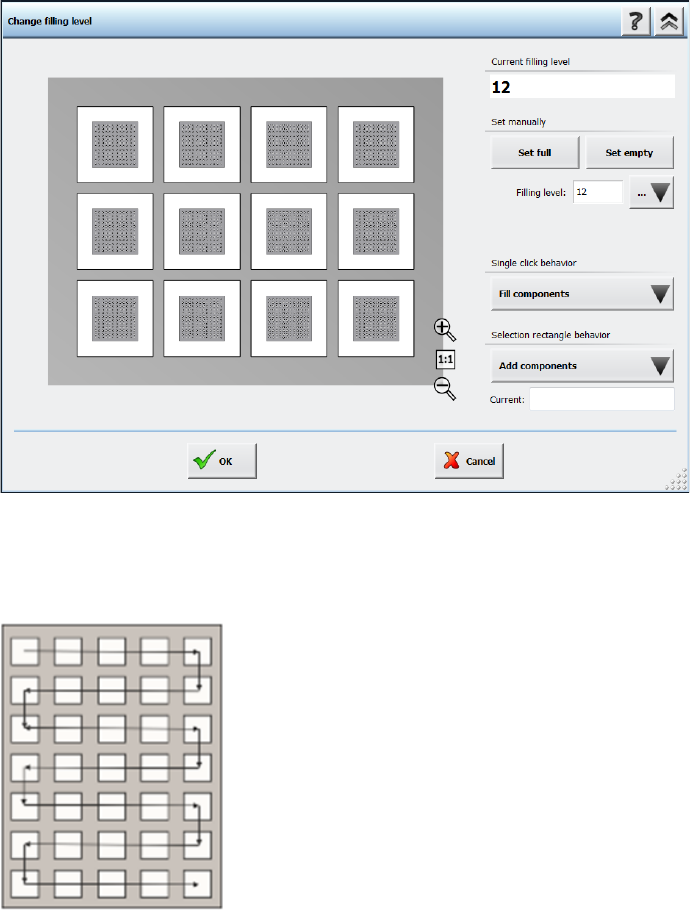
Figure 4-10: Selecting filling level for matrix trays
The pick-up sequence for components is fixed and moves, depending on the selected amount of
components, in a meandering fashion from the top left pocket to the bottom right pocket, as shown
in the following figure:
Figure 4-11: Pick-up sequence for components in a Matrix Tray
Station Software 713.1 (R20-1) / Version Description 05/2020 Edition
20
5 Features of the 713.0 Station Software Version
5.1 Support of SIPLACE SX V3
The SIPLACE SX V3 placement machine is supported.
5.2 Smart Pin Support for TX V2 – Enhancements
The Smart Pin Support for the TX V2 has been enhanced by the functions described below.
Using Partly Accessible Nozzle Magazines
Compatible mode: Complete
A new nozzle magazine with 20 garages has been introduced for the CPP head and C&P20 P / P2
head each:
– Nozzle magazine for CPP head: 20xx magazine, item no. [03135469-xx]
– Nozzle magazine for C&P20 P / P2 head: 40xx magazine, item no. [03218226-xx]
If the TX V2 is configured with Smart Pin Support, not all garages in these nozzle magazines can
be reached by the placement head. To avoid the entire nozzle magazine from being blocked, only
the garages out of reach are blocked and marked as such. All reachable garages can be used.
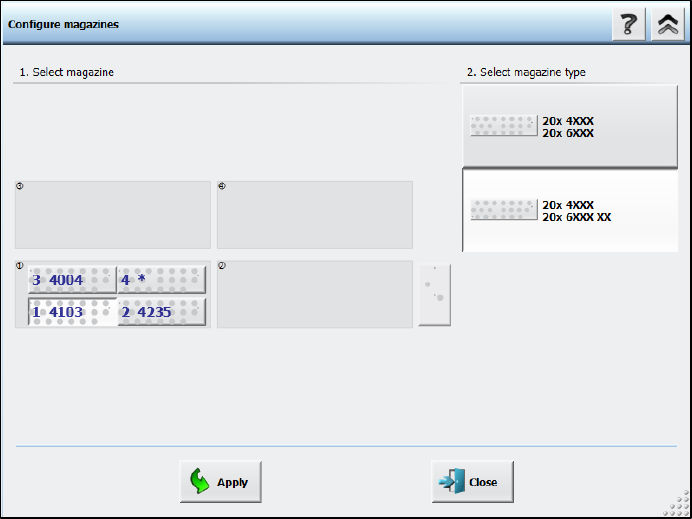
Nozzle magazines that are only partially reachable are marked with an additional “XX” behind the
magazine type name in the Configure magazines dialog.
Figure 5-1: Partly reachable nozzle magazine in Configure magazines dialog
Station Software 713.1 (R20-1) / Version Description 05/2020 Edition
21
Restrictions
– This functionality is only available for the nozzle magazines 6xxx(20), item no. [03218226-xx]
for the C&P20 P2 head and 20xx(20), item no. [03226630-xx] for the CPP head.
– At least two fiducials of partly reachable nozzle magazines must be in reach of the PCB
camera on the placement head.
– All nozzles that are in reach of the placement head must also be in reach of the PCB camera
on the placement head in order to scan the nozzle IDs.
Combination of Smart Pin Support with TwinHead on TX V2
Compatible mode: Complete
The combination of Smart Pin Support with a TwinHead on the TX V2 is supported.
5.3 Automatic Cavity Calibration for Linear Dipping Unit 2 X (LDU 2 X)
Compatible mode: Complete
When exchanging an auto cavity dipping plate, the cavity depth of automatic cavity can be adjusted
manually. The configuration can be saved in the flash memory of the LDU. If the LDU is restarted,
the cavity depth will be adjusted according to the saved configurations.
The cavity depth can be adjusted by clicking the Adjust cavity of dipping plate button in the
station GUI, which opens the Adjust cavity of dipping plate dialog.
For further information, please refer to the Linear Dipping Unit 2 X User Manual, item no.
[00198517-xx].
5.4 Five Color Signal Tower Supported for SIPLACE SX V3 Machine
Compatible mode: Complete
The SIPLACE SX V3 machines optionally support a five color signal tower. The colored lights of
the signal tower have the following meanings:
● Red: serious technical malfunction or irregular condition
● Yellow: setting-up or manual mode
● Blue: change over
● Green: automatic mode or regular operation
● White: powered on, i.e. ready, but not producing