OM-1273-004_w.pdf - 第122页
3-13 AJK-ML T-ID (1) T raverse These offset data is used to adjust the position where a pallet is drawn out by the traverse shafts. T raverse [mm] When a pallet is drawn out, the traverse shafts move as far as the speci…
3-12
AJK-MLT-ID
4.1.2 Unit Offset
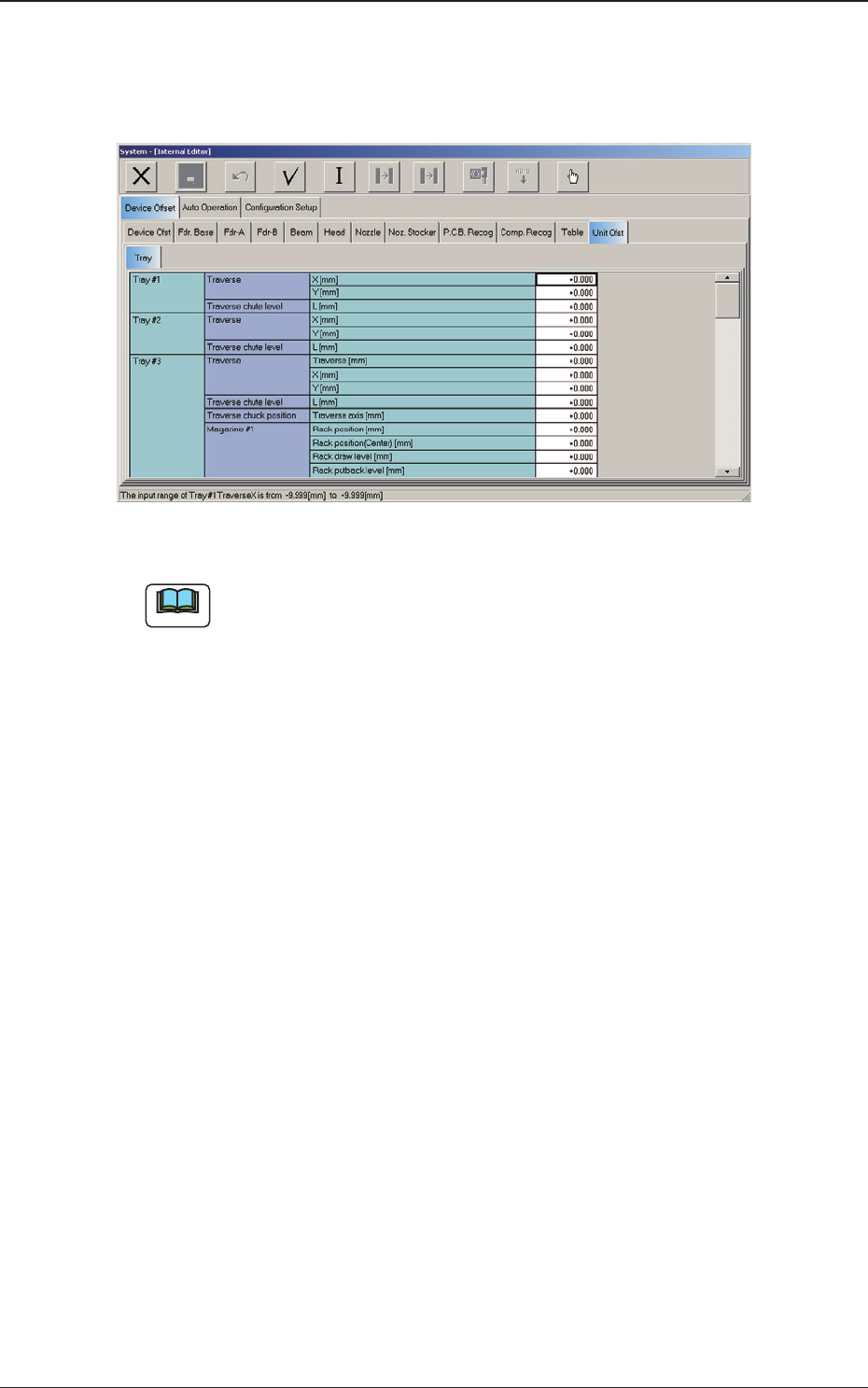
When the "Unit Ofst" subtab is pressed in the "Device Offset" tab sheet and
the "Tray" subtab is further pressed, the following subtab sheet appears.
Fig. C9 "Tray" Subtab Sheet (Multi-Layer Tray Feeder #3 Used)
Note
The displayed subtab sheet will look different, depending on which option
is selected.
4.1 Offset Data
0804-003

3-13
AJK-MLT-ID
(1) Traverse
These offset data is used to adjust the position where a pallet is drawn
out by the traverse shafts.
Traverse [mm]
When a pallet is drawn out, the traverse shafts move as far as the
specied distance where the parameter set in this text box is added.
X
[mm] (Horizontal)
The set parameter is added to the beam travel when components are
picked up.
Y [mm] (Vertical)
The set parameter is added to the beam travel when components are
picked up.
(2) Traverse chute level
L [mm] (Height)
This offset data is used to adjust the level (height) of the pallet drawing
chute.
When
a level lower than the design height is set, a plus value must be
entered in the text box.
(3) Traverse chuck position
Traverse axis [mm]
This offset data is used to adjust the chuck position.
4.1 Offset Data
0706-002
3-14
AJK-MLT-ID
(4) Magazine #1
The lower magazine in the elevator unit can be adjusted.
Parameters can be specied in the "Rack position [mm]", "Rack
position (Center) [mm]", "Rack draw level [mm]", and "Rack putback
level [mm]" text boxes as Magazine #1 Offsets.
Rack position [mm]
This offset data can be used to adjust the loading position of Magazine
#1.
Observe
the position where the elevator shaft has moved to the setup
position and enter proper values.
Note
To set the elevator position in a higher level, a minus value must be
entered in the text box.
Rack position (Center) [mm]
This offset data can be used to adjust the magazine change position.
Note
Follow the same adjustment as taken for the setup position to obtain
the numerical values and perform the adjustment based on the
obtained values.
Rack draw level [mm]
This offset data is used to align the traverse chute in height with the
step (stage) of the tray when a pallet is drawn from Magazine #1 to the
traverse chute.
The entered offset value is reected on the travel of the elevator shaft
when the elevator is moved for the alignment of the pallet drawing step
(pallet drawing from Magazine #1).
Note
To set the elevator position in a higher level, a minus value must be
entered in the text box.
Rack putback level [mm]
This offset data is used to align the traverse chute in height with the step
(stage) of the tray when a pallet is put back from the traverse chute to
Magazine #1.
The entered offset value is reected on the travel of the elevator shaft
when the elevator is moved for the alignment of the pallet returning step
(pallet put back to Magazine #1).
Note
To set the elevator position in a higher level, a minus value must be
entered in the text box.
4.1 Offset Data
0706-002