OM-1273-004_w.pdf - 第70页
2-5 AJK-ML T-ID 2.2.1 Pickup T ray Matrix When the [Pickup T ray Matrix] button is pressed in the "COMP . RELD." window , the "Pickup T ray Matrix" window appears. [1] [4] [3] [2] Fig. B3 "Pickup…
2-4
AJK-MLT-ID
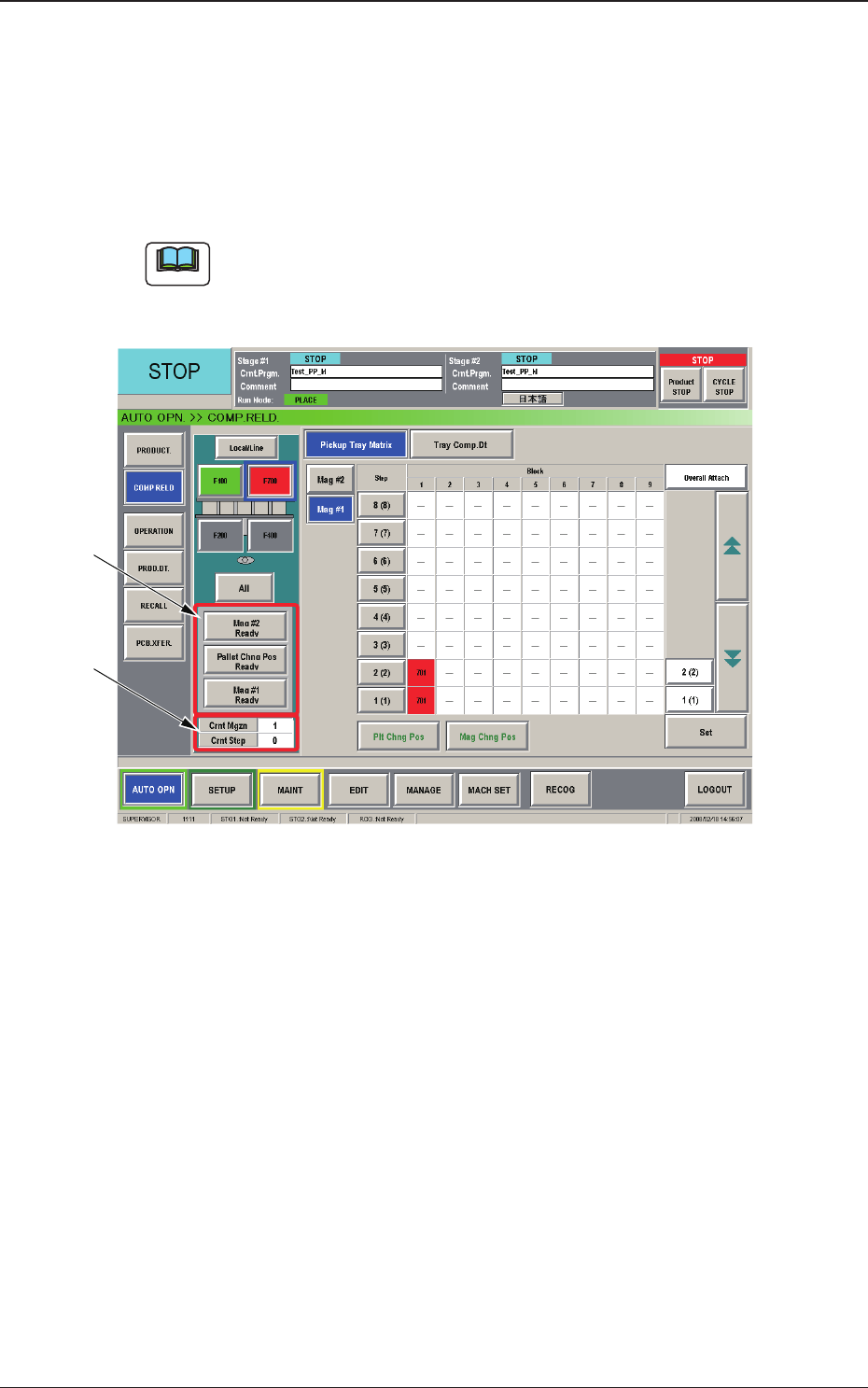
When the feeder block button (F700) is pressed in the "COMP. RELD."
window, the operation sheet for component reloading on the multi-layer tray
feeder appears. The multi-layer tray feeder is installed on the selected feeder
block.
The "COMP. RELD." window for the multi-layer tray feeder is composed of
the
"Pickup Tray Matrix" and "Tray Comp. Dt" operation sheets.
Note
When the feeder block button (where the multi-layer tray feeder is
connected) is pressed in the "PRODUCT." window, the "COMP. RELD."
window for the multi-layer tray feeder also opens.
[1]
[2]
Fig. B2-1 "COMP. RELD." Window (Multi-Layer Tray Feeder #3 Used)
[1] [Mag #2 Ready], [Pallet Chng Pos Ready], and [Mag #1 Ready]
Buttons
When
each button is pressed, the LED of the [READY] switch on the
corresponding door illuminates, indicating that the door is locked.
[2] Crnt Mgzn and Crnt Step
Shown in the text boxes are the numbers of the magazine and step being
used at present.
2.2 Component Reloading
0804-003
2-5
AJK-MLT-ID
2.2.1 Pickup Tray Matrix
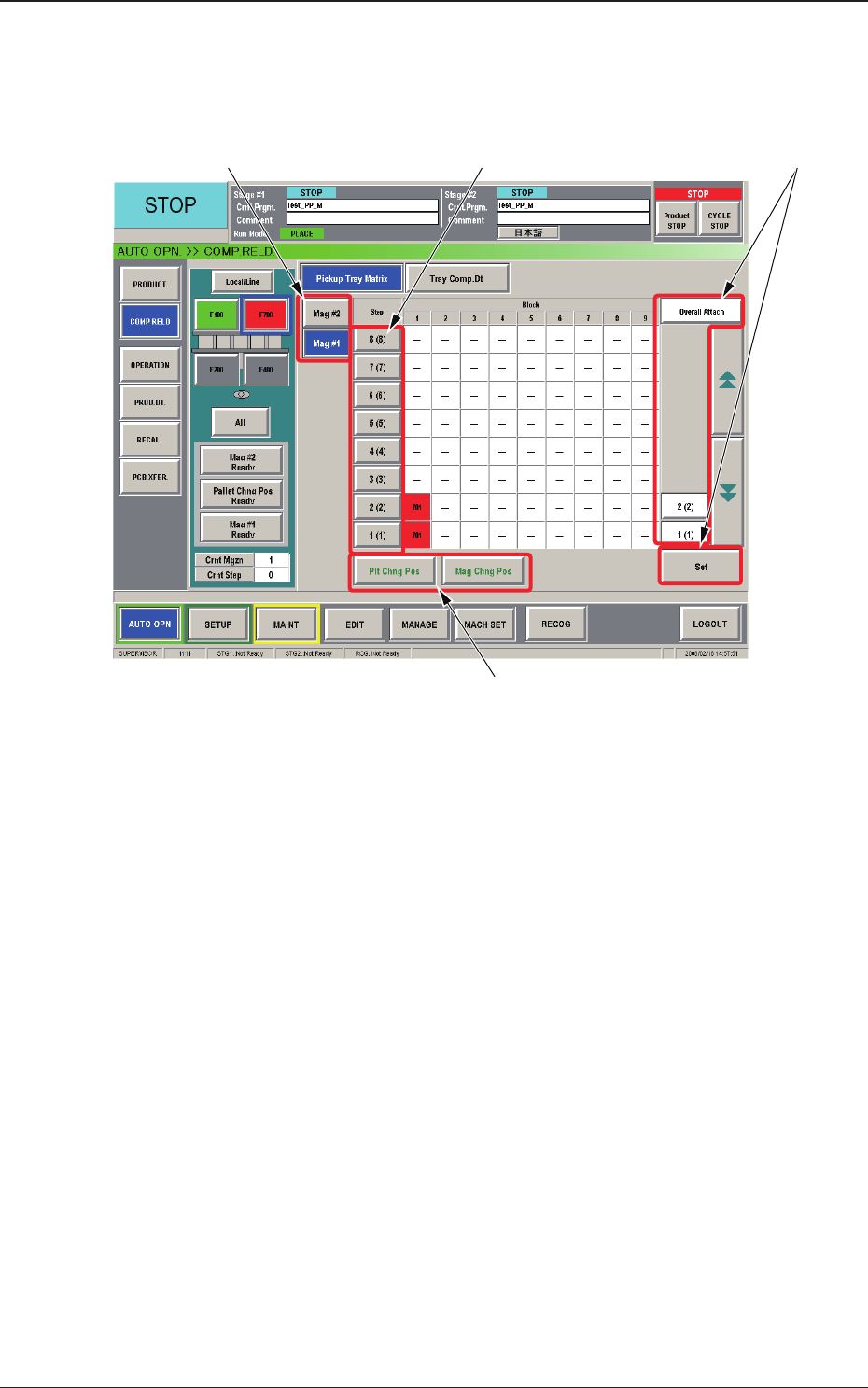
When the [Pickup Tray Matrix] button is pressed in the "COMP. RELD."
window, the "Pickup Tray Matrix" window appears.
[1] [4] [3]
[2]
Fig. B3 "Pickup Tray Matrix" Window
[1] "Magazine" Selection Buttons
These buttons are used to select a magazine to be activated or reloaded
with components.
[2] Magazine Movement Buttons
[Plt Chng Pos] Button :
When pressed, this button moves the
currently selected magazine to the
component supply position.
[Mag Chng Pos] Button :
When pressed, this button moves the
currently selected magazine to the
magazine change position.
2.2 Component Reloading
0804-003

2-6
AJK-MLT-ID
[3] Component Reload Buttons
When the component-reloaded step is selected and the [Set] button is
pressed, the tray pickup matrix of the selected step is set to "(1, 1)" and
the number of remaining components is updated.
Reloaded Step Selection :
The component-reloaded step must be
selected.
[Overall Attach]
Button :
When pressed, this button selects all
steps.
[Set] Button :
When pressed, this button sets the
component reloading condition with the
specied value.
Note
As for the steps that are not used in the pattern program, no
component reload button is displayed.
[4] Step Selection Buttons
When a magazine and a step are selected, the "Block Information"
window appears, making it possible to check and change the tray
matrices.
2.2 Component Reloading
0706-002